01What happens in the Wizard Cat Keyboard Smash trend
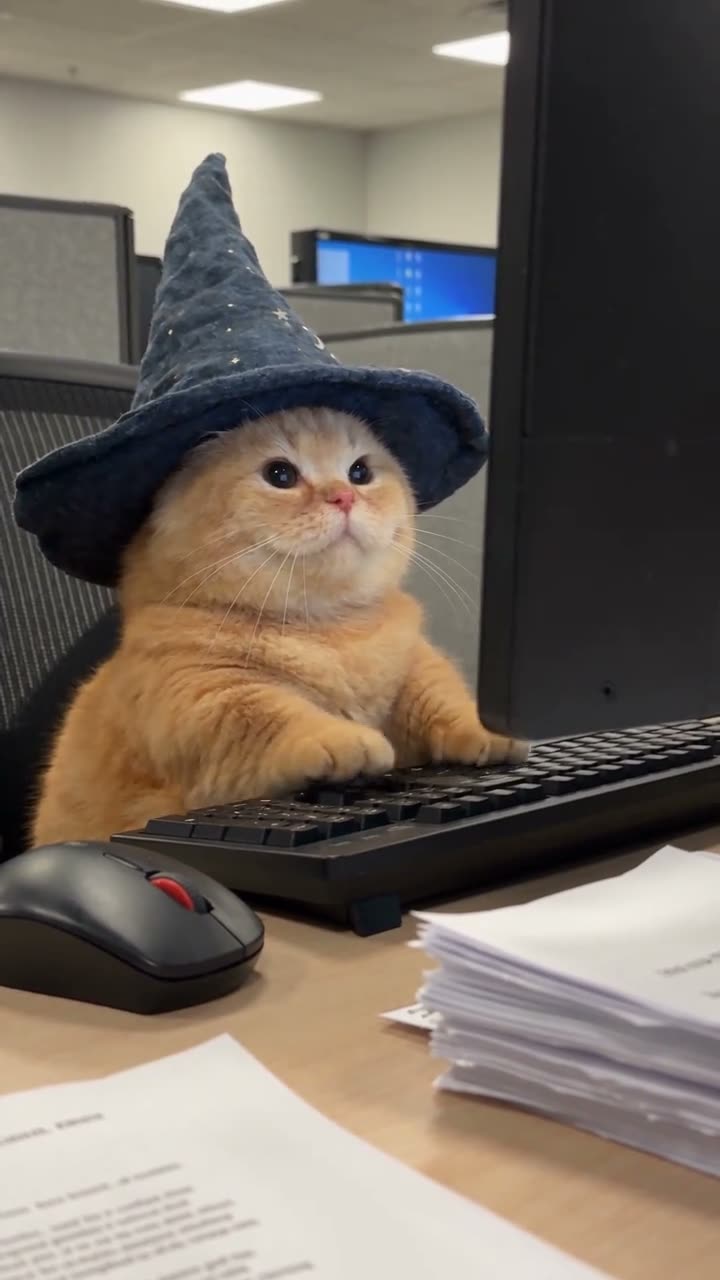
A cat in a pointed hat sits low behind a keyboard in an office cubicle. A monitor, mouse and papers make the desk look ordinary. The cat starts typing, looks up at the screen, pauses and then hits the keys again more vigorously.
The steady side view lets the pauses and paw movements carry the joke. When you use the template, your pet takes over the chair. The keyboard, papers, monitor and blue hat provide enough context for the office scene without a caption on the video itself.
| Shot | Beat |
|---|---|
| Shot 1 | A cat in a pointed hat sits at a desk with both paws near the keys. |
| Shot 2 | The cat types while looking up at the monitor. |
| Shot 3 | The paws pause and the cat holds its stare. |
| Shot 4 | The paws come down in a final burst of typing. |
02How to make the Wizard Cat Keyboard Smash AI video from one photo
The reference on the site is about 7 seconds long. Watch with the sound off to judge how well the result carries the action on its own. The generated clip is silent.
- Open the trend pageStart with the clip credited to @fatchonkywizardcat on TikTok. Watch the section you want to recognize in your own cut. The source shows the order of the actions and the role that the template fills.
- Open Create your ownUse the button on the trend page to open its template. The browser opens the creation screen with the reference already selected. You can use it on your phone.
- Add your photoChoose one photo for the pet at the desk. Confirm that you have permission to use the image or images. Check the role labels and inspect the photo on the screen before you continue.
- Select a resolutionThis template lists 323 credits at 480p and 484 credits at 720p. Read the exact charge on the generation button before you start. Choose the resolution you want for the video you plan to share.
- Make the video and review itTap Make my video and open the result when it is ready. Look for the same pet before the pause and during the final rush. Check that the pointed hat leaves the eyes visible and that the paws meet the keyboard. The still moment and the final movement should both be clear when you watch the cut without audio.
03The photo that works for Wizard Cat Keyboard Smash
Use a picture where you can recognize your pet without its usual surroundings. That makes it easier to judge whether the animal in the chair matches your input. Eyes, ear shape and coat markings are more useful than a familiar couch or a person holding it.
Use the original image if a cropped copy cuts off something the template needs to see. You can look at the upload on your phone at the size you expect people to watch, so blur and dark areas are easier to spot.
- Use a sharp photo with clearly visible eyes and markings.
- Try a photo where the pet holds its head up and looks toward the camera.
- Use a photo you have permission to upload.
- Check that the intended subject is easy to find in the photo.
04A reference prompt for Wizard Cat Keyboard Smash
AI Trend Club fills in the prompt when you select this template. If you are working in a different editor that accepts a reference image and a reference video, use the prompt below to describe the action and how it should be framed.
Read through the prompt before you run it. The order of the shots matters here. Put the lead and the framing first, then describe the actions in the order you see them in the reference.
Place the pet from the reference photo in the chair at an office desk. A pointed blue hat sits above its eyes and leaves the face visible. Frame the cat or dog from the side with the keyboard in front, the large monitor to its right and papers beside the mouse. Start with quick typing, stop on a fixed look at the screen and end with a sudden flurry of keys. Preserve the pet’s species, eyes and markings. Keep the camera steady and the video silent.05CapCut template or AI video?
The clip works because the camera stays put while the rhythm changes. If you add your own caption, leave the desk and paws uncovered so a viewer can see when the typing stops. A sound effect is optional. The still look at the screen already gives the final burst a setup.
A conventional editing template assembles footage you bring to the project. This AI Trend Club template starts with a portrait and uses the clip as a reference for the new scene. You can export the result and take it into a video editor for your own captions or audio afterward.
06Is the Wizard Cat Keyboard Smash AI video free?
You can open the trend page and watch the credited source for free. New accounts start with 25 welcome credits, which cover a few images. A video like this requires more credits. The prices below are the credit options listed for this template.
Check the displayed cost before tapping the generation button. If a video fails, the credits are returned automatically. You can decide whether to try again after checking your input against the role and photo guidance above.
| Option | Price | Credits |
|---|---|---|
| Week pass | $6.99 | 800 |
| Month pass | $19.99 | 2,500 |
| Year pass | $149.99 | 3,000 |
| 1,000 credits | $9.90 | 1,000 |
| 3,300 credits | $29.90 | 3,300 |
| 8,000 credits | $69.90 | 8,000 |
07Post the finished clip
A short line about working at a desk gives the video a setup without explaining the joke. You can also post it as a reply where the long stare makes sense on its own. This template accepts a pet photo, so the caption can be about the pet as much as the workday.
Credit @fatchonkywizardcat when you refer to the source in your caption. Watch your own exported video once before you post it. Add your own audio in your editor if you want sound.
- Me after one more change.
- The desk wizard has a deadline.
08Questions
- Can my dog take the cat’s place?
- Yes. Upload a clear photo of one pet. The dog can take the chair and wear the pointed hat.
- Can I make the video from my phone?
- Yes. Open the trend page in your browser, tap Create your own and add the requested photo or photos. Select your resolution and check the credit total before you generate.
- Who posted the reference video?
- The reference is from @fatchonkywizardcat on TikTok. The trend page links to that post and shows the credited clip near the top.
- Does the download include sound?
- The download is silent. You can add the audio you want after downloading the video.