01What happens in the Dance With Santa trend
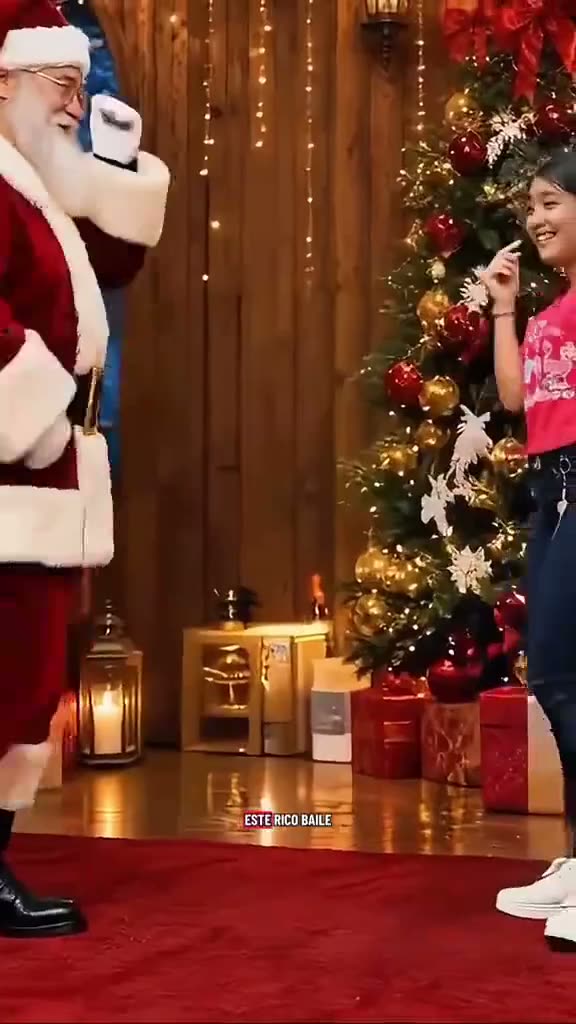
The clip shows people dancing beside Santa in a decorated holiday room. Santa raises his arms while the dancer moves through a short routine. The excerpt then cuts to another example in the same room. It ends on another set of dance steps. The tree, decorations and Santa make the setting easy to recognize, while the changing dancer provides the moment people can personalize.
The full TikTok post is 26 seconds, but the page uses a 10-second excerpt of the dance. It stops before the tutorial interface appears. Add one adult portrait to take the lead dancer’s place. Santa, the room and the other example dancers remain part of the reference. The clip includes its original sound.
| Time | Beat |
|---|---|
| Shot 1 | A dancer moves beside Santa in front of a decorated tree. |
| Shot 2 | Santa raises his arms as the dancer keeps moving. |
| Shot 3 | The clip cuts to another example in the same holiday room. |
| Shot 4 | Santa and a dancer finish another short set of steps. |
02How to make the dance from one photo
You do not need to write a prompt on AI Trend Club. Open the Dance With Santa page and press Create your own. Add one adult portrait for the dancer role, then confirm that you have permission to use it. The template follows the reference dance, with Santa and the holiday setting in the scene.
Choose a resolution and check its credit total before you make the video. At 480p, one render uses 461 credits. At 720p, it uses 1,037 credits. The selected amount appears on the button before spending. If the render fails, its credits return automatically. The result is vertical and includes the original sound.
- Open the trend pageGo to AI Trend Club’s Dance With Santa page and press Create your own.
- Add one portraitChoose an adult whose photo you have permission to use for the lead dancer.
- Keep the dancer role clearUse one portrait for the lead role; Santa remains the scene partner.
- Choose a resolutionThe 10-second video costs 461 credits at 480p or 1,037 credits at 720p. Check the button before you spend.
- Make and download the videoTap Make my video. It is ready in a few minutes. Download with the original sound or silent.
03The photo that works
This template uses one portrait for the featured dancer. Santa stays in the scene, and the original excerpt includes cuts between dance examples. Choose the person you want to play the lead role and use one image for that role.
- Add one adult portrait for the dancer role.
- Use one portrait for the lead so the identity stays consistent between cuts.
- Keep Santa as the scene partner rather than treating him as the lead.
- Expect the holiday room and tree to remain in the video.
- If the dancer changes between cuts, use one portrait for the lead role.
- If Santa changes, the template keeps Santa as the scene partner.
04A prompt to start from
AI Trend Club does not ask you to write an AI prompt. If you want to try a similar edit in another video model that accepts a reference clip, you can use the description below as a starting point.
It keeps the holiday room and Santa in place while making one portrait the lead dancer.
Use the person in the reference photo as the lead dancer in the opening example beside Santa. Keep the same identity in that role and do not copy it onto Santa or the other example dancers. Begin in the decorated holiday room with the tree behind them. The lead moves through the short dance as Santa raises his arms. Follow the cuts and timing of the reference, then keep the later dance examples as separate people. Preserve the setting, camera framing and choreography. Add no tutorial interface, new text or watermark.05CapCut template or AI video?
A CapCut template can combine clips and photos that you record yourself. It cannot place your face into the original holiday room beside Santa. An AI video uses your portrait with the reference clip, so you can take the featured dancer’s place while Santa, the tree and the choreography stay in the scene.
The source creator also mentions a CapCut tutorial, but this page’s excerpt only shows the matching dance section. The tutorial interface is left out. Your generated result includes the original sound. After downloading, you can use CapCut to add captions or make finishing edits if you want them.
06Is the Dance With Santa AI video free?
Watching the original and reading the trend page do not cost credits. A new account gets 25 welcome credits, enough for a few images but not for this video. One render costs 461 credits at 480p or 1,037 credits at 720p. The exact amount appears before you spend, and a failed video returns its credits automatically.
The Week pass is the least expensive option that covers either resolution for one render. The 1,000-credit pack also covers the 480p version, but not the 720p version by itself. You can keep the sound from the original or download silently.
| Option | Price | Credits |
|---|---|---|
| Week pass | $6.99 per week | 800 |
| 1,000 credits | $9.90 | 1,000 |
07Post it
Keep the original sound if it fits your post, or add the trend sound in TikTok or CapCut after downloading silently. Credit @c0pe6zs0b9 in your caption. The holiday room and Santa are part of the recognizable scene, so keep the post focused on the dance and seasonal setting.
Caption ideas:
- A holiday dance, with Santa still in the scene.
- One portrait joins the Christmas dance examples.
- A playful seasonal greeting from the dance floor.
08Questions
- What is the Dance With Santa trend?
- It is a short holiday dance video of people moving beside Santa in a decorated room. One adult portrait takes the featured dancer’s place.
- Is there a dancing Santa AI template?
- Yes. AI Trend Club has a Dance With Santa page with a reference clip and a one-photo creation flow.
- Which AI makes the Dance With Santa video?
- It uses an AI video model guided by the original clip. The site handles the reference edit, so you do not have to write a prompt.
- Can I make it on my phone?
- Yes. The site runs in a browser, so you do not need to install an app. The finished video is vertical and can be downloaded with sound or silent.
- Who made the original?
- @c0pe6zs0b9 posted the original on TikTok on Nov 14, 2026. The page links to the post and uses a 10-second dance excerpt.