01What happens in the Don’t You Dare Christmas trend
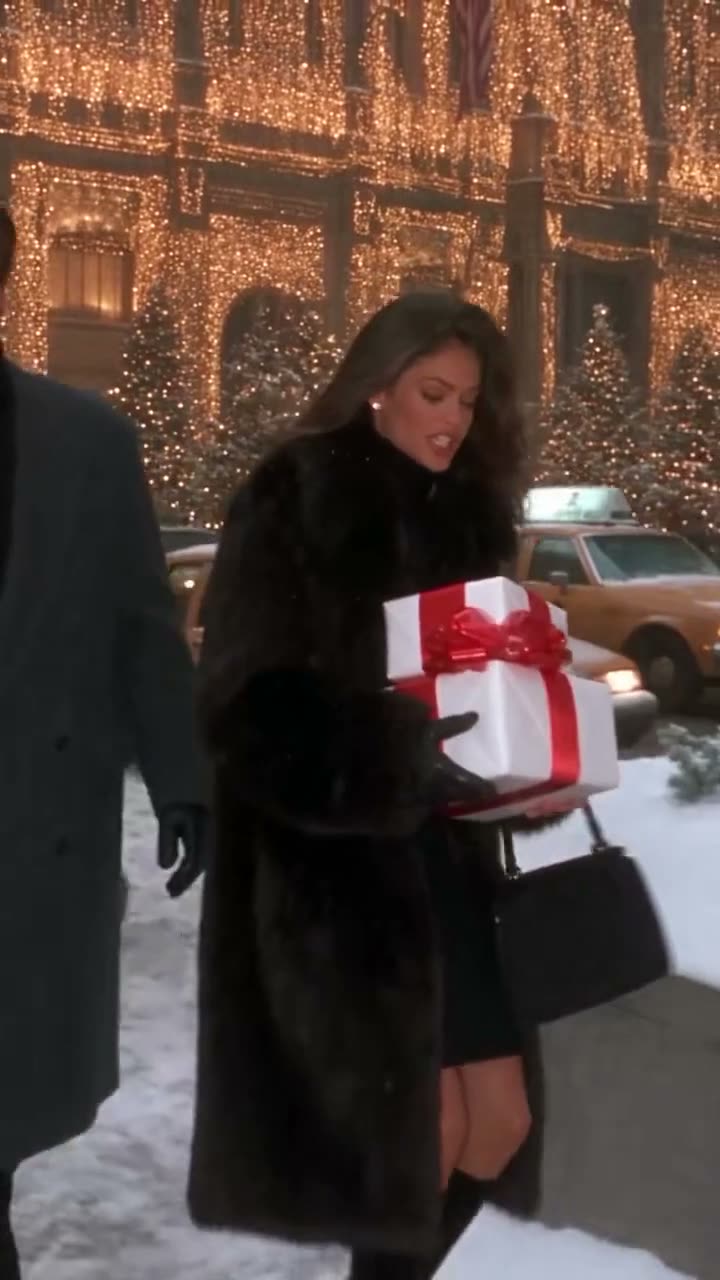
The original shows two people meeting and starting a snowball fight on a snowy street. Add two photos, one of each person to take the lead in this 15-second clip. The video follows the source scene and timing, and the download is silent.
The original post is linked on the trend page so you can see the source before making your own version. The preview is a silent excerpt. The table follows the sequence shown on this page; it is a guide to the shots, not a promise that every generated result will be identical.
A reference clip gives the video model a sequence to follow. Your uploaded photo supplies the identity for the role. Motion and appearance can vary from one render to another, especially during quick movement or a change of camera angle.
| Time | Beat |
|---|---|
| Shot 1 | Two people meet on a snowy street at night. |
| Shot 2 | One person holds a stack of gifts. |
| Shot 3 | A snowball strikes the other person. |
| Shot 4 | The two react to one another in the snow. |
02How to make the Don’t You Dare Christmas AI video from two photos
Open the trend page in your browser and watch the preview first. You do not need to write a prompt on AI Trend Club. The site uses the original clip as the reference for the sequence.
The screen shows the credit cost before you start. Check that you have selected the role and resolution you want, then confirm that you have permission to use each photo. A finished video is private to your account.
- Open the trendGo to the Don’t You Dare Christmas page and press Create your own. Watch the original excerpt to understand the movement and framing.
- Add photosUpload two photos, one for each person. Keep the people in separate images so each role receives its own photo.
- Confirm permissionUse your own photo or a photo you have permission to use. Confirm the permission request before continuing.
- Choose qualityThe 480p version uses 692 credits; 720p uses 1,556 credits. Check the exact amount on the button before spending.
- Make and downloadTap Make my video. When it is ready, download the silent video and add sound you have permission to use if you wish.
03The photo that works
Start with two photos, one for each person. A clear subject helps the model identify the role, though the movement and identity can still vary in the result.
Check the photo before starting, especially if you have cropped it from a larger image. If it is hard to see the subject, use a clearer photo. The site requires permission for the photos you submit.
- Use a photo you have permission to use.
- Choose a clear image.
- Keep the subject visible.
- Avoid an obscured face or identifying features.
- Use one subject per photo.
04The Don’t You Dare Christmas AI prompt
You do not need to write a prompt on AI Trend Club. If you want to try a different video model that accepts reference images, you can use the following as a starting point.
A prompt is a description rather than a guarantee. Other models may interpret the reference and the scene differently. Check the result for the intended identity, sequence and movement before sharing it.
Two people meet on a snowy street at night. One person holds a stack of gifts. A snowball strikes the other person. The two react to one another in the snow. Use the two people in the reference photos as the two characters. Keep their identities distinct across each change of view. Preserve the snowy setting and the order of the encounter, the gifts and the snowball. Follow the reference timing and camera framing. Keep the motion natural and make a silent clip without dialogue or music.05CapCut template or AI video?
A video editing template arranges footage you already have. A reference-guided AI video instead uses the photo and the original clip to make a new version of the scene. These are different ways to approach the same trend.
If you already filmed a performance, an editing template may help you arrange it. If you want to put a photo into the sequence on this page, start with the AI video flow above. Review the preview and the listed credit cost before generating.
After downloading the silent result, you can add captions or sound in an editor such as CapCut. Use sound you have permission to use, or add an available sound through the platform where you plan to post.
06Is the Don’t You Dare Christmas AI video free?
Watching the original and visiting the trend page are free. Generating the video costs credits: 692 at 480p or 1,556 at 720p. The button shows the exact amount before you spend it.
A new account receives 25 welcome credits. Those are enough for a few images, but not enough for this trend video. A failed video returns its credits automatically. Check the available balance before starting another attempt.
The Week pass is a subscription; the credits pack is a separate purchase option. Review the terms and current price shown at checkout before choosing. The table lists the available entry options in the material for this page.
| Option | Price | Credits |
|---|---|---|
| Week pass | $6.99 | 800 |
| 1,000 credits | $9.90 | 1,000 |
07Post it
The download is silent. Add a sound you have permission to use in your editor or on the platform where you post, and credit the original post by @larpmaxinggggg. The source link is on the trend page.
Watch the finished clip before sharing. Look at the subject across the full sequence, especially the faster movements and transitions, and check that you are comfortable sharing the photos used.
Keep the caption simple and describe your own version. Here are a few ideas based on the scene:
- My take on Don’t You Dare Christmas.
- A familiar scene, a new lead.
- Trying this scene with my own photo.
08Questions
- Is there a Don’t You Dare Christmas AI template?
- The trend page provides a reference-guided video flow. Add two photos, one for each person and review the credit cost before starting.
- Which AI makes the video?
- The clip uses an AI video model guided by the original clip. The result can vary.
- Can I make it on my phone?
- The flow runs in your browser, with no app to install. Open the trend page and follow the photo prompts.
- Who posted the original?
- The linked original was posted by @larpmaxinggggg on TikTok.
- Does the download include the original sound?
- No. The download is silent. Add sound you have permission to use when publishing.