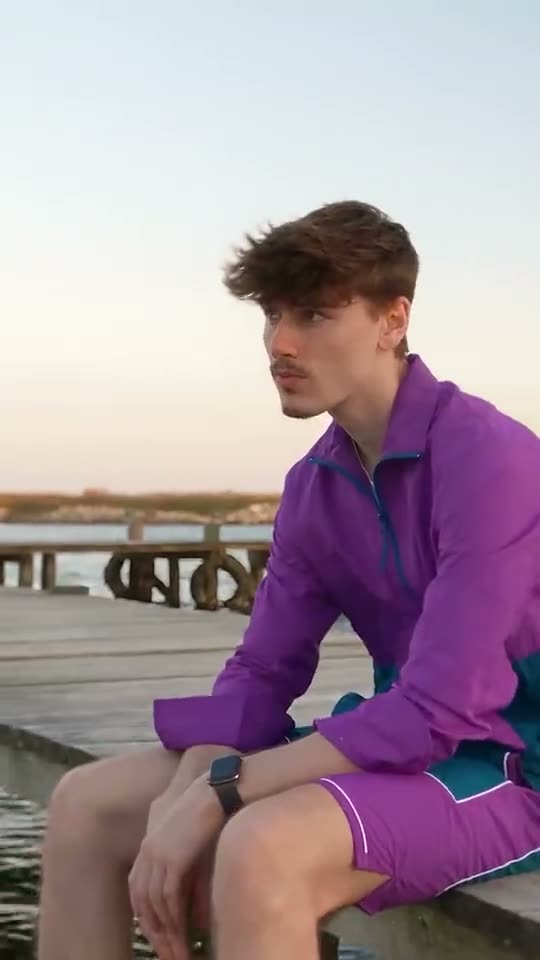
01What happens in the Raindance trend
The Raindance trend is a cinematic video trend inspired by the Raindance music video. In this scene, a figure waits by a wooden pier while another companion walks up singing toward the camera. Both figures then sit together along the sandy shoreline as the music plays.
The original TikTok clip posted by @unchained_off with KevkoYt puts a fresh spin on the visual duet. Using AI Trend Club, one portrait puts you directly into this 15-second music scene with its original audio track attached. The beach backdrop and audio remain intact while your photo takes the lead role.
| Time | Beat |
|---|---|
| Shot 1 | A person waits quietly at the end of a wooden pier. |
| Shot 2 | A companion walks forward and sings directly toward the camera. |
| Shot 3 | The singer faces the waiting person on the pier to finish the verse. |
| Shot 4 | Both rest together on the sandy beach while the music plays. |
02How to make the Raindance AI video from one photo
You can create your own clip right in your browser on AI Trend Club without installing separate software. Follow this Raindance AI tutorial to turn your picture into a rendered video clip.
Only people who have permission to use the uploaded image should submit it. Follow these steps to generate your file:
- Step 1: Open the trend pageGo to the Raindance trend page on AI Trend Club and review the clip details.
- Step 2: Start creationPress Create your own to open the project workspace in your browser.
- Step 3: Add your photoUpload your portrait and confirm you have permission to use the photo. The role requires a person only.
- Step 4: Confirm resolution and creditsUse standard 480p resolution, which costs 692 credits. The exact number of credits shows on the button before you spend anything.
- Step 5: Generate and downloadTap Make my video. The render completes in a few minutes. Download your finished 15-second 9:16 vertical clip with the original sound included or silent.
03The photo that works
Choosing the right picture helps ensure the system places your face cleanly into the shoreline shot without render errors.
- Provide a clear front portrait with good lighting for the pier lead role.
- Use a sharp front-facing photo without strong filters or heavy angles to prevent facial distortion.
- Crop your image tightly so only your face remains visible if you are using a group shot.
- Use an image of a person only, as this specific scene setup is configured for human portraits.
- Make sure you own the picture or hold full permission from the person in the photo.
04The Raindance AI prompt
You do not need to write a prompt when you make this on AI Trend Club. The tool applies the scene pacing, motion, and audio setup automatically.
If you prefer to experiment in a standalone AI video generator that accepts image references, you can test this custom Raindance AI prompt as your starting baseline:
A cinematic video scene at a coastal beach on an overcast day. In shot one, the person in the reference photo stands waiting quietly at the edge of a wet wooden pier overlooking the ocean. In shot two, a companion walks forward along the dock and sings steadily toward the camera. In shot three, the singer turns to face the person in the reference photo to deliver the final vocal line. In shot four, both figures rest beside each other sitting directly on the flat sand as calm water washes nearby, matching the rhythmic flow of a soulful music track.05CapCut template or AI video?
Many mobile creators look for a Raindance CapCut template when they want to join this TikTok movement. While some creators share editing project setups on third-party apps, you should check each specific CapCut template and its export conditions to see what assets it requires.
A standard template project generally requires you to provide video clips that fit into pretimed cut points. By comparison, this Raindance AI video workflow takes your single static image and animates your presence into the pier setting itself. Once your AI render finishes downloading with its original audio track, you can still import the file into editing apps to layer on extra text or custom sound adjustments.
06Is the Raindance AI video free?
Watching the original clip and browsing the Raindance trend page is completely free on AI Trend Club. Creating an account also gives you 25 welcome credits. However, 25 welcome credits are only enough to generate a few static images and will not cover a full motion video.
Generating the 480p Raindance video requires 692 credits. If you need credits, you can choose an entry plan such as the Week pass or the 1,000 credits pack. If a render ever fails during processing, your credits come back automatically to your balance.
| Option | Price | Credits |
|---|---|---|
| Week pass | $6.99 | 800 |
| 1,000 credits | $9.90 | 1,000 |
07Post it
When posting your completed 9:16 vertical render to TikTok, Reels, or Shorts, select the original music track so your clip matches current algorithmic feeds. Tag the original creator credit @unchained_off in your description so viewers know where the pier duet concept came from.
Here are three short caption ideas based on the mood of the scene:
- Recreating this moody pier duet right by the shoreline.
- Waiting at the wooden dock for the verse to start.
- Calm beach scenery and soulful music moments.
08Questions
- What is the Raindance trend?
- It is a cinematic video trend inspired by the Raindance music video, where one person waits at a wooden pier while another approaches and sings before both sit together on the sand.
- Which AI makes the Raindance video?
- The scene is produced by an AI video model guided by the original clip.
- Can I make the video on my phone?
- Yes, everything runs directly in your mobile or desktop browser on AI Trend Club without installing an app.
- Who made the original clip?
- The featured clip was shared by @unchained_off with KevkoYt on TikTok on October 8, 2026.
- What happens if my render fails?
- If a render fails, your credits come back automatically so you can try again with a clearer photo.