01What is IG Receipt?
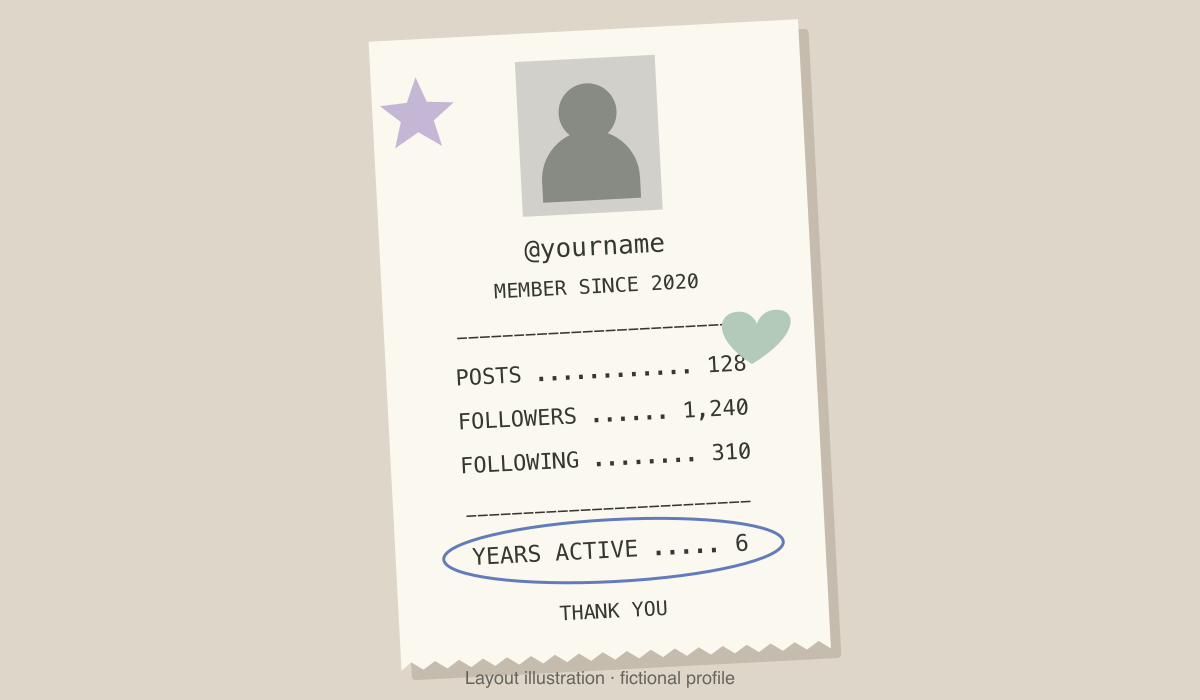
IG Receipt, also called the Instagram Journey photo, puts a portrait, username, joining year and profile counts onto a paper receipt. Stickers and a pen circle give it a scrapbook finish. The example above is a layout illustration with fictional details.
The basic result is a still image for a Story. A video of the receipt printing is a separate animation; you do not need that to make the photo trend.
02Try the Instagram effect
In Sahal Muhammed’s October 26 tutorial, the visible route is Story → Effects → search for IG receipt. His recording shows a receipt effect in the Personalized effects list, a selected portrait processing, then the finished image. We checked the recording; availability on your account is not guaranteed.
- Open a StoryOpen Instagram’s Story creator. Look for Effects on the photo-selection screen.
- Find the effectSearch IG receipt and compare the preview with the paper-receipt layout. Use the effect only if it appears in your account.
- Choose a portraitFollow the effect’s photo selector, let the preview finish, then inspect the username and every number.
- Review before sharingCorrect any details you can edit. If the result is wrong and the effect cannot fix it, use the manual route below.
03If IG Receipt is missing
Different tutorials show different routes. HiTech Talk describes making the image with an AI prompt instead of relying on an automatic filter. A missing effect does not mean you must buy a video template.
You can create the layout in an image generator that accepts text and a reference photo, or arrange the same fields manually in a design editor. Check the tool’s current free allowance and export terms first. AI Trend Club does not offer a dedicated IG Receipt generator on this page.
04Prepare your details
- Write down the username, posts, followers and following you want displayed. These counts are a snapshot, not a live connection to your profile.
- Use a joining year you have verified from your own account records. A public profile screenshot alone does not establish the year.
- Choose one portrait you have permission to use. Crop out private messages, notifications and any bio details you do not want included.
- Calculate years active separately. For completed years, subtract the joining year from the current year, then subtract one if the joining anniversary has not occurred yet. Omit the field if you cannot verify it.
05An IG Receipt prompt to adapt
Replace every bracketed field before using this starting prompt. It is our own layout prompt, not a tested preset or a guarantee of exact text. Upload the portrait only if you are comfortable with your chosen tool’s image handling.
Design a vertical social Story image with a narrow ivory paper receipt on a warm grey background. Use the supplied portrait in a small monochrome photo panel at the top. Below it, arrange the following text in clear, evenly spaced receipt lettering:
@[USERNAME]
MEMBER SINCE [VERIFIED JOIN YEAR]
POSTS [COUNT]
FOLLOWERS [COUNT]
FOLLOWING [COUNT]
YEARS ACTIVE [VERIFIED NUMBER]
THANK YOU
Use fine dotted dividers, subtle folded-paper shading, two small pastel stickers and a loose blue-pen oval around the years-active line. Keep every supplied value unchanged. Do not invent extra account statistics, badges, logos or payment information. Leave generous margins so the receipt is readable on a phone.06Fix the result before you post
Zoom in on the handle, joining year and all counts. In the source walkthrough, the displayed joining year and years-active number do not agree, so treat the graphic as an edit to verify, not an authoritative account report.
If AI keeps misspelling a handle or changing a digit, stop regenerating the whole image. Use a blank receipt background and add the text yourself in a design editor. Keep the text large enough to read in a Story.
Save the finished image and add it to your Story. If you are joining an Add Yours chain, use the sticker from the Story you are responding to when available. Follow Instagram’s current disclosure options for AI-created imagery.
07Questions
- Is IG Receipt free?
- Some tutorials show an in-app effect, while others use external AI tools. We have not verified a free export on every account or service. Check any charge before generating; a paid printing animation is optional.
- Why can I not find the filter?
- The effect shown in a creator’s recording may not appear in your account. Try the in-app search; if it is absent, use the manual photo or design-editor route instead of an unverified download link.
- Is this Receiptify?
- This guide covers the Instagram profile receipt photo, not a music listening-history receipt.
- Does it read my account automatically?
- Do not assume that it does. Verify every field, and enter the details yourself when using an external prompt. You do not need to give an unfamiliar receipt website your Instagram password.