01What happens in the Car Jump trend
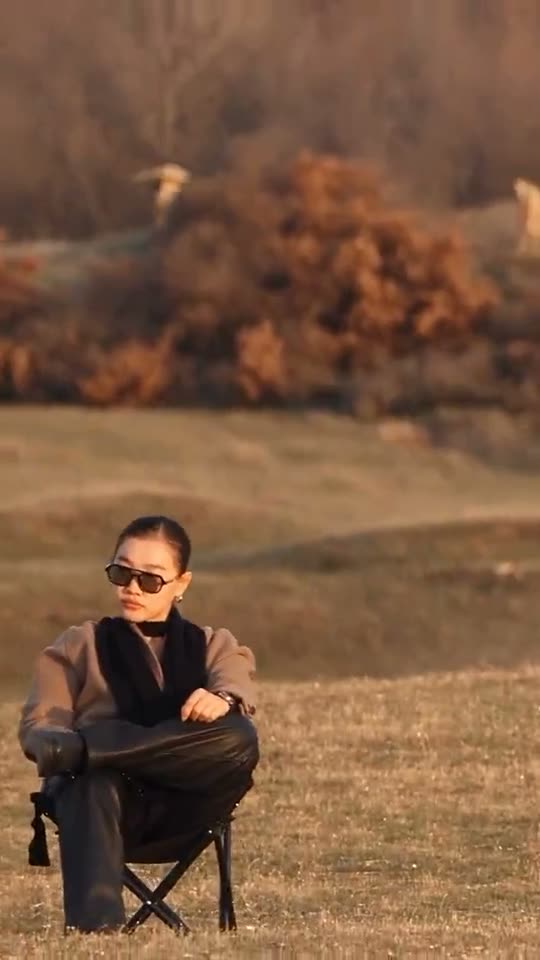
The Car Jump trend is an unbothered video format where you stay seated in a lawn seat in an open field while a speeding truck leaps over you.
A dark pickup launches over the hill and crashes down behind a person resting in a folding seat across an open field at sundown. You raise an arm without flinching while the vehicle flies past in slow motion.
The full scene plays out across four distinct visual beats in a 10-second vertical clip.
| Time | Beat |
|---|---|
| Shot 1 | You sit with crossed legs in a folding seat across an open field at sundown. |
| Shot 2 | You raise an arm as a dark pickup leaps through the air over the ridge behind you. |
| Shot 3 | The airborne vehicle floats above in slow motion surrounded by rising dust. |
| Shot 4 | The truck touches down directly behind you and rolls away while you never glance back. |
02How to make the Car Jump AI video from one photo
You can create this clip directly in your browser on AI Trend Club without installing an app. The generation process takes only a few minutes from start to finish.
Follow these steps to generate your Car Jump AI video using a single picture.
- Step 1: Open the trend pageGo to aitrendclub.com/trends/car-jump in your browser and press Create your own.
- Step 2: Add your photoUpload your solo selfie to take the seat and confirm you have permission to use the picture.
- Step 3: Review standard resolutionUse Standard 480p. The button displays the exact cost of 461 credits before you spend anything.
- Step 4: Generate and waitTap Make my video. The render runs in the cloud and finishes in a few minutes, while your video stays private to your account.
- Step 5: Download the finished clipSave the 9:16 vertical render to your device, choosing to download with the trend sound or silent.
03The photo that works
Your source image determines how clean the final render looks in the camp chair.
- Use a clear selfie looking directly toward the camera.
- Pick a sharp selfie with even light where your head is upright.
- Upload a solo photo that has no other faces in the frame.
- Make sure the image features only yourself, as this template requires a person in the lead seat.
- Confirm you have clear permission to use the photo before uploading.
04The Car Jump AI prompt
On AI Trend Club, there is no prompt to write because the workflow handles the sequence automatically.
If you want to experiment in an external AI video generator that accepts image references, you can test this car jump ai video prompt.
Use the text below to guide the scene structure, camera angle, and action timing.
A continuous cinematic shot across an open field at golden hour sundown. The person in the reference photo sits calmly in a folding camp chair with crossed legs, looking ahead. Behind them, a dark pickup truck suddenly speeds over a hill ridge, launching high into the air. The vehicle floats directly overhead in dramatic slow motion amidst thick plumes of flying dust. The person raises one arm casually, completely unbothered, while the truck crashes down into the dirt behind the chair and drives away without the person ever turning around.05CapCut template or AI video?
Many creators look for a CapCut template when they first see this viral meme online. Before using third-party templates, always check the specific template requirements and free export conditions to see how it handles your footage.
On AI Trend Club, our workflow uses an AI video model guided by the original clip to place your photo directly into the stunt scene, keeping the original vehicle trajectory and sunset field intact.
If you need to add custom text overlays, captions, or alternative audio edits, you can take your downloaded 9:16 render and finish it inside CapCut.
06Is the Car Jump AI video free?
You can view the original reference clip and explore the trend page for free without paying. However, rendering the finished video is not free.
New accounts receive 25 welcome credits upon signing up. This balance is enough for a few still images, but it is not enough to render this 461-credit video.
To generate your render, you can purchase a credit pack or a pass. The most affordable options are the Week pass or the 1,000 credits pack. If a render ever fails, your credits come back automatically to your account balance.
| Option | Price | Credits |
|---|---|---|
| Week pass | $6.99 | 800 |
| 1,000 credits | $9.90 | 1,000 |
07Post it
Once you download your vertical 9:16 video, post it to TikTok, Instagram Reels, or YouTube Shorts. The download already includes the original sound, or you can pair it with the official audio on your platform of choice.
Credit the original creator @ya_danilova01 in your video description to honor the source post from September 26, 2026.
People share this meme to highlight pure composure and an unbothered attitude in the middle of chaos, letting viewers know that nothing shakes your focus.
Here are three short caption ideas based on the meaning of this trend:
- Unbothered by the chaos around me.
- Nothing shakes my focus.
- Staying calm while everything else is flying by.
08Questions
- What is the Car Jump trend?
- It is an unbothered video format where you stay seated in a field while a speeding truck leaps over you.
- How do I make the Car Jump video?
- Press Create your own, add one photo and tap Make my video. There is no prompt to write.
- How many credits does it cost?
- Standard quality at 480p costs 461 credits. The exact number shows on the button before you spend anything, and a failed render gives its credits back automatically.
- Can I use a pet photo instead of a selfie?
- No, this template requires one clear photo of yourself to take the seat.
- Who made the original?
- The original was made by @ya_danilova01 on Instagram on September 26, 2026.