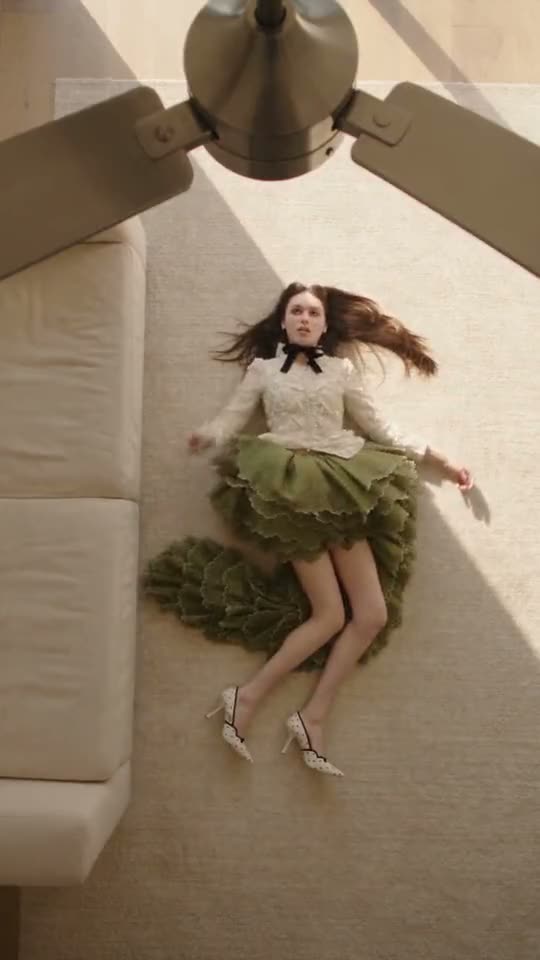
01What happens in the Ceiling Fan Transition trend
The ceiling fan transition trend features a top-down view of someone on the floor while a spinning fan wipes across the camera frame. Each turning blade acts as a natural cut, swapping out your clothes to reveal a brand new outfit on every pass. The final clip runs for 13 seconds in vertical 9:16 format and comes with the original sound included.
The AI format began taking off after Spanish creator fingertips1246 shared a fan transition template on August 26, 2026. Creator shabastudio20 introduced four outfit changes under a wooden fan on September 24, collecting over 1.3 million plays by October 8. Publications like The Tab covered the wave on September 28, and an unedited take by amyrebeccaowen on October 3 reached 8.1 million plays.
The entire sequence moves through four clean outfit changes timed to the movement of the ceiling fan blades above you.
| Time | Beat |
|---|---|
| Shot 1 | The camera looks down from the ceiling as a turning fan blade wipes past you in your first outfit. |
| Shot 2 | Another blade sweeps over the lens, instantly swapping your clothes for a second look. |
| Shot 3 | A third pass of the fan brings in your next styled outfit on the floor. |
| Shot 4 | The final blade cut reveals the fourth outfit before the clip ends. |
02How to make the Ceiling Fan Transition AI video from one photo
You do not need to film four separate wardrobe changes or mount equipment overhead. Creating this ceiling fan outfit transition takes just one front photo of yourself directly on the site.
Everything runs in your browser without installing software, and every project stays private to your account. Follow these simple steps on AI Trend Club to generate your vertical video.
- Open the trend page and startOpen the Ceiling Fan Transition page on AI Trend Club and press Create your own to launch the video setup.
- Add your photoUpload one clear portrait of yourself and confirm you have permission to use the picture.
- Select your qualityChoose your export resolution. Standard quality at 480p costs 600 credits, while HD quality at 720p costs 1,348 credits. The exact number of credits shows directly on the button before you spend anything.
- Generate and downloadTap Make my video. The rendering process finishes in a few minutes. Once ready, download your 13-second vertical 9:16 video with the original trend sound included or as a silent clip.
03The photo that works
A clear input image ensures the model generates clean clothes and keeps your facial features consistent across all four rotations.
- Upload a clear front photo of yourself to serve as the outfit model.
- Use a sharp portrait with neutral lighting across your face.
- Avoid tilted angles so the overhead perspective builds correctly.
- Make sure your hair and shoulders are clearly visible in the frame.
- Use a single portrait of a person only, as this specific format is designed for one person rather than pets or groups.
04The Ceiling Fan Transition AI prompt
You do not need to write or adjust any ceiling fan transition prompt when using AI Trend Club. The tool applies the required camera path, timing, and cuts automatically.
If you want to experiment on an external video generator that supports image references, you can test this ceiling fan transition trend prompt as your baseline.
Top-down overhead camera looking straight down at the person in the reference photo lying flat on the floor. A spinning ceiling fan turns in the foreground close to the lens. With each full turn, a fan blade sweeps across the camera view to create a seamless cut, instantly changing the clothes worn by the person on the floor into a different complete outfit. The sequence reveals four distinct wardrobe changes in rhythm with the rotating fan blades across thirteen seconds, maintaining consistent facial likeness and smooth top-down perspective throughout.05CapCut template or AI video?
A standard editing template functions very differently from an AI video generator. A CapCut template only splices together clips you recorded yourself. To use one, you have to physically change your clothes four times and rig a phone above your head to match the cuts.
By contrast, this ceiling fan transition ai workflow takes a single picture of your face and replaces the subject inside the original video sequence. It generates all four wardrobe reveals automatically without manual recording. After your render finishes, you can still bring the clip into CapCut if you want to add text overlays or custom captions before posting.
06Is the Ceiling Fan Transition AI video free?
Watching the original clip and browsing the trend page on AI Trend Club is completely free. When you sign up, each new account receives 25 welcome credits. That amount is enough to test a few still images, but it is not enough to render a full video.
Generating the ceiling fan transition video requires 600 credits for 480p standard definition or 1,348 credits for 720p HD. The lowest-cost ways to get enough credits are purchasing a Week pass for 6.99 dollars or a 1,000 credits pack for 9.90 dollars. If a render ever fails, your credits come back automatically to your balance so you can try again.
| Option | Price | Credits |
|---|---|---|
| Week pass | $6.99 | 800 |
| 1,000 credits | $9.90 | 1,000 |
07Post it
Your downloaded clip already comes with the original trend sound included, making it ready to share immediately to TikTok, Instagram Reels, or YouTube Shorts. When you publish your clip, credit delinquent_doll in your caption to acknowledge the featured original creator.
People join this ceiling fan outfit transition trend to showcase seasonal styles, everyday looks, or creative outfit ideas in a single quick clip without changing clothes or taping a camera to the ceiling. Here are short caption ideas you can paste under your post:
- Four outfit changes without leaving the floor.
- My new seasonal rotation in thirteen seconds flat.
- The easiest way to show four outfits without changing clothes.
08Questions
- Is there a Ceiling Fan Transition AI template?
- Yes, AI Trend Club provides a ready page for the trend where you just press Create your own, upload one photo, and tap Make my video without entering prompts.
- Which AI makes the Ceiling Fan Transition video?
- It is generated by an AI video model guided by the original clip, swapping your uploaded photo into the four-outfit sequence.
- Can I make it on my phone?
- Yes, everything runs in your mobile browser without installing an app, and your finished video downloads directly to your device.
- Who made the original video?
- The featured clip was posted by delinquent_doll, with earlier template roots from fingertips1246 and shabastudio20.
- What if my render fails?
- Credits come back automatically to your account balance, allowing you to re-upload a sharper photo and try again.