01What happens in the Rumpelstiltskin trend
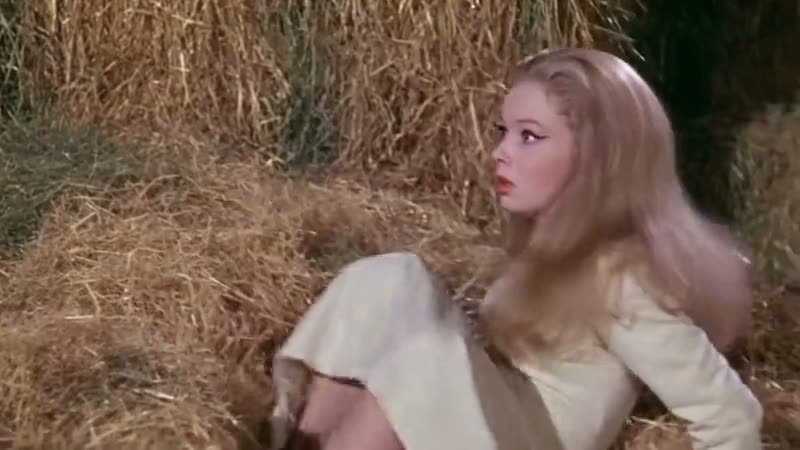
The Rumpelstiltskin AI video features a miniature man dressed in a velvet tuxedo who shushes the viewer and tiptoes across a rustic barn filled with straw. As he moves with exaggerated steps, a startled blonde princess watches his dance in complete disbelief before the straw magically transforms into gleaming gold.
Your uploaded photo takes the dancer's place while his tuxedo and movements remain identical, keeping the gold straw and vintage fairy tale setting untouched across the entire 15-second vertical clip.
Tatyana Tereshchenko (@stroinaya) shared the original video on Instagram on August 27, 2026, alongside @neuroferma and @anna_glinskaya, creating a fantasy world without actors or cameras. On September 29, 2026, TikTok user @6aimbot9 added the song Tip Toe Wing In My Jawwdinz by Riff Raff. The Rumpelstiltskin meme spread globally after an October 1 repost on X by @itsjusttimbro, which climbed past 13.6 million views within a week.
| Time | Beat |
|---|---|
| Shot 1 | A tiny man in a shiny velvet suit leans into view and makes a shushing gesture. |
| Shot 2 | He begins to tiptoe across piles of barn straw with exaggerated steps. |
| Shot 3 | A startled blonde princess watches his dance in complete disbelief. |
| Shot 4 | The straw on the barn floor magically transforms into gleaming gold. |
02How to make the Rumpelstiltskin AI video from one photo
You do not need to download software, edit keyframes, or install an app to create this video. Everything runs directly in your web browser on AI Trend Club, and every render stays private to your personal account.
- Open the trend pageGo to the Rumpelstiltskin dance page on AI Trend Club in your web browser and click the button labeled Create your own.
- Upload your portraitAdd one clear photo of your face to star as the tiptoeing dancer and confirm you have permission to use the image.
- Select your video resolutionChoose your output resolution: 480p standard quality costs 692 credits, while 720p HD costs 1,556 credits. The exact credit cost appears directly on the button before you spend anything.
- Generate and downloadTap Make my video. The clip is ready in a few minutes as a silent 9:16 vertical video formatted for TikTok, Instagram Reels, and YouTube Shorts. If a render fails, your credits come back automatically.
03The photo that works
This template requires one clear photo of a person to map onto the tiptoeing dancer. Follow these photo rules from our checklist to get a clean result on your first render:
- Use one clear photo of a person's face.
- Upload an unedited portrait taken in bright daylight without filters.
- Pick a photo where your mouth is closed and your eyes are wide open.
- Ensure you have permission to use the portrait before uploading.
04The Rumpelstiltskin AI prompt
On AI Trend Club, there is no prompt to write because the site template handles all camera motion, timing, and scene preservation automatically.
If you want to experiment inside other third-party video tools that accept an image reference, you can use the prompt below as your starting point.
A tiny miniature man wearing a shiny velvet tuxedo steps into view, raises a single finger to his lips, and makes a shushing gesture. He tiptoes across piles of golden straw on a rustic barn floor with exaggerated, sneaky steps. Medium wide shot tracks him as a shocked blonde princess watches in disbelief from the side. The straw on the barn floor magically turns into gleaming gold under warm fantasy lighting.05CapCut template or AI video?
A standard CapCut template only lets you splice and trim footage that you recorded yourself. It cannot place your face onto an eccentric fairy tale character or rebuild the vintage setting around your features.
An AI video generator replaces the character's face in the original footage with your uploaded portrait while preserving the movements, the velvet suit, the princess, and the barn environment intact.
Once you download your finished silent 9:16 vertical clip from AI Trend Club, you can bring it into CapCut or TikTok to add captions, text overlays, or the trending sound.
06Is the Rumpelstiltskin AI video free?
Browsing the trend page and watching the original clip on AI Trend Club is completely free. When you register a new account, you receive 25 welcome credits. That welcome balance is enough to try a few images, but it is not enough to generate this trend video.
A standard 480p video costs 692 credits, and a 720p HD video costs 1,556 credits. To render the clip, you can purchase the Week pass subscription or the 1,000 credits pack. If your generation encounters an error, your credits come back automatically to your account balance.
| Option | Price | Credits |
|---|---|---|
| Week pass | $6.99 | 800 |
| 1,000 credits | $9.90 | 1000 |
07Post it
Because the exported file is a silent clip, add the popular trend sound Tip Toe Wing In My Jawwdinz by Riff Raff in TikTok, Instagram Reels, or CapCut before publishing. When posting your video, credit the original creator @stroinaya in your video caption.
People share this scene to highlight late-night sneaking, playful mischief, or an eccentric fairy tale entrance. Pick one of these simple captions based on the trend theme:
- Sneaking downstairs for a late-night snack.
- Making my sneaky entrance into the weekend.
- My eccentric fairy tale side taking over.
08Questions
- What is the Rumpelstiltskin trend?
- It is an AI video featuring a small figure in a velvet tuxedo doing a silent tiptoe dance through a barn full of straw. Your uploaded photo lets you play the character while the background and princess remain intact.
- How do I make the Rumpelstiltskin video?
- Press Create your own, add one photo, and tap Make my video. There is no prompt to write.
- How many credits does it cost?
- It costs 692 credits at standard quality (480p) and 1,556 credits at HD (720p). The exact number is on the button before you spend anything, and a failed video gives its credits back.
- Can I use a photo of my pet?
- No, this template requires one clear photo of a person's face to map onto the dancer.
- Who made the original?
- Tatyana Tereshchenko (@stroinaya) published it on Instagram on August 27, 2026, with @neuroferma and @anna_glinskaya.