01What happens in the Head Bop trend
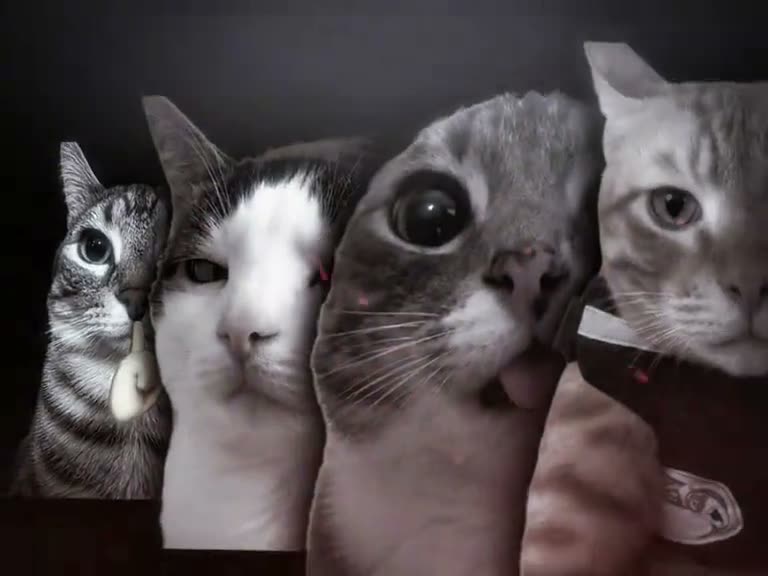
The Head Bop trend features four matching cut-outs moving across a dark screen in a 12-second clip. Uploading one clear picture lets you or your pet take every position in the animated line.
A reference clip on TikTok shared by @popo_hrtz shows four visually distinct cat heads swaying and tilting in unison. The reference post gives an example of the visual format rather than serving as the certified starting point of the concept.
| Time | Beat |
|---|---|
| Shot 1 | Four cat heads appear against a black background and expand in size. |
| Shot 2 | The entire row bounces from side to side while drifting toward the viewer. |
| Shot 3 | The screen dims briefly as the animated figures switch their leaning direction. |
| Shot 4 | The mirrored cut-outs push forward again for a close finishing view. |
02How to make the Head Bop AI video from one photo
You do not need to install an app to create this clip. The entire process runs in your web browser on AI Trend Club, and each finished file stays private to your account.
- Open the trend pageVisit the Head Bop page on AI Trend Club and click Create your own.
- Upload your photoAdd one photo of yourself, a consenting family member, or your own pet. Confirm you have permission to use the image.
- Check the creditsSelect the standard 480p option. The render costs 553 credits, and the exact balance displays on the button before you confirm.
- Generate the clipTap Make my video. The system processes your image into the bouncing chorus layout. Generated results vary with each run.
- Export your fileSave your silent MP4 in the original wide shape. Add your audio track in TikTok or Reels when you get ready to post.
03The photo that works
Following clear image guidelines keeps the moving faces crisp and properly aligned.
- Use a clear, front-facing picture of yourself, a consenting family member, or your own pet.
- Make sure the face sits centered in the frame without hands, hats, or objects blocking it.
- Pick a photo captured straight ahead rather than from a steep overhead tilt.
- Upload one subject only, because that single subject fills all four bouncing positions.
- If a render fails to process, credits come back automatically so you can try again with a clearer photo.
04The Head Bop AI prompt
You do not need to enter an AI prompt on AI Trend Club. The site applies the motion layout automatically.
If you want to test the concept on external video tools that accept an image input, start with this text prompt:
Four identical duplicate head cut-outs of the person in the reference photo appear side by side in a row against a solid black background. The four matching heads bob rhythmically, swaying in unison from left to right as the entire line bounces forward toward the camera. The screen dims momentarily, the figures tilt their heads in the opposite direction, and the full row pushes closer for an energetic finishing frame.05CapCut template or AI video?
You can find template options on external editing platforms like CapCut that produce this core head-bop effect. A free CapCut template can create the visual sequence without paying for an AI service, though users should check specific template requirements and free export conditions on those platforms.
The browser tool on AI Trend Club takes your uploaded picture and applies it across the multi-head bouncing pattern, rendering a silent 480p file. The download includes no embedded music, so you can bring the finished video into CapCut or your social app to attach captions and audio.
06Is the Head Bop AI video free?
Browsing the trend page and checking the reference clip is completely free. New accounts receive 25 welcome credits upon signup, but that amount is only enough for a few still images and cannot cover this video.
Creating the Head Bop video requires 553 credits for the 480p render. If a generation attempt fails, your spent credits come back automatically to your balance. The most accessible entry routes are a one-time pass or a standard credit pack.
| Option | Price | Credits |
|---|---|---|
| Week pass | $6.99 | 800 |
| 1,000 credits | $9.90 | 1,000 |
07Post it
Because the exported file comes without music, pick your backing track in the TikTok or Reels sound library before publishing. Give visual credit to the reference post creator by mentioning @popo_hrtz in your caption.
Repeating one face four times brings an energetic, lighthearted rhythm to a normal portrait or pet picture. Pair your post with one of these short caption ideas:
- Four times the energy for one simple selfie.
- When one face on the screen is never enough.
- My pet taking over every single spot in the line.
08Questions
- Is there a Head Bop AI template?
- Yes, template options exist on external editing platforms, and AI Trend Club offers a direct browser workflow where one photo fills all four spots.
- Which AI makes the Head Bop video?
- It uses an AI video model guided by the original clip to animate four matching cuts of your photo across the screen.
- Can I make it on my phone?
- Yes, the site works entirely in mobile and desktop web browsers without installing extra software.
- Who made the original?
- The reference video was posted on TikTok by @popo_hrtz on October 10, 2026, though it serves as a visual example rather than a certified originator.