01What happens in the Alors On Danse trend
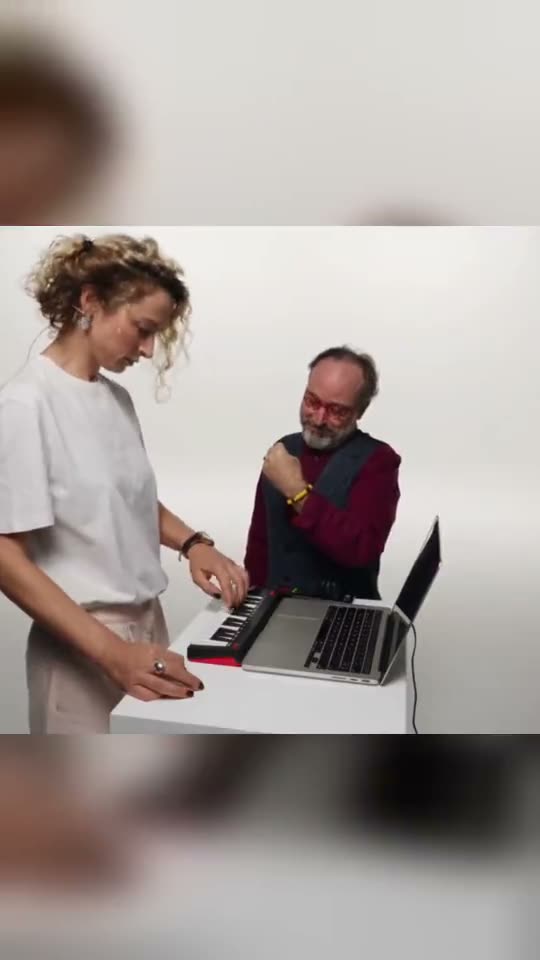
The Alors On Danse AI trend places you directly into a viral music studio sketch. Two people recreate a music session where one taps a mini keyboard while the other hypes the track. The 15-second vertical clip follows the movements of the studio pair as they craft beats and move toward the lens, set to the original sound.
The visual sequence follows three distinct studio moments shown in the reference video.
| Shot | Beat |
|---|---|
| Shot 1 | One person plays the beat on a small keyboard beside a laptop. |
| Shot 2 | The partner claps, points toward the monitor, laughs, and tilts toward the lens. |
| Shot 3 | Both characters jog forward together toward the camera. |
02How to make the Alors On Danse AI video from one photo
Creating your clip takes only a few steps inside your web browser. You do not need to download an app or configure technical tools to join the trend. Follow this step-by-step tutorial to generate your clip directly on the site.
Before you begin, make sure your picture is ready on your computer or phone. The system renders your clip online and lets you download the file as soon as the render finishes.
- Open the trendOpen the trend page on AI Trend Club in your browser and press Create your own.
- Upload your pictureAdd the photo and confirm you have permission to use it.
- Review the resolution and costUse Standard 480p, which costs 692 credits. The exact credits show on the button before you spend anything.
- Start the renderTap Make my video. The render runs in your browser and finishes in a few minutes.
- Save your fileDownload with the trend sound or silent, formatted in 9:16 vertical ratio like the original.
03The photo that works
Your upload serves as the visual guide for the studio lead in the video. Choosing the right source image helps the model position your facial features cleanly into the bright room.
- Upload a clear front portrait with good lighting.
- Use a centered portrait facing straight into the camera to stop the face from looking stretched or unnatural.
- Choose a picture taken in balanced natural light so your lighting matches the white studio.
- Make sure you only use a photo of a person you have permission to use.
- If a render ever fails, your credits come back automatically so you can try again with a clearer photo.
04The Alors On Danse AI prompt
On AI Trend Club, there is no prompt to write. The entire studio motion is guided by the original clip once you upload your portrait.
If you want to experiment in an external AI video generator that accepts image references, you can test a descriptive text prompt. Keep the prompt focused on camera moves, room layout, and timing rather than quality keywords.
In a bright white studio, the person in the reference photo stands beside a companion at a small desk. The companion taps out a rhythmic sequence on a compact keyboard next to an open laptop. The person in the reference photo claps rhythmically, points toward the monitor screen, laughs, and leans forward toward the camera. Both individuals smile, turn in sync, and jog forward together toward the lens in a continuous 15-second vertical shot.05CapCut template or AI video?
Creators looking to join the Alors On Danse trend often search for an AI template on mobile editing apps or online tools. A standard CapCut template relies on the video clips or photos you manually drop into predetermined cut points, without re-rendering your likeness into the reference actor's motion inside the studio sketch.
Our online AI video workflow uses your uploaded portrait to guide the lead character inside the 15-second studio sequence. Check the specific template requirements and export terms if you use external apps, as free export conditions and available features vary by template.
Once you download your finished 9:16 clip from AI Trend Club, you can easily open it in CapCut to add your own captions, text overlays, or extra visual edits before sharing.
06Is the Alors On Danse AI video free?
You can watch the original clip and explore the trend page for free without paying. When you register a new account on AI Trend Club, you receive 25 welcome credits. These 25 credits are enough to make a few static images, but they are not enough to render this 15-second trend video, which requires 692 credits at standard 480p resolution.
The site does not offer a free video generation option for this project. If a render fails during processing, your credits come back automatically to your account balance so you do not lose them.
To generate your clip, you can select a one-time pass or a credit pack. All passes are one-time purchases and do not auto-renew, meaning they are not recurring subscriptions. The Week pass lasts 7 days and provides the lowest entry price to get started.
| Option | Price | Credits |
|---|---|---|
| Week pass | $6.99 | 800 |
| 1,000 credits | $9.90 | 1,000 |
07Post it
Your exported 15-second vertical video comes with the original sound included, ready for TikTok, Instagram Reels, or YouTube Shorts. When you publish your clip, credit the original comedic creators @martaegianluca in your caption to acknowledge the viral sketch.
This video meme captures the lighthearted feeling of creative pairs hyping up a fresh track in the studio. Here are three short caption ideas based on the meaning of the trend:
- When the beat drops in our imaginary studio session.
- Hyping up the track like true producers.
- Studio energy when the mini keyboard rhythm hits just right.
08Questions
- What is the Alors On Danse trend?
- It is a viral video trend based on a 2010 studio sketch between Jamel Debbouze and Stromae, where people place themselves into the beat-making scene.
- How do I make the Alors On Danse video?
- Press Create your own, add one photo and tap Make my video. There is no prompt to write.
- How many credits does it cost?
- The video costs 692 credits at standard quality 480p. The exact number shows on the button before you spend anything, and a failed video gives its credits back automatically.
- Can I make it on my phone?
- Yes. Everything runs directly in your web browser with no app to install, so you can upload your photo and make the video on your phone or computer.
- Who made the original?
- The clip was shared by TikTok creators @martaegianluca on October 5, 2026. We link to it on the trend page.