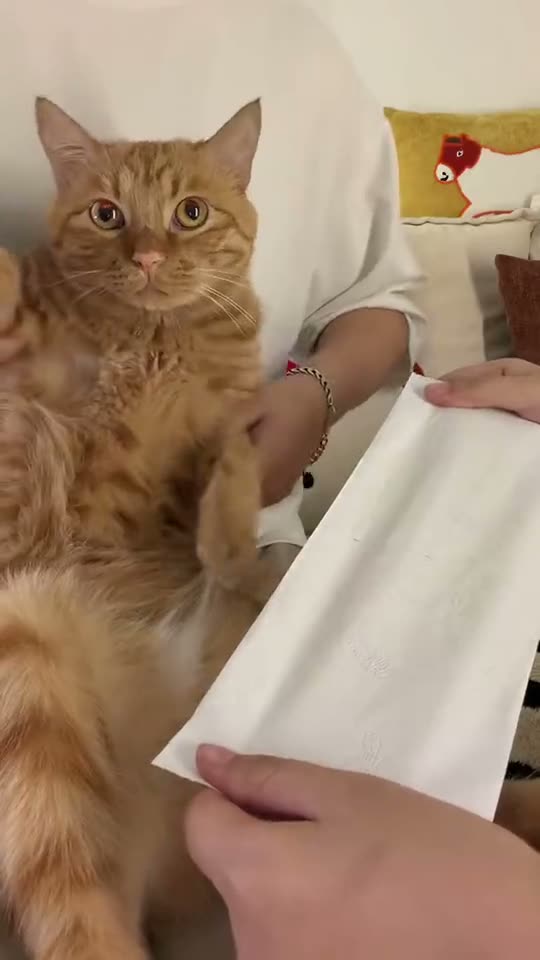
01What happens in the Kung Fu Cat trend
The Kung Fu Cat trend features an orange cat sitting upright on a lap to execute swift martial arts blocks and strike two paper tissues in half. The clip runs for 9 seconds in vertical format, keeping the original sound intact while your pet or your own face takes the lead role.
TikTok creator @lynn59716 posted the original clip from Malaysia on October 19, 2026, pairing the moves with Kung Fu Fighting. Pet owners share the format to turn everyday animals into disciplined fighters through silly, high-energy tissue slicing.
Here is the breakdown of the action across the video.
| Time | Beat |
|---|---|
| Shot 1 | The cat sits upright on its owner's lap and raises its paws to block incoming strikes. |
| Shot 2 | It delivers quick martial arts strikes into the air as the music builds. |
| Shot 3 | The cat slices through the first paper tissue with a sharp chop. |
| Shot 4 | It finishes the routine by splitting a second paper tissue in half. |
02How to make the Kung Fu Cat AI video from one photo
You do not need to install an app to create this clip. Everything runs directly in your web browser on AI Trend Club, and your projects stay private to your account.
Follow these steps to generate your Kung Fu Cat AI meme video from a single image.
- Step 1: Open the trend pageGo to the Kung Fu Cat page on AI Trend Club in your browser. You can watch the original clip for free before you start.
- Step 2: Press Create your ownClick the Create your own button on the page. This opens the generator tool without requiring any complicated setup.
- Step 3: Upload your photoAdd one photo of your cat, your dog, or yourself. Make sure you have permission to use the image before continuing.
- Step 4: Check the credits and start renderingThe online tool offers standard 480p quality for 415 credits. The exact number appears clearly on the button before you spend anything. Tap Make my video to begin.
- Step 5: Download your videoThe render finishes in a few minutes. You can download the completed 9:16 vertical video with the original trend sound included, or save a silent version.
03The photo that works
Your source photo determines how clean the martial arts motions appear in the final render. Pick an image that follows these rules:
- Upload a clear picture of your pet or yourself taken straight from the front.
- Ensure the subject looks directly forward toward the camera so the pet face aligns properly.
- Use a well-lit photo that clearly displays your pet's eyes and facial markings.
- Avoid blurry, dim, or washed out shots that obscure facial details.
- Only upload photos of people or pets that you have permission to use.
04The Kung Fu Cat AI prompt
On AI Trend Club, there is no prompt to write because the workflow guides the motion using the original clip. If you want to experiment in an external video tool that accepts reference images, you can start with the text below.
Describe the routine shot by shot, keeping the focus on the subject in your reference picture.
Vertical 9:16 video. The person in the reference photo sits upright on a lap, wearing a focused expression. Shot 1 shows them raising their hands to execute sharp martial arts blocks. Shot 2 cuts to rapid punches and defensive chops into the air as the tempo increases. Shot 3 captures a clean horizontal strike slicing through a held paper tissue. Shot 4 ends with a decisive downward chop splitting a second tissue in half. The camera stays centered, capturing crisp martial arts timing against a simple indoor background.05CapCut template or AI video?
Many creators look for a CapCut template to participate in this trend. When using third-party templates, you should check the specific template requirements and any free export conditions on that platform to see what assets you need to supply.
The AI Trend Club workflow functions differently from a standard video editing template. Instead of asking you to film clips yourself, our web tool uses one photo to place your pet or your face directly into the 9-second martial arts action sequence.
Because our video includes the original trend sound, you can post the downloaded clip directly or import it into CapCut if you want to add custom captions.
06Is the Kung Fu Cat AI video free?
Watching the original clip and browsing the trend page is completely free. When you create a new account, you receive 25 welcome credits. That welcome balance is enough for a few images, but it is not enough for a full trend video.
Rendering the 480p Kung Fu Cat clip requires 415 credits. If a render ever fails, your credits come back automatically so you can try again with a clearer image.
The cheapest entry points to get enough credits are the Week pass or the 1,000 credits pack. All passes are one-time purchases and do not auto-renew.
| Option | Price | Credits |
|---|---|---|
| Week pass | $6.99 | 800 |
| 1,000 credits | $9.90 | 1,000 |
07Post it
When your video finishes rendering, export the 9:16 vertical file with the included audio. Credit the original creator @lynn59716 in your caption when you share it to TikTok, Instagram Reels, or YouTube Shorts.
Here are three short caption ideas focused on everyday pets turning into skilled martial artists:
- Tissues never stood a chance against my gentle house pet.
- Put in hours of discipline just to chop two paper tissues.
- A peaceful pet by day, a serious martial artist on my lap.
08Questions
- What is the Kung Fu Cat trend?
- It is an October 2026 viral video format where a cat sits on a lap, makes martial arts blocks, and chops paper tissues in half.
- Which AI makes the Kung Fu Cat video?
- The video is produced by an AI video model guided by the original clip, matching the martial arts strikes to your uploaded photo.
- Is there an AI prompt to write on AI Trend Club?
- No. There is no prompt to write on the site. You simply upload one photo and press Make my video.
- Can I use a pet photo or a selfie?
- You can add a clear photo of your cat or dog, or choose a selfie of yourself to play the lead role.
- Who made the original clip?
- TikTok creator @lynn59716 posted the original clip on October 19, 2026.