01What happens in the Bulin 47 trend
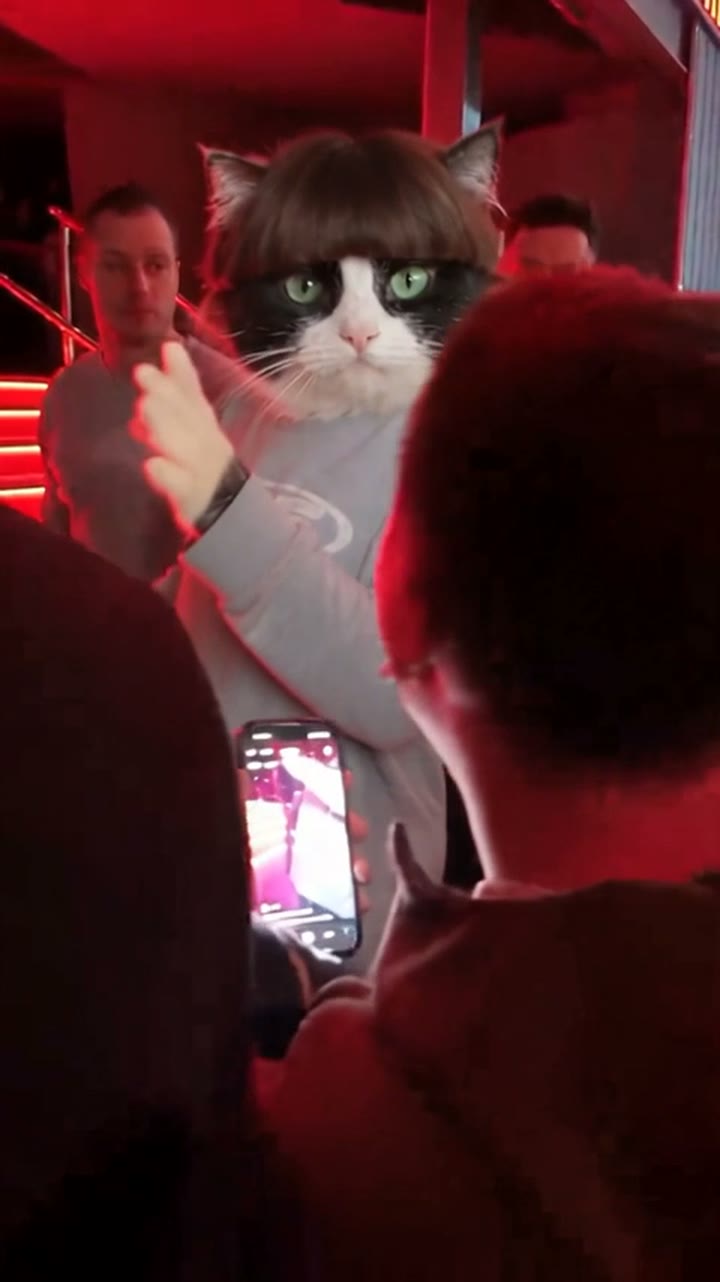
The Bulin 47 trend features a performer dancing outside a restaurant in front of a watching crowd. A speaker plays dembow beats while onlookers record the routine on their mobile phones.
On October 2, 2026, Kevin Wai approached Dominican artist Bulin 47 with a speaker outside a restaurant in Spain. Bulin 47 gave an impromptu freestyle that gained 4.1 million TikTok views and over 500,000 likes within eight days. On October 6, 2026, creator @adolfo___angel posted an animated TikTok version with a cat in a wig, which helped the #bulin47freestyle hashtag pass 24 million views by October 10. In this 14-second vertical video, your selfie or your pet takes the lead spot outside the restaurant while the crowd stays in place.
| Shot | Beat |
|---|---|
| Shot 1 | A speaker plays dembow beats as onlookers gather outside a restaurant with red lights. |
| Shot 2 | The performer grooves to the rhythm in front of the camera while people film on their phones. |
| Shot 3 | The camera shifts angles to capture the dance moves and the watching crowd. |
02How to make the Bulin 47 AI video from one photo
You do not need to install an app on your device. Everything runs directly inside your web browser on AI Trend Club, and your projects stay private to your account.
Follow this step-by-step tutorial to produce your clip with the online AI video generator flow.
- Open the pageOpen the Bulin 47 trend page on AI Trend Club and press Create your own.
- Add your photoAdd one photo of yourself or your pet, and confirm you have permission to use it.
- Select qualityChoose 480p or 720p. Rendering at 480p standard quality costs 646 credits, while 720p HD costs 1,452 credits. The exact number shows on the button before you spend anything.
- Render and exportTap Make my video. The render finishes in a few minutes, and you can download your 9:16 vertical video with the trend sound included or silent.
03The photo that works
The Bulin 47 AI video generator relies on a clean portrait to shape your dancer correctly.
- Upload a clear picture of the street performer taken directly from the front.
- Ensure the shot has good lighting across the entire face.
- If you use an animal, pick a picture showing only your pet with both eyes clearly visible.
- Avoid angled or poorly lit shots to prevent distorted facial features.
- Only submit pictures of people or pets that you have explicit permission to use.
04The Bulin 47 AI prompt
You do not need to write an AI prompt when using AI Trend Club. The tool applies the original camera motions, background crowd, and dance steps for you.
If you prefer to experiment on external platforms that support an image reference, you can use the sample prompt below as a baseline for your clip.
A continuous vertical video shows the person in the reference photo dancing as a street performer outside a restaurant lit by red signage at night. A nearby portable speaker plays dembow music. The dancer grooves to the rhythm, gesturing toward the lens with lively footwork. Surrounding onlookers gather in a circle, holding up mobile phones to record the scene. The camera cuts between medium frontal angles of the dance moves and wider perspective shots capturing the attentive crowd.05CapCut template or AI video?
A standard CapCut template only splices together clips you recorded yourself. It cannot place your face or your pet into the original restaurant setting, match the choreography, or keep the background onlookers intact.
A dedicated AI template swaps your portrait directly into the lead performer spot across all three camera cuts. The original lighting, spectators, and dance timing remain unchanged.
Once you finish rendering on AI Trend Club, you can download your clip with the audio included. If you want to add extra subtitles or overlays, you can import the finished file into CapCut before posting.
06Is the Bulin 47 AI video free?
Visiting the trend page and watching the original clip on AI Trend Club is completely free to view. However, generating your own video requires credits.
Every new account receives 25 welcome credits. This gift gives you enough to test a few still images, but it is not enough to generate this trend clip. A 480p render requires 646 credits, and 720p costs 1,452 credits. If a render ever fails, your credits come back automatically.
The most affordable options to fund your creation are the Week pass subscription or the 1,000 credits pack.
| Option | Price | Credits |
|---|---|---|
| Week pass | $6.99 | 800 |
| 1,000 credits | $9.90 | 1,000 |
07Post it
Your downloaded file includes the original sound, so you can upload directly to TikTok, Instagram Reels, or YouTube Shorts. Make sure to credit the source creator by tagging @adolfo___angel in your caption.
Use one of these simple caption ideas based on the meme theme:
- Dropping into an upbeat street rap moment.
- Turning an ordinary portrait into a lively musical performance.
- Giving my pet the lead spot outside the restaurant.
08Questions
- What is the Bulin 47 AI trend?
- It is a video template based on a viral street freestyle clip, where your photo steps into the dancing role while crowd reactions and music continue as before.
- How do I make the Bulin 47 AI video?
- Press Create your own, add one photo and tap Make my video. There is no prompt to write.
- Can I use a pet photo instead of a selfie?
- Yes, you can upload a portrait of your cat, your dog, or yourself to take the performer's spot.
- Who made the original?
- The AI cat version was shared by @adolfo___angel on TikTok on October 6, 2026.
- Which AI makes the Bulin 47 video?
- The video is produced by an AI video model guided by the original clip.