01What happens in the Bad Times trend
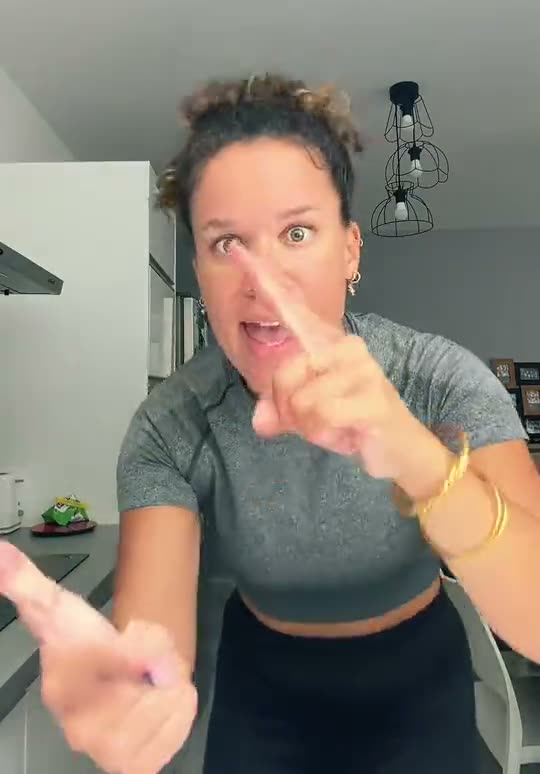
The Bad Times trend is a mock argument routine set to the deep house track by Imael Angel. You play the part of someone who has had enough, marching across the room to argue with whoever is filming.
The original kitchen take comes from @bouuhyachaka on TikTok. Remakes follow her movements shot for shot, moving from tapping hands to a stop sign at the camera, then wrapping up with a hand on the hip and a long stare.
Here is the breakdown of the action across the clip.
| Time | Beat |
|---|---|
| 0:00 | The lead starts across the kitchen, already arguing with whoever is filming. |
| 0:01 | Right up to the lens, tapping a finger on a palm to make the point. |
| 0:04 | A flat hand pushes at the camera: stop right there. |
| 0:09 | One more shout, a flick of the hand, and a turn away. |
| 0:12 | Hand on the hip, back for the last word and a long stare. |
02How to make the Bad Times AI video from one photo
You do not need to record yourself acting out the argument or copy the timing by hand. You only need one clear photo of yourself to put your face and body right into the routine.
Follow this quick tutorial to turn your image into a finished clip on the site.
- Step 1: Open the trend pageOpen the trend page on AI Trend Club in your browser. You do not need to install an app. Everything runs inside your browser window.
- Step 2: Start your projectPress Create your own to open the setup screen for the routine.
- Step 3: Upload your photoAdd the photo you want to use for the lead role. Confirm you have permission to use the image before moving forward.
- Step 4: Pick your resolutionChoose your export resolution. Standard quality at 480p costs 692 credits. HD quality at 720p costs 1,556 credits. The exact credits show on the button before you spend anything.
- Step 5: Render and downloadTap Make my video. The system creates the 15-second vertical clip in a few minutes. You can download the finished 9:16 video with the trend sound included, or download it silent to use your own audio track.
03The photo that works
The routine relies on clear facial tracking and active hand gestures, so picking the right image matters. Keep these points in mind when selecting your upload:
- Upload one sharp, front-facing photo taken in even light.
- Crop or frame the image from the waist up so your upper body is clear.
- Keep your hands away from your face in the source picture, because the routine needs both hands free.
- Use a photo of a person only.
- Avoid heavy shadows, blur, or extreme head angles that block your features.
04The Bad Times AI prompt
On AI Trend Club, you do not write a prompt. The site handles the camera paths, kitchen setting, and character actions automatically from the template flow.
If you want to experiment in an external AI video generator that accepts reference images, you can use the description below as your starting point.
A continuous kitchen shot of the person in the reference photo arguing with the camera. At first, the person in the reference photo walks forward while talking. They stop close to the lens and tap a finger onto an open palm. Next, they push a flat palm toward the camera lens to signal a stop. They shout once more, flick their hand, and turn away. Finally, they turn back with a hand on the hip, deliver one last word, and hold a steady stare.05CapCut template or AI video?
People often search for a CapCut template when they see this routine take off online. A CapCut template is useful for cutting and timing clips that you have already filmed in real life. However, it cannot insert your face or body directly into the original scene.
An AI video generator takes your single still photo and animates you inside the original kitchen setting, matching the exact rhythm of the argument. Once you download the rendered video from AI Trend Club, you can still import the file into CapCut if you want to adjust the crop, overlay text, or apply custom filters.
06Is the Bad Times AI video free?
You can browse the site, view the original clip, and check the trend page for free. When you sign up, a new account receives 25 welcome credits. This welcome bonus is enough for a few still images, but it is not enough to cover a full video generation.
A standard 480p render costs 692 credits, while a 720p HD render costs 1,556 credits. If a render ever fails, your credits come back automatically to your balance.
To get enough credits for this clip, the cheapest entry options are the Week pass or the 1,000 credits pack. Here is how those two compare:
| Option | Price | Credits |
|---|---|---|
| Week pass | $6.99 | 800 |
| 1,000 credits | $9.90 | 1,000 |
07Post it
After downloading your 9:16 clip, share it directly to TikTok, Instagram Reels, or YouTube Shorts. Make sure to keep the track by Imael Angel attached so viewers recognize the audio immediately.
Give credit to the creator behind the viral kitchen take in your description by tagging @bouuhyachaka.
The concept is all about calling out the person holding the camera. Here are three quick caption ideas you can paste under your post:
- When my roommate asks why the sink is still full.
- POV: you asked me what I want for dinner one too many times.
- Me explaining why this argument was settled yesterday.
08Questions
- Is there a Bad Times AI template?
- Yes. On AI Trend Club, the Bad Times setup works like an automated template where you upload one photo and generate the clip without writing custom text.
- Which AI makes the Bad Times video?
- The clip is produced by an AI video model guided by the original clip to replicate the exact kitchen routine.
- Can I make it on my phone?
- Yes. The entire creation process runs directly in your mobile web browser, so you do not need to download or install a separate mobile app.
- Who made the original video?
- The kitchen take was posted on TikTok by @bouuhyachaka on September 9, 2026, set to the song by Imael Angel.
- What should I do if the render fails?
- If your render fails, the credits come back automatically to your account balance, and you can try again with a sharper, front-facing image.