TrendingTrending in October 2026
Ceiling Fan Transition AI Trend
Swap outfits with each fan blade turn.
A top-down view films you on the floor as a spinning ceiling fan wipes across the frame, revealing a fresh outfit on every turn. Add one clear photo to star in the 13-second vertical clip with the original sound.
- 1 photo you add
- 13 s vertical clip
- 9:16 for TikTok, Reels, Shorts
- Original sound included
Ready in a few minutes · from 600 credits · failed videos refund their credits
What the Ceiling Fan Transition video looks like
This is the original. Your photo replaces its lead, so your video follows the same shots with your face. No two runs come out exactly the same.
In the featured clip from @delinquent_doll, each turn of the ceiling fan reveals a different wardrobe look. Your photo takes the lead's place while the four outfit transitions stay the same.
Also calledceiling fan transitionfan transitionceiling fan outfit changeunder the fan
 0:01
0:01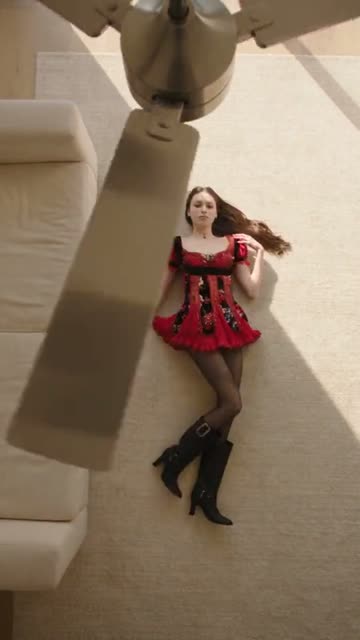 0:04
0:04 0:07
0:07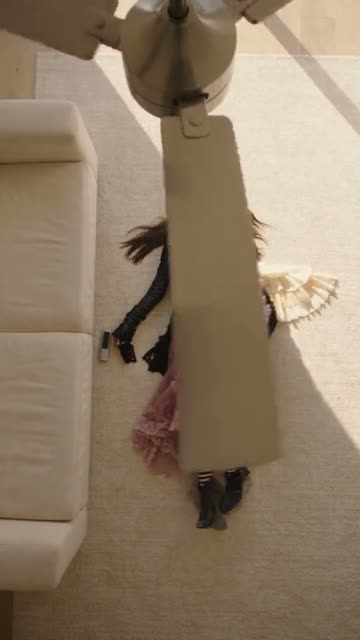 0:11
0:11
How to make the Ceiling Fan Transition video
- 01
Add your photo
Outfit model: clear front photo of yourself.
- 02
Press Make my video
The button shows the price before anything is spent: 600 credits at 480p.
- 03
Download and post
A vertical 9:16 MP4, with the trend’s sound or silent. Find it later in My videos.
Which photo works best?
- Use a clear selfie
- Keep lighting even
- Look straight at camera
Avoid
- Blurry or dark shots
- Faces covered by sunglasses
- Group photos with others
What happens in your video
- 01
The camera looks down from the ceiling as a turning fan blade wipes past you in your first outfit.
- 02
Another blade sweeps over the lens, instantly swapping your clothes for a second look.
- 03
A third pass of the fan brings in your next styled outfit on the floor.
- 04
The final blade cut reveals the fourth outfit before the clip ends.
Where the trend came from
A Spanish tutorial on TikTok by @fingertips1246 featured a fan transition template on August 26, 2026. The AI concept gained ground a month later when @shabastudio20 shared four outfit changes under a wooden fan on September 24, collecting over 1.3 million plays by October 8.
The Tab published a guide to the trend on September 28 as autumn outfit rotations spread across TikTok. By October 1, tracker Kavel counted 76 posts with about 3.9 million views, and an unedited attempt by @amyrebeccaowen on October 3 reached 8.1 million plays.
What it means
People share this trend to showcase multiple fashion looks without changing clothes or taping a camera to the ceiling. It offers a smooth, overhead aesthetic that makes wardrobe reveals feel effortless.
It suits anyone wanting to display seasonal styles, everyday looks, or creative outfit ideas in a single quick clip.
How many credits it costs
| Quality | Length | Credits |
|---|---|---|
| Standard · 480p | 13 s | 600 |
Credits come from a plan or a credit pack. A video that fails gives its credits back. See plans
What goes wrong, and the fix
| If… | Do this |
|---|---|
| The face looks distorted | Upload a sharp portrait with neutral lighting and no tilted angles. |
| The outfits do not match your style | Try a front-facing photo where your hair and shoulders are clearly visible. |
| The render failed | Credits come back automatically. Try again with a clearer photo. |
Ceiling Fan Transition questions
What is the Ceiling Fan Transition trend?
It is a top-down video style where turning fan blades sweep across the screen, changing your outfit on the floor every time a blade passes.
How do I make the Ceiling Fan Transition video?
Press Create your own, add one photo and tap Make my video. There is no prompt to write.
How many credits does it cost?
600 credits at standard quality (480p), 1,348 at HD (720p). The exact number is on the button before you spend anything, and a failed video gives its credits back.
Can I use a pet photo instead of a selfie?
This specific format uses a single photo of yourself, so provide a clear portrait of your own face.
Who made the original?
The featured reel was posted by @delinquent_doll. We link to it above.
Other AI video trends
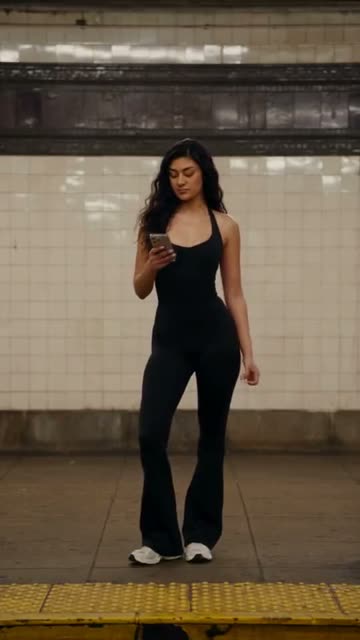 Original13B views on subway fitSubway Outfit Change AI TrendEvery passing train brings another stylish look.600 credits · 1 photo
 Original4.2M views on the originalI'm With You AI TrendSing your heart out on the ride.461 credits · 1 photo
 Original743.5M views on #wipemedownWipe Me Down Dance AI TrendDance the viral stomp from one photo.692 credits · 1 photoThe trend deskAll AI video trendsEvery trend traced to its original post.Browse
Make your own Ceiling Fan Transition video
Add one photo and tap once. No prompt to write. 600 credits.
Create your own