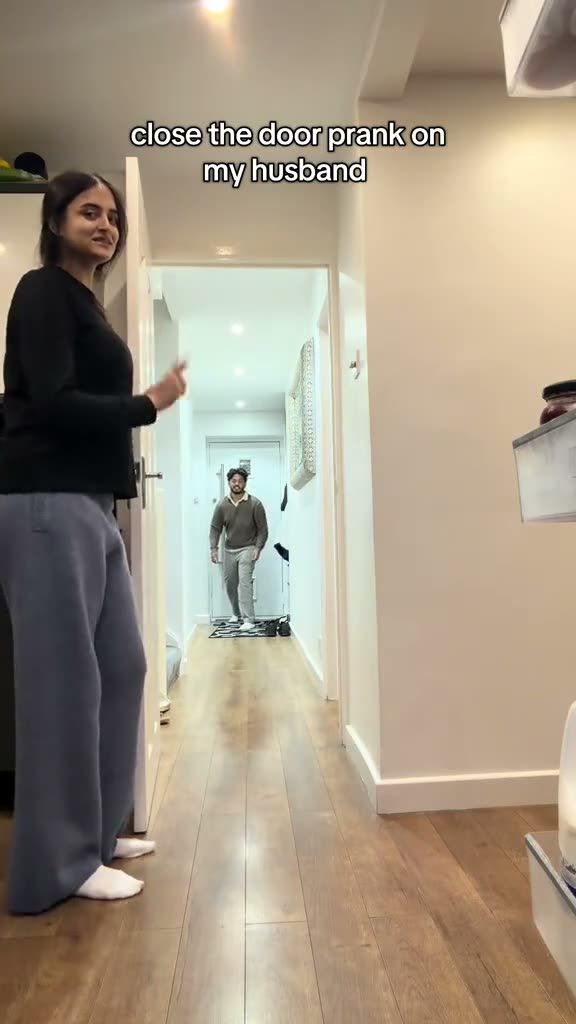
01What happens in the Closing Door Prank trend
The clip centers on a doorway encounter and a kneeling reaction. The original plays on the trend page, where you can watch the sequence before making your own version.
The creator is credited as @nnnbxox, with a link to the original post. The AI version uses your photo for the person approaching the door, while following the reference clip. The result can vary, so the preview of the original is a useful guide to the intended action.
The table breaks the reference into its main beats. Watch the sequence in order before choosing a photo: the action is what makes the short clip recognizable, and the page shows the original alongside the creation option.
| Time | Beat |
|---|---|
| Shot 1 | A person in the foreground stands by the door. |
| Shot 2 | Another person approaches the doorway. |
| Shot 3 | The door closes and the approaching person drops to their knees. |
02How to make the Closing Door Prank AI video from one photo
Open the trend page in your browser. You can watch the original and review the photo role before starting. No separate app or written prompt is required on AI Trend Club.
The controls show the credit cost before you spend. Review the standard 480p option and your balance, then submit the job. When the video is ready, you can download it with the original sound or as a silent clip. Your videos stay private to your account.
- Open the pageGo to the Closing Door Prank trend page and watch the original.
- Start creatingPress Create your own to open the photo flow.
- Add your photoChoose one clear photo of a person and confirm that you have permission to use it.
- Review the costStandard 480p uses 692 credits. Check the exact amount on the button before spending.
- Make and downloadTap Make my video. Once it is ready, download the vertical clip with sound or silent.
03The photo that works
Use a clear, well-lit photo of yourself with your face visible. The page asks for one person in the lead role.
If your face looks unclear in a result, try a clearer and better-lit photo. The tool follows the original action, but individual details can vary.
- Choose one photo of yourself.
- Show one person clearly.
- Keep your face visible.
- Use a well-lit image.
- Only use a photo you have permission to use.
04The Closing Door Prank AI prompt
On AI Trend Club, you do not have to write a prompt. The trend page supplies the reference and the role; you add a photo and review the cost.
If you want to experiment elsewhere with a video model that accepts a reference image, start with the prompt below and use the original clip as a guide. Results and available controls depend on the model you choose.
Use the original clip as the motion reference. The person in the reference photo approaches the doorway while another person stands by the door. The door closes and the approaching person drops to their knees. Keep the scene and camera framing aligned with the reference, and follow the order and timing of its actions. Replace only the person approaching the door with the person in the reference photo. Keep the movement continuous from the opening through the final gesture or reaction. Let the action play at the same pace as the reference rather than adding a new scene or an extra cut.05CapCut template or AI video?
A template for editing footage and a reference-guided AI video serve different purposes. A conventional editing template arranges footage you already have. Here, the AI video flow uses your photo for the lead in the reference scene.
After downloading, you can use an editor such as CapCut to add a caption or adjust the presentation for the platform where you plan to share it. The trend page offers a version with the original sound and a silent version, so choose the one that fits your editing workflow.
Check the generated result before sharing. In particular, look at the lead and the action that carries the clip. The reference describes the intended sequence, but it is not a guarantee that each generated detail will match.
06Is the Closing Door Prank AI video free?
Watching the original and viewing the trend page are free. Creating a new video costs 692 credits at standard 480p quality. The exact cost appears on the button before you spend.
New accounts receive 25 welcome credits. That is enough for a few images but not for this video. The Week pass is a subscription, while the 1,000 credits option is a credit pack. Compare the options and your current balance before starting.
If a video render fails, its credits return automatically. A failed render and a result with details you would like to change are different situations, so review the displayed result before deciding what to do next.
| Option | Price | Credits |
|---|---|---|
| Week pass | $6.99 | 800 |
| 1,000 credits | $9.90 | 1,000 |
07Post it
When you are ready to share, choose the download with sound or add the trend sound in your editor. Credit @nnnbxox and link to the original post where the platform allows it.
The vertical download is suited to short-form feeds. Review the video before posting, and make sure the photo you used is yours or that you have permission to use it. Here are a few short captions inspired by the action:
- That doorway moment.
- Walking right into the prank.
- The reaction at the door.
08Questions
- What is the Closing Door Prank trend?
- The original clip features a doorway encounter and a kneeling reaction. Watch the credited original on the trend page to see the full sequence.
- How do I make a Closing Door Prank AI video?
- Open the trend page, press Create your own, and add one permitted photo. Review the cost and tap Make my video.
- Can I make it on my phone?
- The flow runs in your browser, with no app to install.
- Who posted the original?
- @nnnbxox posted the original on TikTok. The trend page links back to the post.
- Which AI makes the video?
- The site uses an AI video model guided by the original clip. You do not need to enter a prompt on the trend page.