01What happens in the Tsundere Dance trend
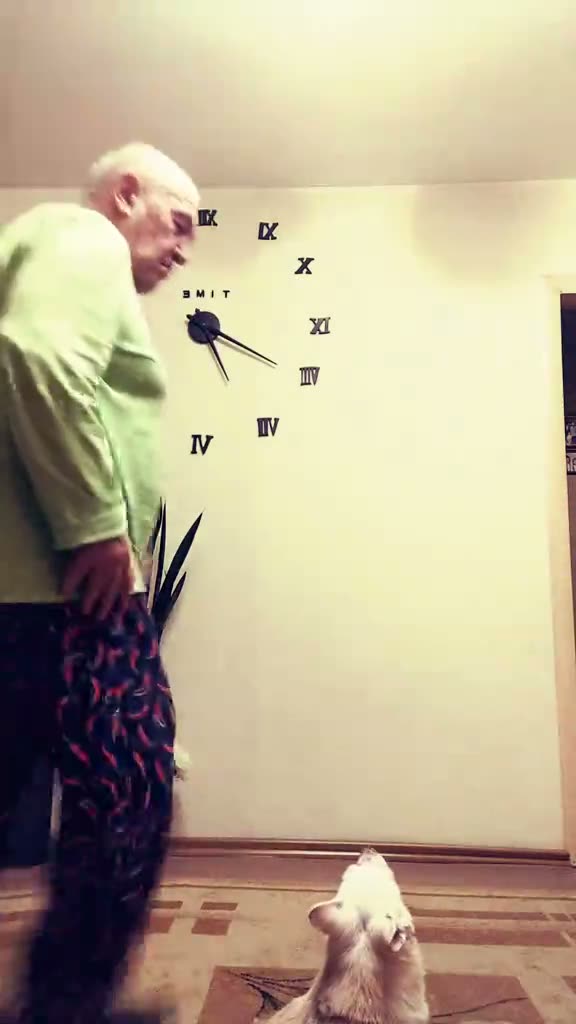
The Tsundere Dance is a brief stomp-and-pose routine. An adult dancer enters the room, turns toward the camera, puts both hands on their hips, kicks to one side and ends in a proud stance. A small white dog watches nearby. The AI Trend Club page keeps the dog and room in the silent reference while one photo takes the dancer’s place.
The linked TikTok by @savanay_60 was posted on Nov 7, 2026. When checked on Nov 13, the post had 2M views and 377K likes. Those are counts on the original post at the time of the check. The trend page shows the creator and links to the source; it does not present those counts as a promise about a new video.
| Time | Beat |
|---|---|
| Shot 1 | The dancer enters from the side as a small dog watches. |
| Shot 2 | The dancer turns to the camera and places both hands on their hips. |
| Shot 3 | They kick to one side and plant their feet wide. |
| Shot 4 | They finish in a proud hands-on-hips pose. |
02How to make the Tsundere Dance AI video from one photo
The AI Trend Club flow is prepared for the reference clip, so there is no prompt to write on the site. Add one photo for the dancer and check the credit total before you start. The creator runs in a browser without an app installation, and the site says your videos stay private to your account.
- Open the trend pageGo to the Tsundere Dance page to see the original TikTok, the silent preview and the move sequence.
- Press Create your ownFollow the trend page button into the browser-based creator. It has a prepared motion recipe.
- Add one photoUse one clear photo of yourself or a pet that you have permission to use. It takes the lead dancer’s place; the dog stays in the reference.
- Choose a resolutionA 480p video costs 369 credits. A 720p video costs 830 credits. The button shows the current total before you spend.
- Make and downloadTap Make my video and wait a few minutes. The file is silent, so add a sound in TikTok or CapCut if you want one.
03The photo that works
The page asks for one full-body photo for the dancer. The move sequence includes a kick and a wide stance, so the source page recommends leaving room around the subject. If the face or fur changes, its fix is to choose a clearer photo with the subject facing the camera.
- Use one clear photo of a person or pet you have permission to use.
- Show the full body in the frame.
- Choose even light on the face or fur.
- Avoid group photos with several possible leads.
- Avoid a close crop that cuts off the legs.
- If the face or fur changes, try a clearer photo with the subject facing the camera.
04The Tsundere Dance AI prompt
There is no prompt field in the AI Trend Club creator. If you want to test this idea in another video model that accepts a reference image and clip, use the prompt below as a starting point. It describes the generic dance and does not rely on a character name.
Recreate the short stomp-and-pose routine from the reference clip. The person in the reference photo takes the adult dancer's role. Start as the dancer enters the room while the small white dog watches nearby. Turn toward the camera, place both hands on the hips, kick to one side, plant the feet wide and finish in a proud hands-on-hips pose. Keep the same room, dog, vertical framing, movement order and timing from the reference. Change only the lead dancer's identity. Keep the clip silent and do not add text.05CapCut template or AI video?
A CapCut template is an edit made from footage you record or choose. It can arrange those clips, but it does not place your face into the original room with the dancer and dog. The AI video flow uses your photo as the lead and the original clip as a guide for the setting and moves.
The Tsundere Dance page uses a silent preview, and the download does not contain the trend sound. Add a sound in TikTok or CapCut after downloading if you want music. You can add captions or make additional edits there too. When you share the result, credit @savanay_60 and link the original post.
06Is the Tsundere Dance AI video free?
You can open the page and watch the reference without buying a video. Making a new video uses credits. New accounts receive 25 welcome credits, which are enough for a few images but not a trend video. The creator shows the total before you submit, and credits for a failed video come back automatically.
The Week pass costs $6.99 and includes 800 credits. One 480p Tsundere Dance video uses 369 credits, and one 720p video uses 830 credits. The Week pass therefore covers one video at either listed resolution. The 1,000-credit pack costs $9.90 and also covers either one-video option. Review the current credit total on the button before you spend.
| Option | Price | Credits |
|---|---|---|
| Week pass | $6.99 | 800 |
| 1,000 credits | $9.90 | 1,000 |
07Post it with the source credited
The page does not embed music in the preview. If you want a sound with your finished video, add it in TikTok or CapCut after downloading. Credit @savanay_60 and link the original TikTok shown on the trend page. Explain that your photo takes the dancer’s place while the dog and room stay in the reference.
The serious pose and quick kick create a mock-grumpy feel, and the small dog adds a quiet reaction. A caption can describe those visible details without adding a named character or suggesting that the original creator made your result.
- A quick stomp, a kick, and a proud pose.
- One photo steps into the routine while the dog watches.
- A mock-grumpy dance with a quiet audience.
08Questions
- What is the Tsundere Dance trend?
- It is a short routine with a kick, stomp and proud hands-on-hips pose. The linked clip shows an adult dancer with a small dog nearby.
- Can I use a pet photo?
- Yes. Add one clear photo of yourself or a pet to take the lead dancer’s place.
- Which AI makes the Tsundere Dance video?
- It uses an AI video model guided by the original clip. The trend facts do not name a specific model.
- Can I make it on my phone?
- The creator runs in a browser and has no app to install. Check the credits before you submit.
- Who posted the original?
- @savanay_60 posted the linked TikTok on Nov 7, 2026. The trend page links to that source.