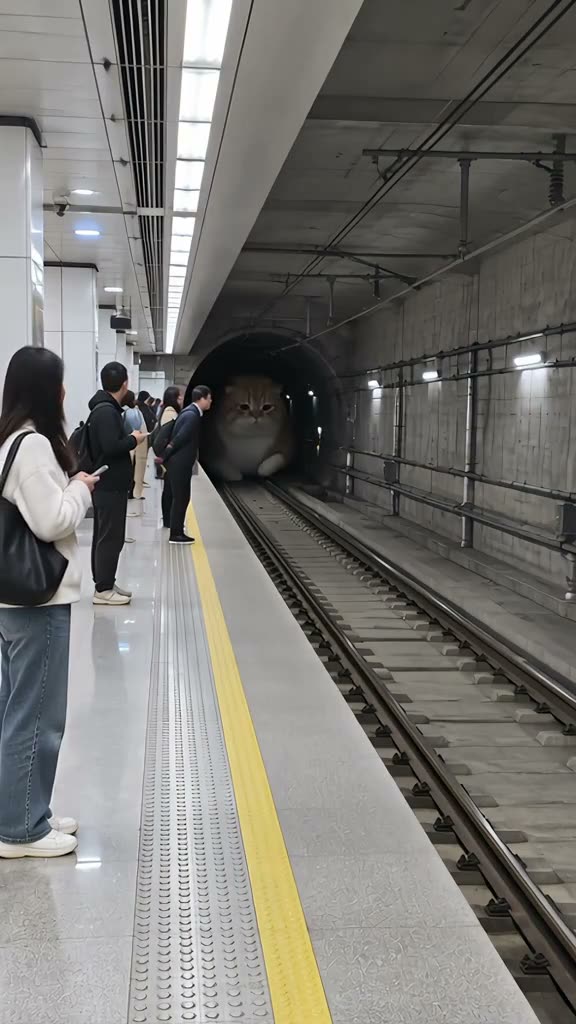
01What happens in the Giant Cat trend
A huge orange cat arrives at a subway platform in the place of a train. The original clip shows the cat coming out of a tunnel, passing commuters, and moving along the track. This page uses a 15-second vertical excerpt from the original post.
| Time | Beat |
|---|---|
| Shot 1 | The camera looks down the tracks toward a dark subway tunnel. |
| Shot 2 | An orange cat-shaped train appears at the tunnel entrance. |
| Shot 3 | The huge cat rolls close to commuters waiting on the platform. |
| Shot 4 | It passes the camera and continues along the track. |
02How to make the Giant Cat AI video from one photo
You do not need to write a prompt for this trend flow. The reference clip supplies the subway scene and movement. Your single photo supplies the lead, which can be you or a pet. The video is vertical and includes the source clip’s sound.
- Open the trend pageWatch the source clip and check that this is the subway cat scene you want to use. Open the Giant Cat page on AI Trend Club.
- Start your videoPress Create your own. The page is already set to the subway reference, so you do not need to upload a video or describe the scene in text.
- Add one photoChoose one photo of yourself, your cat, or another pet. Confirm that you have permission to use the photo before continuing. The subject in that photo takes the giant role.
- Choose a resolutionThe current standard price is 692 credits at 480p or 1,556 credits at 720p. The button shows the exact number for your run before you spend anything.
- Make and save the clipTap Make my video. When it is ready, download the vertical clip with the trend sound or choose the silent version. You can post it to TikTok, Reels, or Shorts.
03The photo that works
The flow takes one photo, so choose the person or pet you want to appear as the giant. You can use yourself, a dog, or a cat.
- Use one photo for the single lead role.
- Pick the person or pet you intend to show in the subway scene.
- A pet photo can be of a dog or cat.
- Confirm you have permission to use the image.
- Do not add a second role photo; this page asks for one.
04The Giant Cat AI prompt
AI Trend Club runs this trend from its source clip, so there is no prompt box to fill in. If you want to try the idea in another video model that accepts a reference clip, start with the description below and adjust it to that model’s controls. The subject can be the person in the reference photo or the pet shown in that photo.
Create a vertical subway scene based on the supplied reference clip. Keep the tunnel, tracks, platform, yellow safety line, commuters, camera angle, approach and timing. Replace only the giant cat-shaped train with the person in the reference photo or the pet shown in that photo, scaled to fill the platform scene. Preserve the subject’s face, hair, skin tone, species, fur and markings. Keep the passing motion and ordinary passengers. Use natural movement. Do not add signs, brand marks, dialogue, captions or extra characters.05CapCut template or AI video?
A CapCut template arranges footage or photos that you bring into a preset edit. It can help you make a short clip, add text, or time cuts to audio. It does not put your photo into the subway scene shown in the original clip.
AI video generation uses the reference clip as the scene. It places the person or pet from your photo in the lead role while the tunnel, platform, commuters, and movement stay with the source. That is the difference between assembling your own footage and changing who appears in a reference scene.
You can download this result with the trend sound or without sound. If you choose the silent version, you can add audio and captions later in your editing app. The site flow also lets you keep the included sound.
06Is the Giant Cat AI video free?
Watching the original and opening the trend page do not use video credits. Making the video is paid. A new account receives 25 welcome credits, which cover a few images but are not enough for this video.
This clip uses 692 credits at 480p or 1,556 credits at 720p. The create button shows the exact number before the run starts. If a video fails, its credits are returned automatically. The lowest listed ways to buy enough credits are the Week pass or the 1,000-credit pack.
| Option | Price | Credits |
|---|---|---|
| Week pass | $6.99 per week | 800 |
| 1,000-credit pack | $9.90 | 1,000 |
07Post it
The source clip includes its sound. If you post the remake, check that the sound is available on the platform you use and credit @thegiantcatworld for the original. Keep the caption focused on the giant pet and the subway setting.
- My cat missed the train and became the train.
- The platform was not ready for this commute.
- One photo, one very large passenger.
08Questions
- Is there a Giant Cat AI template?
- Yes. Open the Giant Cat AI Trend page, add one photo, and use the reference subway clip. The video page handles the scene and timing.
- Which AI makes the Giant Cat video?
- The trend page uses an AI video model guided by the original clip. The model name is not listed in the current page facts.
- Can I use my own cat?
- Yes. The lead can be a person, a dog, or a cat. Add one photo of the subject you want in the scene.
- How much does a Giant Cat video cost?
- The current run uses 692 credits at 480p or 1,556 credits at 720p. The button shows the exact amount before you spend.
- Who made the original?
- The selected TikTok was posted by @thegiantcatworld on Oct 18, 2026. The trend page links to the source.