01What happens in the Come and Get It edit
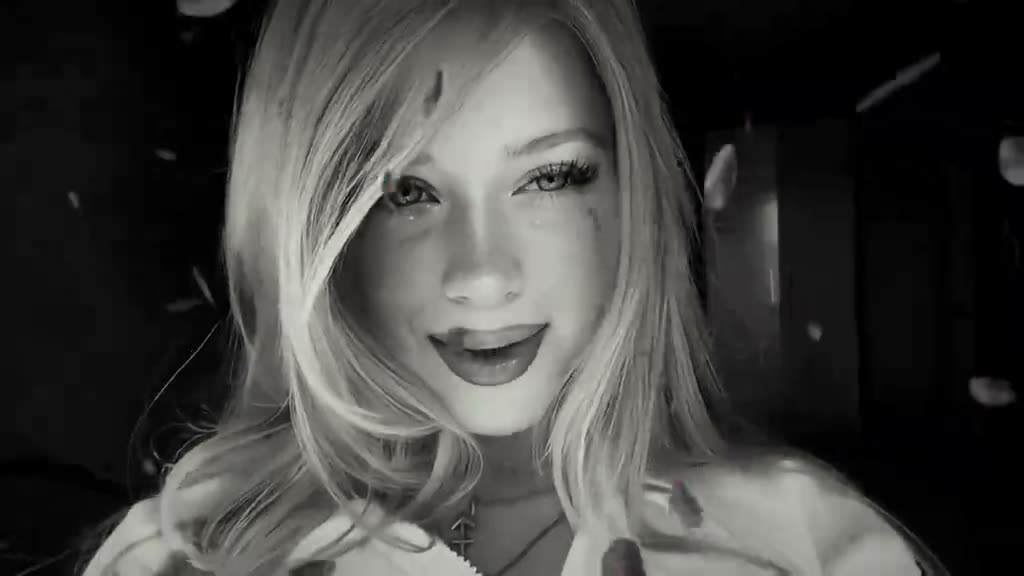
The Come and Get It edit is a short portrait video built around a change in color. The hosted reference opens in warm gold with petals passing across the face, then moves into slow black-and-white close-ups. The framing stays close on one person throughout.
The page uses a silent copy of the original clip. The opening still has its warm look and petals, while later shots move into monochrome. The camera stays on the featured person rather than a group or changing location.
| Time | Beat |
|---|---|
| Shot 1 | A warm gold portrait fills the frame as rose petals cross the close-up. |
| Shot 2 | The edit cuts to a black-and-white view of the same lead. |
| Shot 3 | The camera stays close while the lead smiles and moves. |
| Shot 4 | A tight monochrome portrait holds through the last sampled shot. |
02How to make the Come and Get It AI video from one photo
You can make this version directly from the trend page. The flow uses one photo for the portrait lead, and there is no prompt to write on AI Trend Club. Confirm that you have permission to use the photo before you submit it.
The hosted reference is horizontal, and the generated video follows its wide shape. The page does not attach the original audio to the file. That keeps the visual edit separate from its sound.
- Open the trend pageGo to the Come and Get It AI video page and check the reference clip.
- Start your own versionPress Create your own to open the page's video flow.
- Add one photoChoose one photo for the person in the close-up. Confirm you have permission to use it.
- Choose a resolutionThe standard 480p option costs 553 credits. The 720p option costs 1,245 credits. The exact amount appears on the button before you spend.
- Make and downloadTap Make my video and wait for it to finish. Download the silent, widescreen result. If you want audio on a social post, add a sound separately in TikTok or CapCut.
03The photo that works
This edit has one featured person, so use one photo for the lead. A clear portrait fits the close camera framing in the reference. The page asks you to confirm that you have permission to use the image before making a video.
- Choose one clear photo of the person who will take the lead.
- Use a portrait that can fit a tight face crop.
- Keep the face visible so the lead is easy to identify.
- Use a photo you have permission to use.
- Expect one person in the video; this recipe does not have a second role.
- Remember that the hosted clip and download are silent.
04The Come and Get It AI prompt
AI Trend Club does not ask you to write a prompt. If you want to try a similar edit in another reference-video model, you can start with this description and adjust it to fit that tool.
Create a short portrait edit from the reference clip. The person in the reference photo is the only lead. Begin with a warm gold close-up as rose petals pass across the frame, then cut to slow black-and-white close-ups of the same person. Keep the horizontal framing tight on the face and preserve the original timing and color transition. Keep the lead’s appearance consistent through every shot. Do not add text, extra people, dialogue or music.05CapCut template or AI video?
A CapCut template can add cuts, color changes and other edits to a video you record yourself. It does not place your photo into the reference creator’s scene. An AI video uses a reference clip to guide the camera framing and action, then places the person from your photo in the lead role.
For this edit, the reference matters because it sets the warm opening, close framing, petals and monochrome shots. A template can help style a clip you already have, but it cannot recreate the same reference scene from one portrait. The AI Trend Club version starts from the hosted reference and one photo.
The download is silent. After it is ready, you can add a sound in TikTok or CapCut if you want an audio track. Choose an available sound separately; this page does not include the reference post’s audio.
06Is the Come and Get It AI video free?
You can view the original and the trend page without paying. Making the video uses credits. A new account receives 25 welcome credits, which are enough for a few images but not enough for this video. The standard option costs 553 credits, and 720p costs 1,245 credits. The site shows the exact amount before you confirm.
The Week pass is the least expensive listed option that covers one 480p video. The 1,000-credit pack also covers one 480p video. Neither option listed above covers a 720p version on its own, so check the current amount on the button before spending. A failed video returns its credits automatically.
| Option | Price | Credits |
|---|---|---|
| Week pass | $6.99 | 800 credits |
| 1,000 credits | $9.90 | 1,000 credits |
07Post it
The reference clip used on this page is silent, so choose a sound separately if you want music. Use a sound available to you in the app where you post, and credit @1nymaria for the visual reference. Keep the caption about the color change and close-up rather than naming an artist or song.
These short captions describe the visible edit without reusing the source audio:
- Warm gold to black and white, one close-up at a time.
- A portrait, a few petals and a quiet color shift.
- Same face, softer light, monochrome finish.
08Questions
- How do I make the Come and Get It video from one photo?
- Open the trend page, press Create your own, add one photo and confirm permission to use it. Choose a resolution and tap Make my video. There is no prompt to write.
- Which AI makes this video?
- It uses an AI video model guided by the original clip. The photo takes the lead’s place while the reference guides the framing and movement.
- Can I make this on my phone?
- Yes. The flow runs in your browser and does not require an app install. Open the trend page, add your photo and follow the on-screen steps.
- Does the download include the original audio?
- No. The hosted reference copy and the generated video are silent. If you want audio in a social post, choose a sound separately in TikTok or CapCut.
- Who made the original?
- TikTok creator @1nymaria posted the reference on October 27, 2026. We link to the original above.