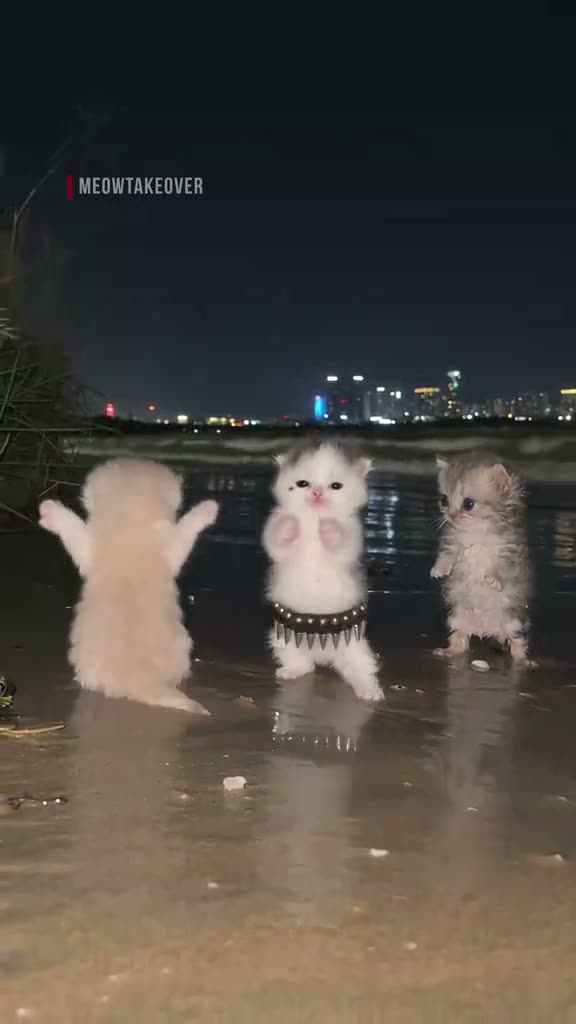
01What happens in the Suave Cat Dance trend
Three cats dance together in a nighttime scene. The middle cat raises its paws, turns, and keeps moving with the group. The clip is a short vertical video with a fixed camera and city lights in the background.
The original was posted by @meowtakeover. On AI Trend Club, you can use a photo of yourself or your pet to take the middle cat's place. The other cats and their dance remain part of the scene.
| Time | Beat |
|---|---|
| Shot 1 | Three cats stand together at night. |
| Shot 2 | The middle cat raises its paws. |
| Shot 3 | The cats move together in the scene. |
| Shot 4 | The middle cat turns and continues dancing. |
02How to make the Suave Cat Dance AI video from one photo
Open the trend page to watch the original before you start. The page shows the role your photo will take, so you can see how it fits into the group dance. You need one photo, and the process runs in your browser.
You do not have to describe the dance in a prompt. The site uses the original clip to guide the video. Confirm that you have permission to use the photo before submitting it, and check the credit amount shown on the button before spending.
- Open the trendGo to the Suave Cat Dance page on AI Trend Club and watch the original clip.
- Start your versionPress Create your own to open the photo step.
- Add your photoChoose a clear photo of yourself or your pet and confirm you have permission to use it.
- Choose qualitySelect 480p for 692 credits or 720p for 1,556 credits. Check the exact amount on the button.
- Make and downloadTap Make my video. When it is ready, download the vertical video with the trend sound or silent.
03The photo that works
Choose a clear photo that makes the person or pet easy to see. If the subject is hard to see or the image is blurry, try a brighter or sharper image before submitting it.
The photo supplies the subject for the lead role. It does not need to show the other cats or recreate the nighttime setting. The reference clip supplies the scene and the group dance. You can use a photo of a person, a dog, or a cat, provided you have permission to use it.
- Use one clear photo.
- Choose yourself or your pet as the subject.
- Make sure the subject is easy to see.
- Use a brighter image if the subject is hard to see.
- Choose a sharper image if your first photo is blurry.
- Confirm you have permission to use the photo.
04The Suave Cat Dance AI prompt
You do not need to write a prompt on AI Trend Club. If you want to try another video model that supports reference images, start with the description below and adapt it to that model's controls.
The prompt describes the role and actions visible in the reference. Results can vary, especially when the subject turns or moves with the other cats. Check the finished clip against your photo and the original dance.
Use the person or pet in the reference photo as the middle dancer in a group of three cats at a nighttime waterfront. Keep the two cats on either side and the distant city lights. Hold the camera fixed as the three stand together. The middle dancer raises its paws, moves with the group, then turns and continues dancing. Keep the group formation, the wet pavement and the timing of the original dance throughout the clip.05CapCut template or AI video?
A CapCut template arranges footage you already have. An AI video uses your photo as the subject in the scene guided by the original clip. For this trend, that means your chosen subject takes the middle dancer's place while the other cats remain.
Once your video is ready, you can download it and use an editor such as CapCut to add captions. The download can include the trend sound, or you can choose a silent version. Watch the result before sharing to make sure the subject and dance look the way you intended.
06Is the Suave Cat Dance AI video free?
Watching the original and viewing the trend page are free. Creating a new video uses credits. A new account receives 25 welcome credits, enough for a few images but not enough for this video.
The standard 480p version uses 692 credits, and the 720p version uses 1,556 credits. The Week pass includes enough for one standard video. The 1,000-credit pack is another option for a standard video. Check the amount on the button before you spend.
If the render fails, its credits come back automatically. You can then try again with a clearer photo. The pass and the credit pack are different purchase options, so choose the one that fits how you plan to use the site.
| Option | Price | Credits |
|---|---|---|
| Week pass | $6.99 | 800 |
| 1,000 credits | $9.90 | 1,000 |
07Post it
Download your finished clip with the trend sound or silent, then share the vertical video. Credit @meowtakeover, who posted the original. You can also add a short caption about joining the group dance.
Check the video before posting. Your photo should occupy the lead role, while the other cats and the nighttime scene remain. Here are a few simple caption ideas based on the dance.
- Joining the cat dance.
- My pet takes the lead.
- A new dancer joins the group.
08Questions
- What is the Suave Cat Dance trend?
- It is a clip of three cats dancing together at night. You can use a photo to take the middle dancer's place.
- Which AI makes the video?
- AI Trend Club uses an AI video model guided by the original clip. You do not need to write a prompt on the site.
- Can I use a pet photo?
- Yes. Choose a clear, well-lit photo of your pet that you have permission to use.
- Can I make it on my phone?
- The process runs in your browser, so there is no app to install.
- Who posted the original?
- @meowtakeover posted the original on TikTok. The trend page links to that post.