01What happens in the Christmas Lights Car trend
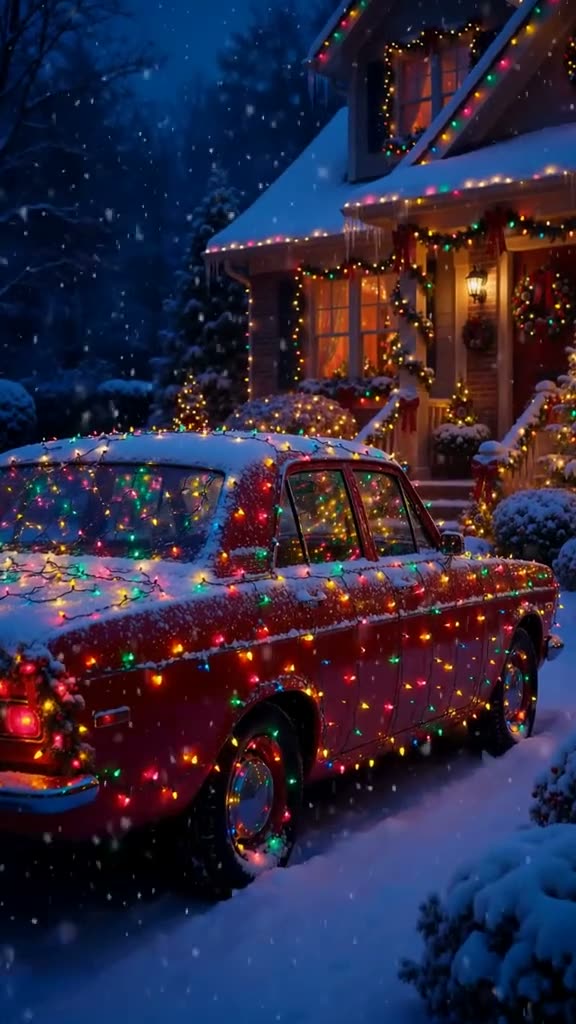
A car is parked on fresh snow outside a house covered in Christmas lights. Every line of the car, the roof, the doors and the hood, is traced in colored bulbs, and snow keeps falling as the camera slowly moves in. It looks like a car wrap made of Christmas lights.
The Christmas lights car trend is a holiday card for car people. Instead of a red car from the original, it is your own car that glows in the snow. You add one photo of your car and the AI puts it in the scene. The clip runs 15 seconds and keeps its original sound.
Here is the clip shot by shot:
| Time | Beat |
|---|---|
| Shot 1 | A red car sits on fresh snow in front of a house covered in Christmas lights. |
| Shot 2 | The camera moves closer: every edge of the car is traced in colored bulbs. |
| Shot 3 | Snow falls on the glowing roof and hood as the camera glides along the side. |
| Shot 4 | The shot ends close on the lit-up car, with other cars glowing in the snow nearby. |
02How to make the Christmas Lights Car AI video from one photo
Everything runs in your browser on AI Trend Club. There is no app to install and no prompt to write. Your finished video is private to your account until you download it and post it yourself.
- Open the trend pageGo to the Christmas Lights Car trend page on AI Trend Club and watch the original clip first.
- Press Create your ownThe maker opens with one photo slot for the lead role.
- Add your photoAdd one photo of your own car, with the whole car in frame. Confirm that you have permission to use it.
- Check the creditsA 480p video uses 692 credits and a 720p video uses 1,556. The exact number shows on the button before you spend.
- Make and downloadTap Make my video. It is ready in a few minutes, as a vertical 9:16 MP4 with the trend sound or silent.
03The photo that works
This trend needs a photo of your car, not of you. The car takes the place of the lit-up car in the original, so the model needs to see its shape and color clearly:
- Get the whole car in frame.
- Shoot it from the side or at a three-quarter angle.
- Use daylight with no harsh shadows.
- Avoid close-ups of one part, like a wheel or a headlight.
- Avoid night photos.
- Make sure no other car is blocking yours.
04The Christmas Lights Car AI prompt
On AI Trend Club you do not need a prompt. The trend page holds the original clip and the instructions, and you only add a photo of your car.
If you want to try it yourself in another video model that accepts a reference image, start from the prompt below.
A night scene on a snowy driveway in front of a house covered in warm Christmas lights, snow falling. The car in the reference photo is parked on the fresh snow, with every line of its body traced in colored Christmas light bulbs: the roof, the doors, the windows and the hood. The camera starts wide, then slowly pushes in along the side of the car as snow settles on the glowing roof. A close shot of the front corner shows the bulbs on the hood and mirror. Calm, slow, festive pacing.05CapCut template or AI video?
A CapCut template is a fixed edit: it cuts and times clips that you filmed yourself. It cannot put your pet, your face or your car inside the Christmas Lights Car scene, because that scene was never filmed with you in it.
An AI video works the other way around. It keeps the original shots, the camera and the timing, and puts your photo into the lead role. That is what you need for the Christmas Lights Car trend.
The two work well together. Make the AI video first, download it, then open it in CapCut to add a caption, a title card or the trend sound before you post.
06Is the Christmas Lights Car AI video free?
Watching the original and reading the trend page is free. Making the video is not. New accounts get 25 welcome credits, which are enough for a few images but not for this video.
One Christmas Lights Car video uses 692 credits at 480p and 1,556 credits at 720p. The exact number is on the button before you spend anything, and a failed video gives its credits back automatically.
The cheapest ways in are the Week pass and the smallest credit pack. Either one covers a standard 480p video.
| Option | Price | Credits |
|---|---|---|
| Week pass | $6.99 | 800 |
| 1,000 credits pack | $9.90 | 1,000 |
07Post it
Post it with the original sound and credit the creator of the clip, @ai__404__, in your caption. It works as a holiday greeting from you and your car.
Caption ideas:
- My car is ready for Christmas.
- No lights were bought for this video.
- Holiday mode: on.
08Questions
- What is the Christmas lights car trend?
- An AI video trend where a car parked in the snow is covered in Christmas lights along every line of its body. People make it with a photo of their own car.
- Can I use a photo of me or my pet?
- No. This trend needs a photo of your car, which takes the place of the lit-up car.
- Is it a real Christmas lights car wrap?
- No, the lights are made by AI in the video. Your car stays as it is, and you do not need to buy or hang any lights.
- Which AI makes the Christmas Lights Car video?
- An AI video model guided by the original clip, so the snow, the house and the camera moves match the trend.
- Who made the original?
- The clip is by @ai__404__ on TikTok, posted November 2, 2026. An earlier version by @intiszene from December 20, 2024 reached 27,700 views.