01What happens in the Flamingo Float trend
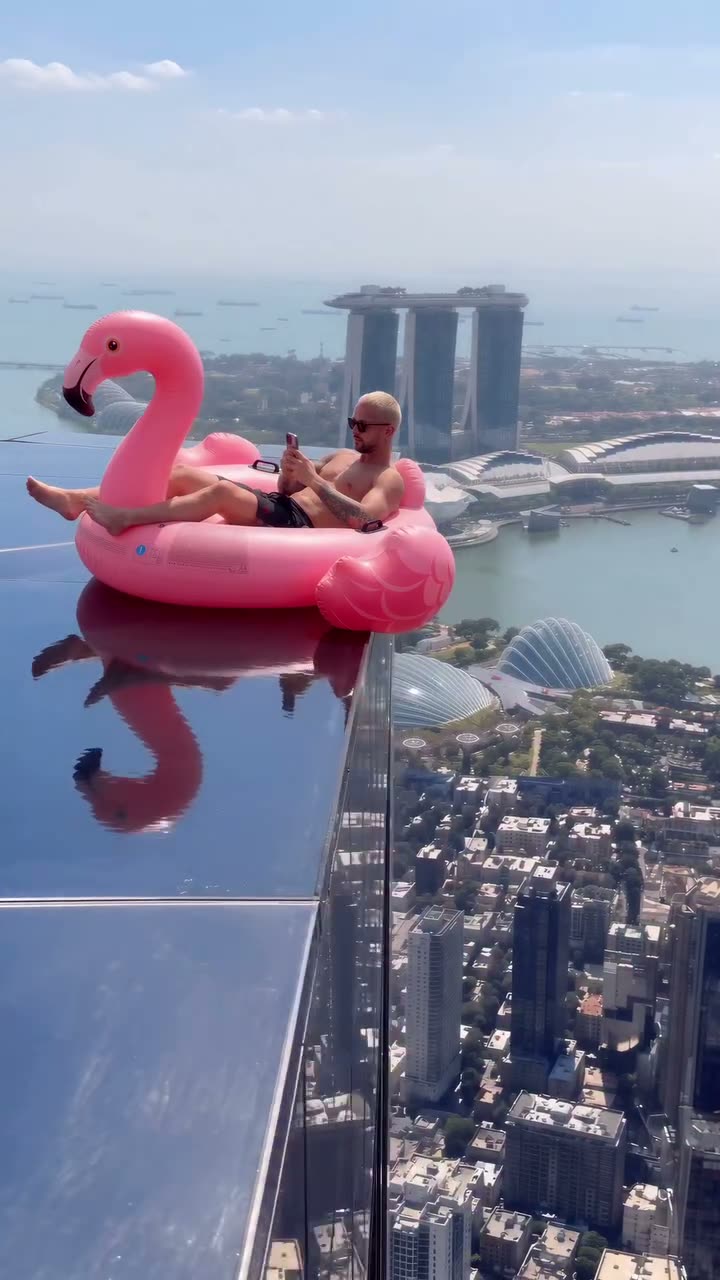
A person rides a pink flamingo float near a rooftop pool edge. The AI-generated reference clip is 11 seconds long and follows the rider and the float through a short poolside scene. The page links to the public Instagram reel by @cain.aii.
The framing gives the clip one main subject: the person on the inflatable flamingo. Your version uses one photo to take that rider’s place while the pink float and poolside setting stay. The beat list describes the reference scene in order.
| Time | Beat |
|---|---|
| Shot 1 | A person is on a pink flamingo float near a rooftop pool. |
| Shot 2 | The float moves through the poolside scene. |
| Shot 3 | The short clip follows the rider and float to the end. |
02How to make the Flamingo Float AI video from one photo
Open the trend page and review the source clip before you make a version. The page uses one photo of yourself as the rider. It follows the reference sequence, so you do not need to film a pool scene or write a prompt for AI Trend Club.
The workflow runs in a browser and does not require an app installation. You can choose 480p or 720p; the page shows the exact credits before you submit. Your video is private to your account, and a failed render returns the credits.
- Open the trend pageVisit the Flamingo Float page on AI Trend Club and press Create your own after reviewing the reference.
- Add one photoChoose one photo of yourself and confirm that you have permission to use it. This photo supplies the person who rides the float.
- Review the setupCheck that one photo is attached for the rider. There is no prompt to write on the site.
- Choose a resolutionThe 480p version costs 507 credits. The 720p version costs 1,141 credits. The button shows the exact amount before spending.
- Make and downloadTap Make my video. When it is ready, download the vertical clip with the trend sound or pick the silent version.
03The photo that works
The photo supplies the person who takes the rider’s place. Use one picture of yourself and choose an image that clearly shows the person you want to appear in the scene. Confirm that you have permission to upload the photo.
- Use one photo of yourself.
- Choose the person who will ride the float.
- Pick an image that clearly shows you.
- Keep the upload to one person.
- Use a photo you have permission to share.
04The Flamingo Float AI prompt
There is no prompt field on AI Trend Club for this trend. If you are trying another video model that accepts a reference image, the text below can help describe the same poolside setup. It is optional and belongs in that outside tool.
Keep the person, pink float and pool edge in the reference order. The scene stays focused on one rider and the flamingo float, without adding a new setting or another character.
Show the person in the reference photo sitting on a pink flamingo float near a rooftop pool edge. Begin with the rider and float clearly visible beside the pool. Follow the float through the poolside scene while keeping the person in the lead. Use a steady view that shows the pink float and its movement together. Continue the same short sequence toward the ending in the reference. Keep the rooftop pool setting and do not add another character, a new location or a different action.05CapCut template or AI video?
A CapCut template is an editing layout for clips you record or choose. It can arrange your footage, but it cannot put your photo into the original rooftop pool scene. The AI workflow uses the reference clip and places your photo in the rider’s role.
The template route starts with your own footage. The AI route starts with the flamingo float scene and one photo. Once you download your result, you can use CapCut to add text or make another edit before sharing.
06Is the Flamingo Float AI video free?
You can watch the reference reel and view the trend page without paying. A new account receives 25 welcome credits, enough for a few images but not enough for this video. The 480p video costs 507 credits. The 720p option costs 1,141 credits.
The Week pass is a subscription that costs $6.99 and includes 800 credits, enough for one standard video at 480p. A 1,000-credit pack costs $9.90. Check the amount shown on the button before you submit. If a video fails, its credits are returned automatically.
| Option | Price | Credits |
|---|---|---|
| Week pass | $6.99 | 800 |
| 1,000 credits | $9.90 | 1,000 |
07Post it
The trend sound is included with the download. Use the version with sound if you want to keep it, or choose the silent file if you plan to add audio later. Credit @cain.aii and link to the Instagram reel when you share your version.
The source is about the rider and the pink flamingo float in a poolside setting. Keep a caption close to that scene. These ideas use only the visible setup:
- A flamingo float by the pool
- Taking the rider’s place
- One short ride by the rooftop pool
08Questions
- Which AI makes the Flamingo Float video?
- Use an AI video model guided by the original clip. The trend page handles the reference scene and your photo.
- Can I make it on my phone?
- The site runs in a browser and does not require an app installation. Open the page, add one photo and choose a resolution.
- Can I use a pet photo?
- This page uses a person as the rider. Add one photo of yourself to take the lead on the float.
- Who posted the reference reel?
- @cain.aii posted the reel on Instagram on October 29, 2026. The trend page links to it.