01What happens in the Santa Sleigh trend
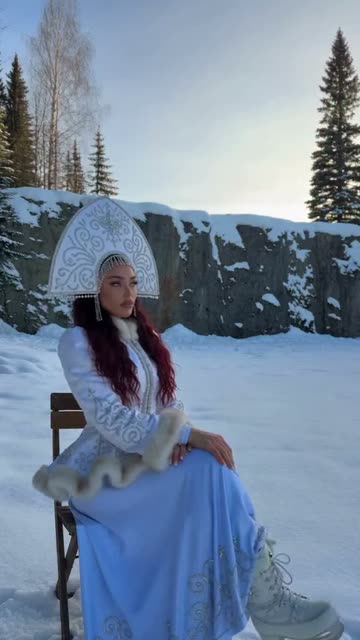
The Santa Sleigh AI trend is a short winter scene with a single seated lead. A woman points toward the sky as a reindeer sleigh arrives, lands in the snow and sends the reindeer toward the camera. One photo puts you or your pet in her place.
This source is the snowy clearing version. A separate Santa sleigh version takes place on a rooftop, so the two scenes should not be mixed.
| Time | Beat |
|---|---|
| Shot 1 | A woman sits on a wooden chair in the clearing. |
| Shot 2 | She raises an arm and points toward the sky. |
| Shot 3 | A reindeer sleigh appears and descends behind the chair. |
| Shot 4 | The reindeer run toward the camera as she turns to watch. |
02How to make the Santa Sleigh AI video from one photo
The flow runs in your browser. You do not need to write a prompt or install an editing app. The page shows the credit amount on the button before you start.
- Open the trend pageGo to the Santa Sleigh AI trend page and press Create your own.
- Choose one photoAdd a clear photo of yourself or one of your own pets. Confirm that you have permission to use it.
- Check the previewReview the lead and scene. The person or pet in your photo takes the seated role.
- Choose a resolutionA 480p video uses 415 credits. A 720p video uses 934 credits. Check the live amount shown on the button before you spend.
- Make and downloadTap Make my video. It is ready in a few minutes. The download is silent, so add a sound later if you want one.
03The photo that works
The source has one seated lead. Use one image for that role, and keep the face or pet easy to see.
- For a person, use a clear waist-up or full-body photo in good light.
- For a pet, use one dog or cat with its whole body or its head and chest visible.
- Use a photo that you own or have permission to use.
- Keep the photo sharp enough to recognize the face, fur and markings.
- Avoid sunglasses or a hood that hides a person’s face.
04The Santa Sleigh AI prompt
You do not need a prompt on AI Trend Club. If you are using another video model that accepts a reference image and clip, this description can help you test the same scene.
Recreate the reference video as one continuous vertical shot in a snowy clearing at golden hour. The person or pet in the reference photo sits on the wooden chair and points toward the sky. A reindeer sleigh appears above the snowy rock wall, descends behind the chair, and lands in a burst of snow. The reindeer then run past the chair toward the camera. Keep the fir trees, rock wall, chair, snow, sleigh, reindeer, camera position and timing from the reference video. Change only the lead.05CapCut template or AI video?
A regular CapCut template arranges footage that you recorded yourself. It does not put your face or pet into the original snowy clearing or match the chair-and-sleigh action.
An AI video flow uses one photo and the reference clip to place a new lead inside that scene. The sleigh, reindeer, setting and movement stay tied to the source video.
The rendered download is silent. After you save it, you can add a sound or captions in TikTok, Reels or CapCut. The site does not provide the original sound in this trend download.
06Is the Santa Sleigh AI video free?
Viewing the original and the trend page is free. A new account gets 25 welcome credits, which is not enough for this video. The 480p version uses 415 credits and the 720p version uses 934 credits.
The Week pass is $6.99 for 800 credits, enough for a 480p video. The 1,000-credit pack is $9.90. The price and credit amount appear on the button before you spend, and failed videos return their credits.
| Option | Price | Credits |
|---|---|---|
| Week pass | $6.99 | 800 |
| 1,000 credits | $9.90 | 1,000 |
| 3,300 credits | $29.90 | 3,300 |
07Post it
The download is silent. If you want the trend sound, add one in TikTok, Reels or CapCut after you download the video. Credit the original creator, @ai.creatorledii, when you post.
- A snowy hello with a sleigh overhead.
- My pet takes the chair this winter.
- A little holiday scene from the clearing.
08Questions
- Is there a Santa Sleigh AI video generator?
- Yes. Add one photo on the AI Trend Club page and let it take the lead role in the snowy clearing scene.
- Can I make the Santa Sleigh video with my dog or cat?
- Yes. One photo of your own dog or cat can play the seated lead. Use a clear photo in good light.
- Does the Santa Sleigh AI video include sound?
- No. The generated video is silent. Add a sound in TikTok, Reels or CapCut after downloading.
- How many credits does the Santa Sleigh video use?
- The 480p option uses 415 credits and the 720p option uses 934. Confirm the amount on the button before you start.
- Who made the original Santa Sleigh reel?
- Instagram creator @ai.creatorledii posted the original reel on November 7, 2026. The trend page links to it.