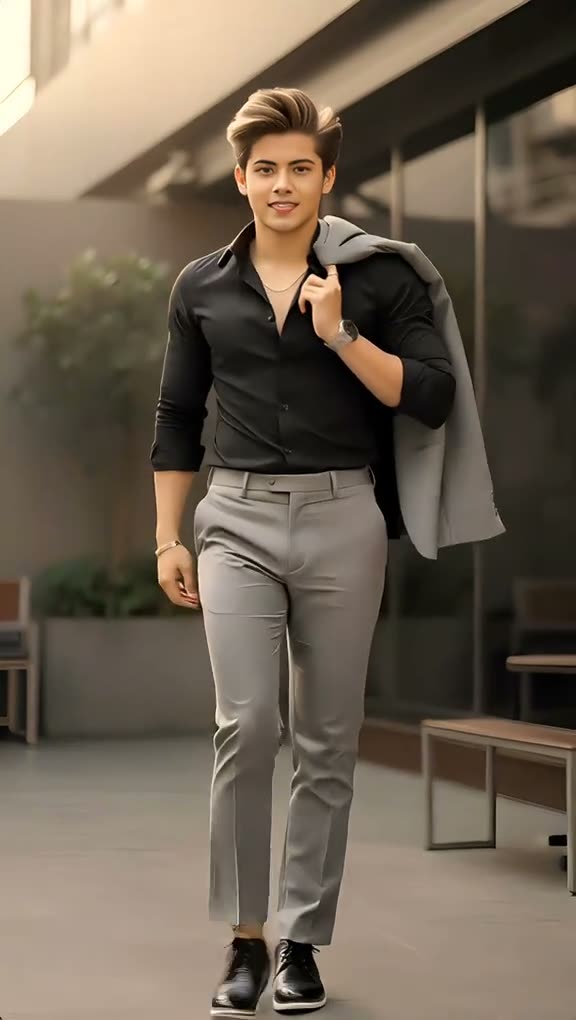
01What happens in the AI Walking Effect trend
The AI Walking Effect turns a still portrait into a short walk toward the camera. The original clip follows one person through an outdoor walkway, getting closer as the walk continues.
This page shows the six-second vertical source clip. Your photo plays the walker's role, and the outdoor setting stays in the video.
| Time | Beat |
|---|---|
| Shot 1 | A person walks toward the camera through an outdoor walkway. |
| Shot 2 | The walker gets closer while facing the camera. |
| Shot 3 | The same walk continues in the same setting. |
| Shot 4 | The shot ends with the walker close to the camera. |
02How to make the AI Walking Effect video from one photo
The AI Walking Effect generator runs in your browser. Follow these steps from the trend page:
The button shows the exact credit amount before you spend, so you can check the resolution and cost before starting the video.
- Open the trend pageGo to the AI Walking Effect page on AI Trend Club. You can watch the original clip and read the trend details first.
- Start the flowPress Create your own to open the video setup. There is no separate app to install.
- Add your photoChoose one clear photo of yourself and confirm that you have permission to use it. A full-body picture helps keep the walking action visible.
- Choose a resolutionPick 480p for 277 credits or 720p for 623 credits. Check the button before you spend, because it shows the exact price for your video.
- Make and downloadTap Make my video. It is ready in a few minutes. Download it with the original trend sound or as a silent clip.
03The photo that works
Use one clear photo of yourself. The uploaded person becomes the walker in the scene.
- A full-body photo shows the walk from head to toe.
- Keep your face visible so it can take the lead role.
- A selfie is allowed, though the page's help notes say a full-body photo shows the walk better.
- Choose a photo that is sharp enough for your face to be easy to see.
- Only upload a photo you have permission to use.
04The AI Walking Effect prompt
You do not need to write a prompt on AI Trend Club. If you are trying the idea in another video model that accepts a reference photo and clip, start with this description of the original scene.
Use the person in the reference photo as the lead walker in the original vertical clip. Keep the outdoor walkway and the camera facing the walker. Begin with the person moving toward the camera. Continue the same relaxed forward walk as the person gets closer. Keep the setting and movement consistent through the short shot. Change only who appears as the walker. Do not add a new scene, another lead, text, or a soundtrack.05CapCut template or AI video?
A CapCut template can arrange footage you record yourself. It does not place your face into the original walk and setting. The AI video flow uses your photo to put you in the lead role of the reference clip, so the outdoor scene and forward walk remain around you.
You can still use CapCut after downloading the result. Add captions or the trend sound there if you want to edit the finished clip. On AI Trend Club, the original sound is already available in the video download options.
06Is the AI Walking Effect video free?
Watching the original clip and reading the trend page is free. Generating a video uses credits. A new account gets 25 welcome credits, which cover a few images but not this trend video. The 480p version uses 277 credits, and the 720p version uses 623. A failed video returns its credits automatically.
The Week pass is the lowest-priced listed way to get enough credits for one standard video. You can also buy a 1,000-credit pack. The button shows the exact cost before you make the video.
| Option | Price | Credits |
|---|---|---|
| Week pass | $6.99 | 800 |
| 1,000 credits | $9.90 | 1,000 |
07Post it
The original sound is included as an option. When you share the clip, credit @pardesi.kanxa.0x3 and link to the original TikTok post. Keep the caption about the photo becoming a walk or a portrait moving through the scene.
Caption ideas:
My photo took a walk.
A portrait, now in motion.
08Questions
- Is there an AI Walking Effect template?
- Yes. Open the trend page, add one photo and press Make my video. The flow uses the original clip and does not ask you to write a prompt.
- Which AI makes the AI Walking Effect video?
- It uses an AI video model guided by the original clip. The model name is not listed in the trend facts.
- Can I make the AI Walking Effect video from a selfie?
- Yes. Add one clear photo of yourself. The page's help text says a full-body photo shows the walk better.
- Can I use a pet photo?
- This trend is set up for a person only. Add a photo of yourself that you have permission to use.
- Who made the original?
- TikTok creator @pardesi.kanxa.0x3 posted it on October 12, 2025. The trend page links to the post.