01What happens in the It's My Life Dog trend
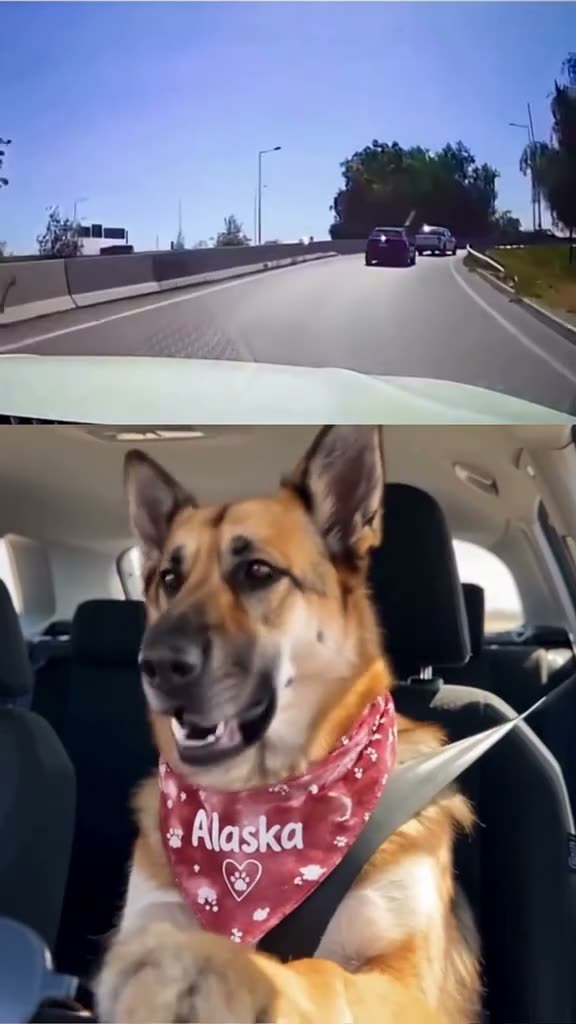
The It's My Life Dog clip pairs a road view with a German shepherd sitting in a car. The road appears in the upper part of the frame, and the dog sings below it before pausing to put on sunglasses with a paw. The vertical reference is 14 seconds long.
The source post is from @alaska.zeus.dogs on TikTok. Its caption says the dog takes the wheel as It's My Life comes on. This guide describes the dog and split-screen sequence visible in that post.
| Time | Beat |
|---|---|
| Shot 1 | The road fills the upper part as the dog sits buckled below. |
| Shot 2 | The dog mouths along to the sound while the car moves. |
| Shot 3 | The singing pauses as the dog looks ahead. |
| Shot 4 | A paw brings sunglasses to the dog's face before the singing resumes. |
02How to make the It's My Life Dog AI video from one photo
The remake keeps the split-screen road view and follows the dog clip's order. Your video is private to your account. You can open the linked TikTok reference from the trend page before you decide whether to make your own.
- Open the trend pageGo to the It's My Life Dog page on AI Trend Club and press Create your own.
- Add one photoChoose a clear photo of your dog, cat, or yourself. Confirm you have permission to use it.
- Pick the resolutionSelect 480p or 720p. The button shows the exact credit amount before you spend anything.
- Check the creditsA 480p video uses 646 credits. A 720p video uses 1,452 credits. Check your balance before starting the selected version.
- Make and downloadTap Make my video and wait for the render to finish. Download the vertical video with the original sound or choose a silent file.
03The photo that works
One photo fills the lead role. The page accepts a pet or a person, so choose a clear image that shows the face you want in the video. For a pet, keep the face and chest in view so the model has the markings to follow.
- Use one clear photo of your pet or yourself.
- Keep the face visible.
- For a pet, include the head and chest.
- Choose a photo that is not blurry or dim.
- Use only a photo you have permission to submit.
04The It's My Life Dog AI prompt
The prompt describes the scene without naming the TikTok account or quoting lyrics. Another model may not match the original timing, so compare its output with the source before sharing it.
Create a vertical split-screen car video using the reference clip for timing and framing. The upper frame shows the road ahead from inside a moving car. In the lower frame, the person in the reference photo, or the pet in a pet photo, takes the seated dog's role and mouths along to the sound. Pause, then raise a hand or paw to put on sunglasses before continuing. Keep the dashboard view and split-screen layout consistent. Add no new people, text, logos, lyrics, or dialogue.05CapCut template or AI video?
A CapCut template can arrange footage or photos you have already recorded. It is useful for adding a title or trimming your finished clip, but it does not place your photo inside the original car scene by itself.
An AI video uses your photo with the reference clip as a guide. For this trend, the linked video provides the upper road view, lower car view, singing pause, and sunglasses action. Your pet or your own face takes the lead in the lower frame.
You can add captions or a different sound in CapCut after the download. If you want the original sound, use the sound option when downloading. Keep the link and creator credit with your remake so viewers can find the source post.
06Is the It's My Life Dog AI video free?
The video is not included in the welcome credits. You can still watch the reference clip and use the written guide to decide whether a paid render is right for you. The resolution button shows the credit total before the video begins.
| Option | Price | Credits |
|---|---|---|
| Week pass | $6.99 | 800 |
| 1,000 credits | $9.90 | 1,000 |
07Post it
Add the original trend sound if you want the remake to match the source, and credit @alaska.zeus.dogs for the TikTok clip. The source account's caption describes a German shepherd taking the wheel as It's My Life comes on. Keep the creator credit next to the video when you share it.
- When the dog takes the front seat.
- A road trip with a singing co-pilot.
- Wait for the sunglasses moment.
08Questions
- Is there an It's My Life Dog AI video template?
- Yes. The trend page provides a one-photo flow based on the linked split-screen car clip.
- Which AI makes the It's My Life Dog video?
- The page uses an AI video model guided by the original clip. It follows the car framing and action order.
- Can I make it on my phone?
- The flow works in a browser, with no app to install. The video is vertical and can be downloaded with sound or silent.
- Can I use a photo of myself?
- Yes. The page supports a clear photo of a person or a pet for the lead role.
- Who posted the original clip?
- @alaska.zeus.dogs posted it on TikTok on Oct 28, 2026. We link to it above.