01What happens in the Giant Ramp Climbing trend
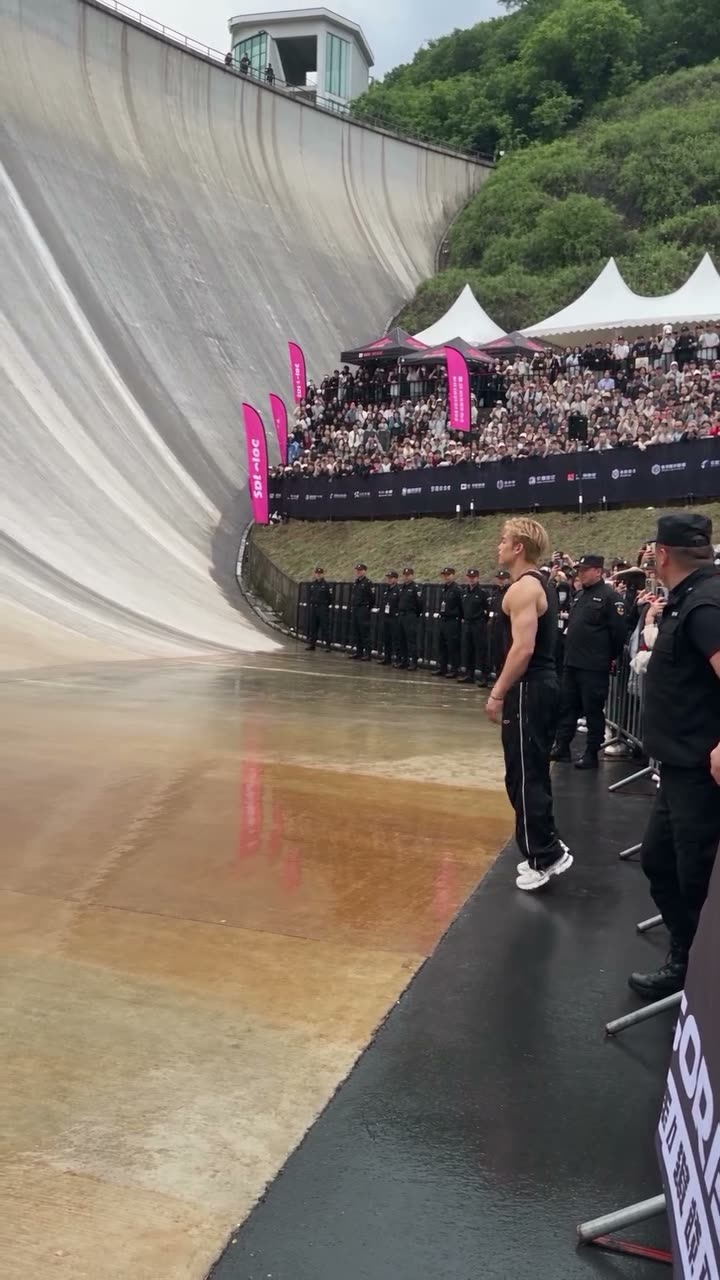
The Giant Ramp Climbing AI video shows a runner sprinting up a curved dam wall, flipping above a crowd, sliding back down and celebrating toward the camera. The original is an AI-made clip, not a real stunt. One photo of you or your pet can take the runner’s place.
The source is the Instagram reel by @jacksonzhangai. The wall, barrier, spectators and action form one vertical scene. Do not try to run or flip on a real dam.
| Time | Beat |
|---|---|
| Shot 1 | One runner waits beside the curved wall with a crowd behind the barrier. |
| Shot 2 | The runner sprints up the broad dam wall. |
| Shot 3 | At the top, the runner flips above the railing. |
| Shot 4 | The runner slides down and celebrates toward the camera. |
02How to make the Giant Ramp Climbing AI video from one photo
AI Trend Club runs in your browser. You do not need to install an editing app or write a prompt. The trend page shows the credit amount before you start a video, and the result is private to your account.
- Open the trend pageGo to the Giant Ramp Climbing page and press Create your own.
- Choose Human or PetAdd one photo of yourself or one of your own pets. Use a photo you have permission to use.
- Review the roleYour photo takes the runner’s place. The curved wall, crowd and sequence stay tied to the reference clip.
- Choose a resolutionThe 480p option uses 692 credits. The 720p option uses 1,556 credits. Confirm the amount shown on the button before you spend.
- Make and downloadTap Make my video and wait for it in your account. The trend sound is included with this reference; you can choose silent playback when sharing.
03The photo that works
One photo supplies the lead. A full-body view helps the video model follow a runner who is far away during the climb and closer to the camera at the end.
- For a person, use one clear full-body photo with the face visible.
- For a pet, include the whole animal, its face and its markings.
- Use a photo of yourself, a friend who agreed, or your own pet.
- Avoid a hat or sunglasses that cover the face.
- Keep the source scene in mind: it is an AI stunt on a dam wall, not an activity to try.
04The Giant Ramp Climbing AI prompt
You do not need a prompt on AI Trend Club. If you are using another video model that accepts a photo and a reference clip, this description can guide a similar AI scene. It does not describe a stunt to perform.
Recreate the reference video as one vertical phone shot at a giant curved dam wall with a crowd behind the barrier. The person in the reference photo is the only runner. They sprint up the wet wall, flip above the railing, land and slide back down, then celebrate toward the camera. Keep the wall, crowd, security line, camera movement and sequence from the clip. Treat the whole scene as AI-generated. No real-world stunt instructions, added text or extra runner.05CapCut template or AI video?
A CapCut template arranges clips and transitions in a preset layout. It is useful if you want to edit footage you recorded, but it does not use your photo to place you inside the original dam wall scene.
The AI flow uses one photo with a reference clip. Your photo supplies the runner or pet while the dam, crowd and camera movement follow the source.
The video is an AI effect. Keep that clear when you share it, and never describe the climb as a real stunt. The source clip itself is a visual reference, not a safe challenge.
06Is the Giant Ramp Climbing AI video free?
Viewing the original and trend page is free. A new account gets 25 welcome credits, which is not enough for this video. The 480p option uses 692 credits and the 720p option uses 1,556 credits.
A Week pass costs $6.99 and includes 800 credits, enough for the 480p option. The 1,000-credit pack costs $9.90 and also covers 480p, but it does not cover the 720p option. The live amount appears on the button before you spend. Failed videos return their credits.
| Option | Price | Credits |
|---|---|---|
| Week pass | $6.99 | 800 |
| 1,000 credits | $9.90 | 1,000 |
07Post it
The trend sound is included in the video flow. If you prefer a silent version, choose that when sharing. Credit @jacksonzhangai and link to the original Instagram reel when you post your own AI version.
Say that the clip is AI-generated. The source shows an impossible wall run, flip and slide. Do not attempt this action at a real dam or suggest that it is safe.
- My pet takes the ramp.
- A quick AI stunt scene from one photo.
- The wall run is only an AI effect.
08Questions
- Is the Giant Ramp Climbing video real?
- No. The source clip is AI-made. Do not try to run or flip on a real dam.
- Can I make the Giant Ramp Climbing video with a pet?
- Yes. Add one photo of your own pet as the lead. A full-body photo shows its face and markings.
- How many credits does the Giant Ramp Climbing video use?
- The 480p option uses 692 credits and the 720p option uses 1,556. Check the button for the current amount before you start.
- Does the video include sound?
- The trend sound is included with this reference. You can choose a silent version when sharing.
- Who made the original dam wall reel?
- Instagram creator @jacksonzhangai posted it on October 23, 2026. The trend page links to the reel.