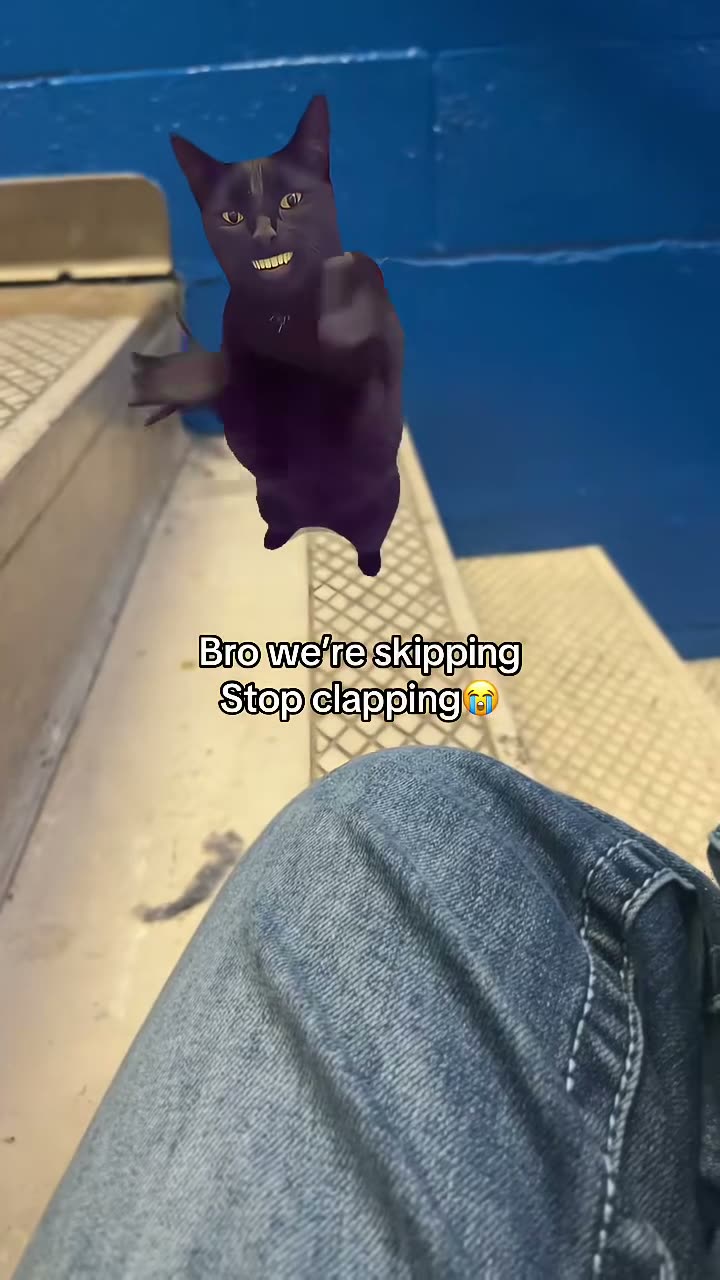
01What happens in the Cat Clapping trend
The Cat Clapping clip opens on a person, then cuts to a stylized black cat against a blue wall. The cat raises its paws and brings them together several times. A short text overlay appears on the cat shot, and the edit stays close on the cat as it moves.
This reference is 7 seconds long and includes its original sound. The page keeps the opening shot and cut to the cat, while a photo of you or your pet can take the cat’s place.
| Time | Beat |
|---|---|
| Shot 1 | A person appears briefly at the start. |
| Shot 2 | The edit cuts to a stylized black cat against a blue wall. |
| Shot 3 | The cat lifts its paws and claps while facing the camera. |
| Shot 4 | The clip holds on another cat pose as it ends. |
02How to make the Cat Clapping AI video from one photo
Searches such as “cat clapping AI video” and “AI cat clapping TikTok” point to the same simple setup: use one photo to take the animated cat role. The flow runs in a browser, so there is no app to install and no prompt to write on AI Trend Club.
- Open the trend pageVisit the Cat Clapping page on AI Trend Club and check the reference clip.
- Start the flowPress Create your own to open the guided video steps.
- Add one photoChoose a photo of yourself or a pet, and confirm you have permission to use it.
- Choose a qualityThe 480p version uses 323 credits. The 720p version uses 726 credits. Check the button before spending.
- Make and downloadTap Make my video. When it is ready, download the vertical result with the included sound or without sound.
03The photo that works
The photo you add becomes the animated cat lead. The original person in the opening shot remains part of the reference sequence. Use a photo you have permission to use, and keep the face or pet easy to see.
- Use one clear photo of yourself or your pet.
- Choose a sharper image if the face looks soft.
- Try a brighter image if the cat lead is hard to see.
- Keep the face unobstructed.
- Use even lighting so the subject stays visible.
04The Cat Clapping AI prompt
The guided creation flow does not ask for a prompt. If you want to try another video model that accepts a reference clip, you can use this short description as a starting point.
Show the person in the reference photo, or the pet in the reference photo, as the playful stylized black cat lead. Frame the cat upright against a blue wall in a fixed vertical shot. Begin with the paws held near the chest, then lift and bring them together in a repeated clapping motion. Keep the cat in the same place and maintain the original steady rhythm. Preserve the short cut from the opening human shot to the cat. End with the cat facing the camera and its paws raised. Add no new characters, logos, watermarks, or readable text.05CapCut template or AI video?
A CapCut template edits footage you record or import. It cannot put your photo into the original cat clip. An AI video uses the reference scene and your photo so you or your pet can take the cat’s place while the opening person and the cuts remain.
Once the result is downloaded, you can use CapCut to add captions or adjust the sound for your own post. The original sound is included with this Cat Clapping reference. You can download with that sound or choose a silent version, then add sound later if you prefer.
06Is the Cat Clapping AI video free?
You can watch the reference and open the trend page without buying a video. A new account receives 25 welcome credits, enough for a few images but not for a trend video. This clip costs 323 credits at 480p or 726 credits at 720p. If a video fails, its credits come back automatically.
The Week pass is a subscription with 800 credits. That covers either quality for this clip. The 1,000 credits option is a separate credit pack. Compare the two before choosing, and check the exact credit amount shown on the creation button.
| Option | Price | Credits |
|---|---|---|
| Week pass | $6.99 | 800 |
| 1,000 credits | $9.90 | 1,000 |
07Post it
The original sound is included if you want the same timing. Credit @asian5767 in your post and link to the reference shown on the trend page. The meaning is a playful cat reaction, so a short caption can stay simple and focused on the paws.
- My cat has a reaction.
- Paws up for this one.
- A tiny clap break.
08Questions
- Is there a Cat Clapping AI template?
- The Cat Clapping page offers a guided one-photo flow. You can use a photo of yourself or your pet as the animated lead.
- Which AI makes the Cat Clapping video?
- The material for this page does not name a specific model. It uses an AI video model guided by the original clip.
- Can I use my pet photo?
- Yes. The cat role can use a clear photo of your pet or a photo of yourself.
- Can I make it on my phone?
- The site runs in a browser and does not require an app install. Open the trend page in your browser to view the available options.
- Who posted the reference clip?
- @asian5767 posted it on TikTok on Sep 28, 2026. We link to it above.