01What happens in the Elf Dance trend
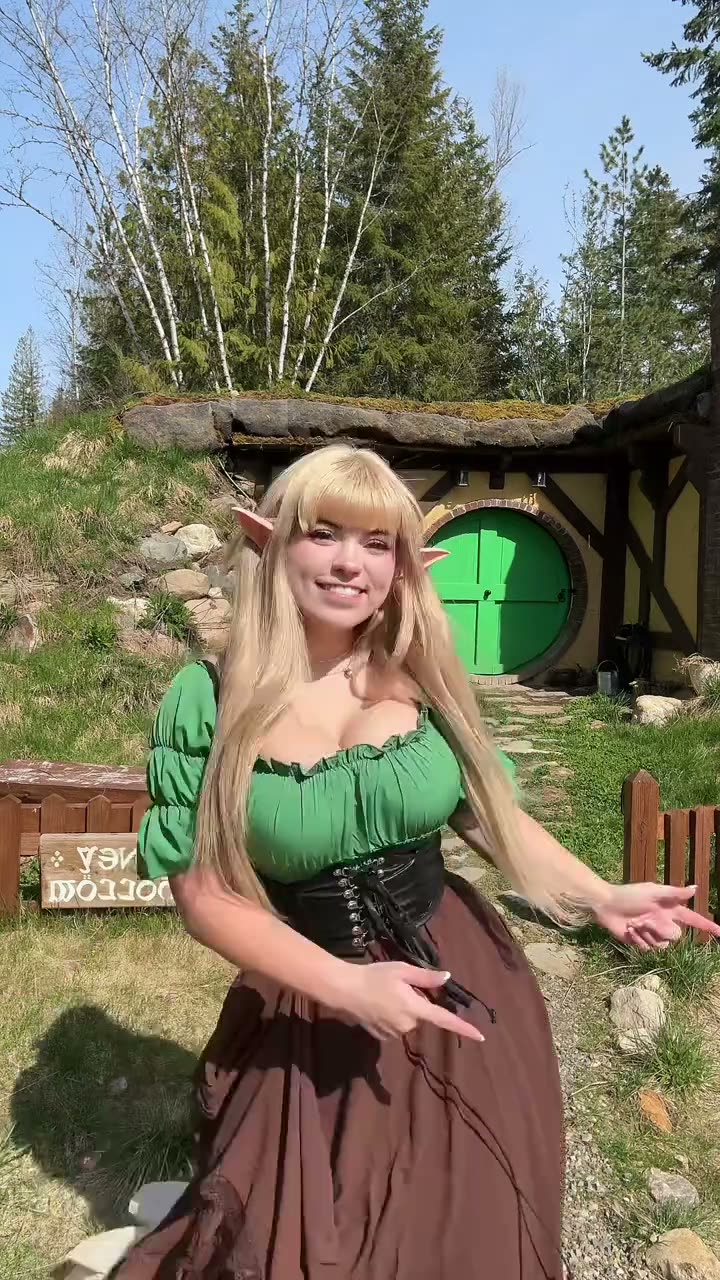
The Elf Dance trend turns a portrait into the lead of a short, vertical costume dance. This page follows one creator clip: a dancer in pointed ears and a green outfit, moving outside a small cottage. Add one photo of yourself or your pet to take the dancer’s place in the same scene.
The linked source is a creator’s video, not an AI Trend Club sample. The video page describes the moments in order so you can see what the reference keeps: one dancer, an outdoor setting and a simple solo routine. The generated result can vary, so review it before you share it.
| Time | Beat |
|---|---|
| Shot 1 | The costumed dancer faces the camera outside a small cottage. |
| Shot 2 | She smiles and moves her arms while dancing in place. |
| Shot 3 | The camera stays fixed as she shifts her weight and gestures. |
| Shot 4 | She finishes facing the camera in the same outdoor setting. |
02How to make the Elf Dance AI video from one photo
AI Trend Club uses the original clip as a visual reference. You add one photo for the lead role, then the video model follows the costume, setting and movement. There is no prompt box to fill in on the site, and you can review the credit cost before you submit.
You can watch the original and read this trend page without paying. A new account also receives 25 welcome credits. Those credits cover a few images, but they are not enough for this trend video.
- Open the trend pageVisit the Elf Dance page in a browser. There is no separate app to install.
- Start your videoPress Create your own to open the video flow.
- Add one photoChoose one photo of yourself or your pet, and confirm you have permission to use it.
- Choose a resolutionAt 480p, this video uses 692 credits. At 720p, it uses 1,556 credits. Check the button for the exact amount before you spend.
- Make and downloadTap Make my video. When it is ready, download a vertical 9:16 clip with the trend sound or choose the silent version.
03The photo that works
This flow uses one photo for one lead role. The role hint asks for one clear face and the full body in frame. A dog or cat can take the role too. The source video itself shows a human dancer, while your photo supplies the person or pet that plays the lead.
Only upload a photo of someone, or a pet, that you have permission to use. If the result does not look right, check the photo and try again only if you want another render; failed videos return their credits automatically.
- Use one photo for the lead dancer.
- Keep one clear face visible.
- Include the full body in the frame when possible.
- Use a person or a pet you have permission to feature.
- For a pet lead, use a dog or cat photo.
04The Elf Dance AI prompt
You do not need to write a prompt on AI Trend Club. If you want to try the same idea in another video model that accepts a reference clip and photo, start with this description. It follows the linked clip’s simple scene rather than adding a new story.
The person in the reference photo takes the lead dancer’s role. Keep the pointed elf ears, green puff-sleeve blouse and long brown skirt from the reference. In a sunny outdoor setting, preserve the round green cottage door, wooden fence, grass and trees. Use a fixed vertical camera and show the full-body dancer facing the lens. The lead smiles, shifts weight from side to side and makes playful arm gestures in place. Keep the movement continuous and finish with the dancer still facing the camera. Preserve the original scene and timing. Do not add text, a logo or another character.05CapCut template or AI video?
An editing template and a reference-guided AI video use different inputs. A CapCut template arranges the clips and photos you add according to its own timing and layout. It does not use this page’s reference clip to put your photo into the dancer’s scene.
The Elf Dance page uses one photo as the lead identity and the original video as a guide for its scene and movement. You can still edit the downloaded result in CapCut, add text or trim it for a post. The page also offers a silent download, while the version with sound includes the source trend audio.
- Use a CapCut template when you want to assemble your own footage in its layout.
- Use the Elf Dance AI video flow when you want your photo to take the lead in this reference scene.
- Check your downloaded clip before adding extra edits or sharing it.
06Is the Elf Dance AI video free?
Viewing the source and the trend page is free. Making the video uses credits because a video model has to render a new result. The credit amount appears on the button before you spend, and a failed video returns its credits automatically.
The Week pass is the lowest-priced entry at $6.99 for 800 credits. That covers one 480p Elf Dance video at 692 credits. The 720p version costs 1,556 credits, so check your balance and the displayed amount first.
- The Week pass is the cheapest listed way to start this video.
- A 1,000-credit pack costs $9.90.
- The 25 welcome credits are enough for a few images, not a trend video.
| Option | Price | Credits |
|---|---|---|
| Week pass | $6.99 | 800 |
| 1,000 credits | $9.90 | 1,000 |
07Post it
The downloaded video is vertical and includes the trend sound, with a silent version available too. If you post the clip, credit the source creator as @hibeanstheelf and link to the original TikTok. Keep the caption about a light seasonal greeting rather than suggesting that the linked creator invented the wider trend.
These short caption ideas follow the page’s meaning:
- A little elf dance for the holidays.
- Sending a festive hello.
- Dancing into the holiday season.
08Questions
- Is there an Elf Dance AI video generator?
- Yes. This page uses an AI video model guided by the original clip. Add one photo for the lead role; you do not need to write a prompt.
- Can I make the Elf Dance video on my phone?
- The site runs in a browser, and there is no app to install. Open the page, add your photo and check the credits shown before submitting.
- Can I use a pet photo?
- Yes. A person or a dog or cat can take the single lead role. Only use a photo you have permission to submit.
- How many credits does the video use?
- The Elf Dance video uses 692 credits at 480p or 1,556 at 720p. The exact amount appears on the button before you spend, and failed videos return their credits.
- Who made the original?
- @hibeanstheelf posted the linked reference clip on TikTok on Jan 21, 2026. The evidence does not establish who started the wider trend. We link to the source above.