01What happens in the A New Kind of Love Dance trend
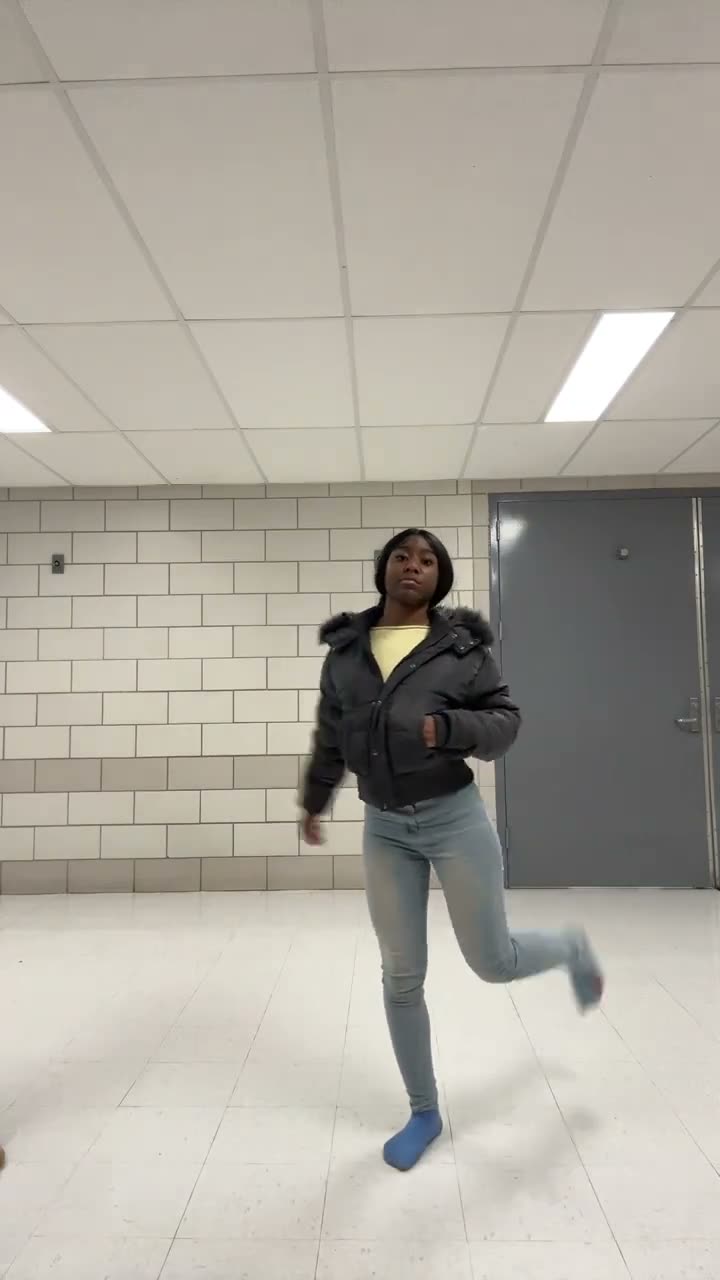
The selected source clip starts with one dancer stepping into a bright tiled corridor. A second performer joins, and the two finish the routine side by side with arm swings and knee lifts. The preview on AI Trend Club is the linked source video, so you can see the movement before making your own version.
The format shifts from a solo entrance to a shared dance. Here are the main beats in the clip.
| Time | Beat |
|---|---|
| Shot 1 | One dancer steps into the tiled corridor and starts the routine. |
| Shot 2 | A second performer joins from the side and stands beside the lead. |
| Shot 3 | Both dancers swing their arms as they move in time. |
| Shot 4 | They finish with raised arms and quick knee lifts. |
02How to make the A New Kind of Love Dance AI video from one photo
You do not need to learn the dance or film yourself in a corridor. The page uses the source clip as a reference and one photo for the lead dancer. The second performer stays separate. You can do the setup in a browser, without installing an app or writing a prompt.
Use a person or pet photo you have permission to use. Videos stay private to your account.
- Open the trend pageVisit the A New Kind of Love Dance page. The silent preview shows the solo entrance, the second dancer joining and the final arm and knee movements.
- Start your videoPress Create your own to open the setup flow. It works in a browser on a phone or computer, so there is no app to download.
- Choose one lead photoUpload one clear photo of yourself or your pet. Confirm you have permission to use it. Your photo takes the first dancer's role; the other performer remains a separate person in the scene.
- Select a resolutionA 480p video uses 692 credits. A 720p video uses 1,556 credits. The button shows the amount before you spend.
- Make and downloadPress Make my video. The site says the vertical clip is ready in a few minutes. The page does not include the source soundtrack, so add a permitted sound separately if you want audio.
03The photo that works
The source has one lead and one separate dancer. Choose one clear picture for the lead role and avoid a group photo that could make the subject unclear. The page accepts a person or a pet photo, and the movement of a new result may differ from the source.
- Use one clear photo of the person or pet who will play the lead.
- Make sure the lead is easy to see in the image.
- Crop out other people before uploading.
- Only use a photo you have permission to upload.
- If the lead is hard to identify, try one clear image again.
- Expect the side-by-side movements to vary from the preview.
04The A New Kind of Love Dance AI prompt
On AI Trend Club, you do not write a prompt. The page uses the source clip to guide the vertical camera, corridor and order of movements.
If you are trying another video model that accepts a reference clip and image, start with a description like this.
Recreate the 15-second vertical reference clip in a bright tiled corridor. The person in the reference photo takes the lead dancer's place and enters the frame first. Keep the second dancer separate and preserve their identity. Let the second dancer join from the side, then have both move side by side with arm swings, small turns and knee lifts before raising their arms to finish. Keep the camera framing and source timing. Do not add lyrics, text, music or logos.05CapCut template or AI video?
A CapCut template is an edit layout for footage or images that you supply. It does not place your photo inside the corridor and movement of the source clip. An AI video uses your photo to put you in the lead role while keeping the other performer and corridor as part of the reference.
The workflow on this page is the AI version. The preview is the source clip, and the page does not display a generated remake. Your result may differ from the source, especially in the timing of the dance and the second dancer's movement.
The page preview is silent. If you edit the downloaded clip, you can add text or a sound in TikTok or CapCut. Choose audio you are allowed to use on your account; the source soundtrack is not included here.
06Is the A New Kind of Love Dance AI video free?
Watching the source clip and reading the trend page are free. Making a new video uses credits. New accounts receive 25 welcome credits, enough for a few images but not enough for this video.
The standard 480p option costs 692 credits. A Week pass is $6.99 and includes 800 credits, enough for one 480p run. The 720p option costs 1,556 credits, so it takes more than one Week pass worth of credits.
A pack of 1,000 credits costs $9.90 and covers one 480p run. Check the Generate button before you confirm, because it shows the exact amount for the chosen resolution. Credits from a failed video come back automatically.
| Option | Price | Credits |
|---|---|---|
| Week pass | $6.99 | 800 |
| 1,000 credits | $9.90 | 1,000 |
07Post it
This page uses a silent source clip and does not include its original soundtrack. If you add audio after downloading, choose a sound that is available for use in your TikTok or CapCut post. Credit the displayed clip to @xox0arii and keep the choreography credit to @OhHeyTjMax separate. The trend page links to the source video.
Keep the caption about the shared routine. Here are a few short starting points:
- One dancer, then the whole hallway joins in.
- A quick corridor routine for two.
- Taking the lead for this dance.
08Questions
- Is there an A New Kind of Love Dance AI template?
- The trend page has a reference-video flow for the corridor routine. Add one photo of yourself or your pet to take the lead.
- Which AI makes the dance video?
- The page uses an AI video model guided by the original clip. The preview is the source, not a generated sample.
- Can I make it on my phone?
- Yes. The setup runs in a browser, so you can open the page on a phone without installing an app.
- Can my pet do the dance?
- Yes. The template accepts a person or a pet photo for the lead role.
- Who choreographed the dance?
- The selected high-view clip is posted by @xox0arii. The choreography credit is @OhHeyTjMax, and the first source post is unknown. We link to the shown clip above.