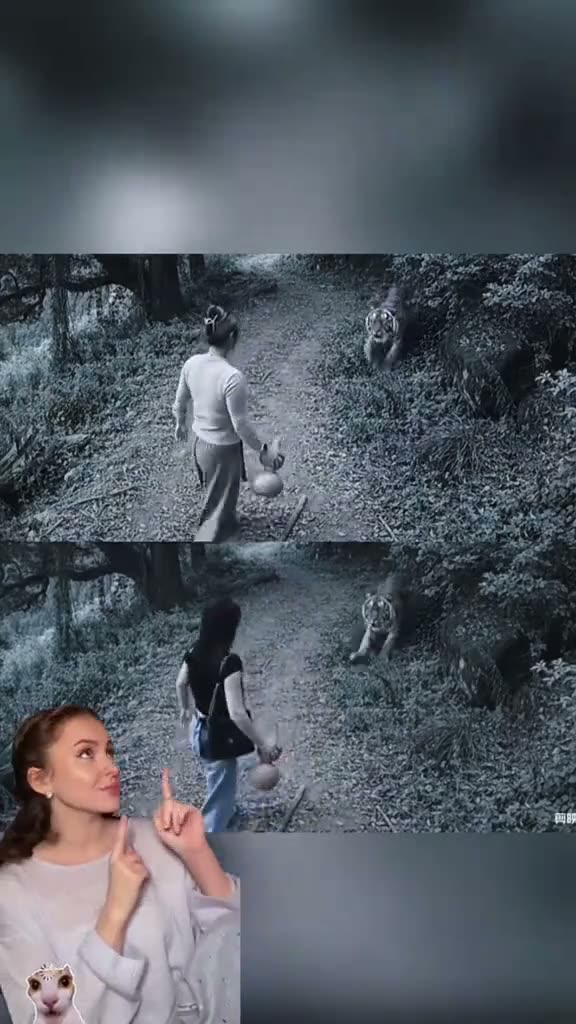
01What happens in the CCTV Tiger Fight trend
The CCTV Tiger Fight AI video uses a fixed grayscale view opens on a person and a tiger on a wooded lane. The selected TikTok was posted by @fahsai5350 on Nov 10, 2026. On Nov 12, 2026, it had 1.2M views and 39K likes.
The page shows a 15-second vertical excerpt. The source clip sets the scene, action, and camera view. This guide follows that selected edit so you know what you are choosing before you create a version from your own photo.
| Time | Beat |
|---|---|
| Shot 1 | A fixed grayscale view opens on a person and a tiger on a wooded lane. |
| Shot 2 | The person moves toward the tiger while the roadside camera stays fixed. |
| Shot 3 | A closer moment shows the person wrestling with the tiger in the comic scene. |
| Shot 4 | A small creator reaction overlay appears beside the final action. |
02How to make the CCTV Tiger Fight AI video from one photo
AI Trend Club connects one photo of yourself or your pet to the source clip. You do not record a replacement scene or write a prompt. The photo supplies the lead identity; the original setting, other people, and edit remain part of the reference. Review the sequence and the resolution cost before sending a video request.
- Open the trend pageReview the original reel and its four frames. They show the selected version of CCTV Tiger Fight, including a fixed grayscale view opens on a person and a tiger on a wooded lane.. The trend page and original are free to view.
- Press Create your ownThe button opens the browser flow. There is no app to install and no prompt to write. If you want to check which clip is selected, return to the source preview before adding a photo.
- Add your photoChoose yourself or your pet to play the fighter and confirm that you have permission to use the image. The person or pet in your photo plays the lead. The other source roles and scene come from the reference clip.
- Choose the resolutionAt 480p, this 15-second video uses 692 credits. At 720p, it uses 1,556 credits. Check the button for the exact amount before you spend any credits.
- Make and download the videoTap Make my video and wait a few minutes. The result stays private to your account. The download is silent. Add the trend sound in TikTok or CapCut if you want audio when posting. The clip is vertical 9:16, so it is ready to place in a post.
03The photo that works
This page asks for one photo of yourself or your pet. That image decides who plays the fighter; the source scene stays with the clip. Choose an image you have permission to use, then keep the flow to one lead photo.
- Add one photo of yourself or your pet or your dog or cat.
- Choose the person or pet you want to play the fighter.
- Confirm that you have permission to use the photo.
- Use one lead photo; this page does not ask for a second role.
- Expect the setting and camera view to come from the original clip.
04The CCTV Tiger Fight AI prompt
AI Trend Club does not ask you to write a prompt. If you are trying another video model that accepts a source clip and an image, use the sample below as a starting point. It is written for a human photo; for an animal photo, change the lead to the pet in your reference.
Use the person in the reference photo as the lead in a fixed grayscale security-camera view of a quiet, tree-lined lane. A tiger enters the frame and faces the lead. Keep the camera wide and still. The lead steps toward the tiger, then the two move through a brief, clearly fictional wrestling gag on the roadside. Keep the background and reaction overlay in place. Match the source clip cuts and timing. Show a playful effect with natural motion and no injury, blood, or graphic action. Add no new scene, text, logo, or music.05CapCut template or AI video?
A CapCut template can arrange footage you record yourself, but it does not place your photo into the original scene. The AI video flow uses the selected clip as its reference and puts your photo into the lead role. That difference matters when you want the same setting and timing as the trend.
You can still use an editor after the AI video is ready. Add a caption or adjust the sound there if you want. The editor is a finishing step; it does not make the source scene or replace the original creator credit.
06Is the CCTV Tiger Fight AI video free?
Watching the source and reading this page are free. A new account receives 25 welcome credits, enough for a few images but not enough for this video. It uses 692 credits at 480p or 1,556 credits at 720p. The page shows the exact amount before you spend.
The two options below are the lowest listed ways to reach enough credits for one standard version. A failed video returns its credits automatically. Check the current price and the amount on the button before choosing a payment option.
| Option | Price | Credits |
|---|---|---|
| Week pass | $6.99 | 800 |
| 1,000 credits | $9.90 | 1,000 |
07Post it
Download the silent file. Add the trend sound in TikTok or CapCut when posting if you want audio. Credit the original creator as @fahsai5350 and link to the source post when you share your edit. That gives viewers a path back to the clip used by this page.
Caption ideas based on the scene:
- A quiet lane, then a tiger enters the frame.
- Security-camera calm with a very strange visitor.
- My pet is ready for its roadside close-up.
08Questions
- Do I need to write a prompt?
- No. Press Create your own, add one photo, and tap Make my video.
- Can I use a pet photo?
- Yes. Add one photo of yourself or your dog or cat, with permission to use it.
- Which AI makes this video?
- An AI video model guided by the original clip. The page does not name a separate model.
- Can I add the trend sound when I post?
- The download is silent. Add the trend sound in TikTok or CapCut when posting if you want audio.
- Who posted the original?
- The selected TikTok was posted by @fahsai5350 on Nov 10, 2026. The trend page links to it.