01What the AI Text Prank does
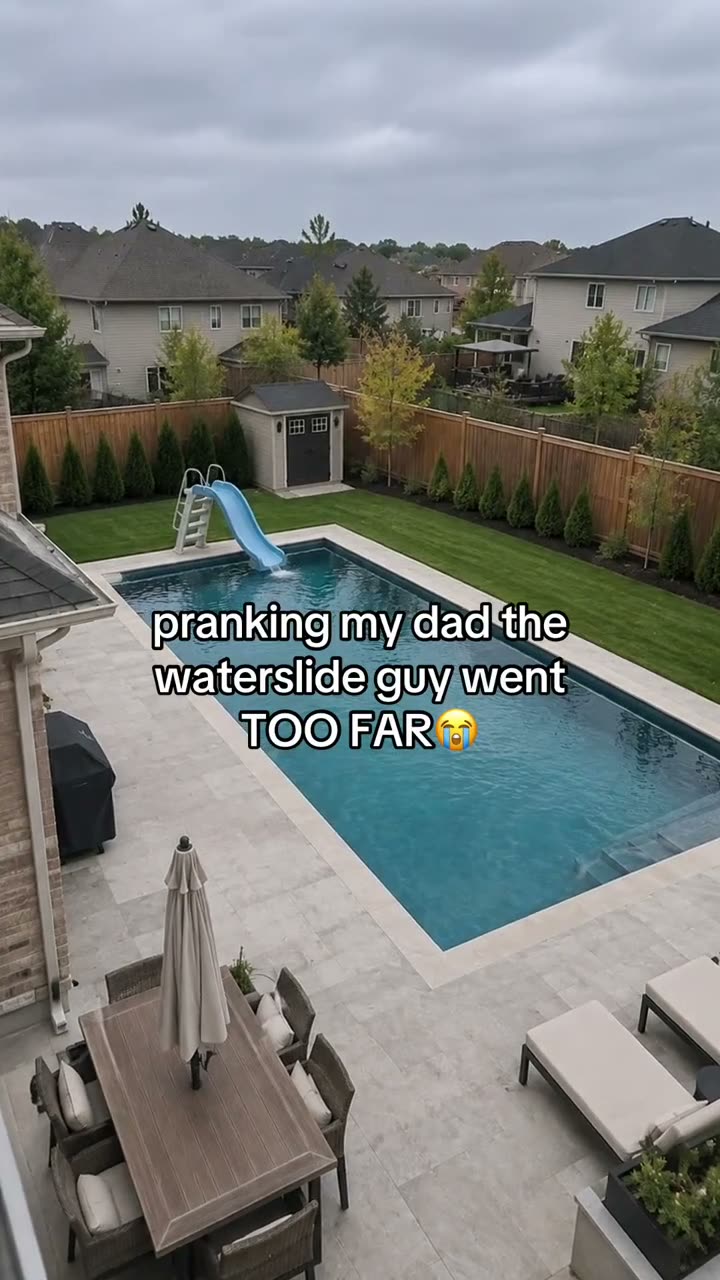
The AI Text Prank format pairs a familiar home photo with an impossible addition. The linked post by @steve.pranks starts from an ordinary property image and adds an oversized backyard waterslide. Its caption sets up the joke as a request for a small waterslide. The visual and the message work together, but they are made separately.
The editor on this page changes the photo. It does not create a text conversation or send a message. If you want to recreate the full format, make the image first, then write your own message in your regular messaging app. That keeps control of the wording and recipient with you.
The linked post had 2.9M views and 219,400 likes when checked on Nov 12, 2026. Those counts belong to the original post at that time. They do not tell you how a new edit will perform.
02Pick a property photo
Start with a house, yard or pool image that you own or have permission to edit. A clear daytime photo is easier to work with because the house shape and outdoor space are visible. A broad view gives the edit room to place a waterslide beside or behind the house without hiding the scene.
Check the edges of your photo before uploading. Remove anything that reveals an address, license plate, school name or other personal detail you do not want shared. You can crop those details out first if they are not needed for the joke. Keep people out of the frame unless you have permission to include them.
A straight camera angle helps the edited slide feel attached to the scene. If the image is tilted sharply, taken at night or blocked by a fence, the new object may be difficult to place. You do not need a professional photo, but the house and yard should be easy to read.
- One property or yard photo you own or have permission to edit
- A clear view of the roof and outdoor space
- Daylight and a steady camera angle
- No private details you do not want to share
03Review the waterslide prompt
The trend page fills in an edit prompt that asks for an oversized backyard slide while keeping the original home, yard, viewpoint and daylight. It is meant to create a playful image edit, not a construction mock-up. Read it before you submit and change its wording if your photo has a different yard layout.
Keep the scale intentionally exaggerated. The visual joke depends on a slide much taller than the roof, but the house itself should stay recognizable. If the tool changes too much of the property, ask it to preserve the same structure and camera angle. The image result can still differ from the reference.
The text-message part is not included in this prompt. Do not expect the editor to add a conversation to the image. The photo edit and the message are separate tasks, and this page only supplies the photo edit.
Edit the uploaded photo of the home. Preserve the same house, yard, camera angle, and daylight. Add an oversized backyard waterslide taller than the roof, attached to a playful pool. Make it look like a harmless, obviously over-the-top family prank. Keep the house structure intact. Do not add people, property damage, fire, flooding, or emergency details.04Create the photo edit
Open the image editor from this page to carry the prompt into the tool. Add the property photo, confirm that you have permission to use it and check the wording. The editor currently costs 5 credits per image. It displays the price before you submit, so you can review the charge before starting.
Submit the edit and inspect the result when it is ready. Compare the house shape, roofline and yard with your original. The slide should be large enough to read as a joke while the original property remains recognizable. Check that the image has not introduced people, signs, damage or details that were not in your brief.
If the image is close but not right, revise one part of the prompt and try again. A clearer source image may help if the model could not see the yard. No sample has been generated for this trend page, so the reference should not be treated as a result that the tool has already reproduced.
- Open the image editorUse the button on this page so the waterslide prompt is ready to review.
- Add your property photoUse a home or yard image you own or have permission to edit.
- Review and createCheck the prompt and price, submit the image edit and inspect the result.
05Write the message separately
The word “text” in this trend name refers to the way the image is presented with a message. The image editor does not create the message itself. After you finish the picture, open your usual chat app and decide what to write there. You choose the recipient, wording and timing.
The reference caption frames the joke around someone asking for a small waterslide. You can use your own situation as the setup, but write it yourself so it sounds like the people involved. Do not copy a private conversation or use a screenshot from someone else's chat without permission.
When the image is sent, keep the prank clear and harmless. The visual should read as an exaggerated edit, not evidence that the property has been altered. If the recipient asks whether the slide is real, tell them it is an edited image.
| Part | What to do |
|---|---|
| Photo | Make the waterslide edit in the image editor. |
| Message | Write the setup yourself in your own chat app. |
| Share | Send it only to someone who will understand the joke. |
06Fix common scene issues
If the slide is too small, restate that it should rise above the roof and dominate the yard. If the house changes, ask the editor to preserve its structure and the original viewpoint. Avoid piling many new objects into the same prompt, since the waterslide is the central visual idea.
If the pool or yard becomes crowded, remove optional details and keep the prompt focused on the slide, house and existing outdoor space. If the edit looks too realistic, make the scale more exaggerated so the joke is easy to understand. Inspect the final image before sending it to anyone.
If a private detail remains in the image, go back to the source and crop it out before another edit. Generated images may also create new signs or markings, so look around the full frame, not only at the slide.
- A slide that looks too small: emphasize its height above the roof
- A changed home: repeat that the original structure must stay
- A busy scene: remove optional objects from the prompt
- Private details: crop them from the source and inspect the whole result
07Questions about the AI Text Prank
The image editor handles the visual only. The reference post uses the edited property picture with a separate line of text, so you can decide how to recreate that format without giving an image tool control of your messages.
08Questions
- Does the image tool write a text conversation?
- No. It edits the photo only. Write and send any message separately in your own messaging app.
- How many credits does the image edit use?
- The current price is 5 credits for one image. The editor shows it before you submit.
- Can I use a photo of a friend's house?
- Use a photo you own or have permission to edit. Remove private details before sharing.
- Will the editor keep the house exactly the same?
- The prompt asks it to preserve the home and viewpoint, but generated results can vary. Inspect the image before sharing.
- Is the waterslide real?
- No. It is an AI-edited visual gag and does not describe an actual property change.
- Who posted the reference?
- The linked waterslide post is by @steve.pranks. Its message is separate from the photo edit.