01What happens in the Darts 170 Prank trend
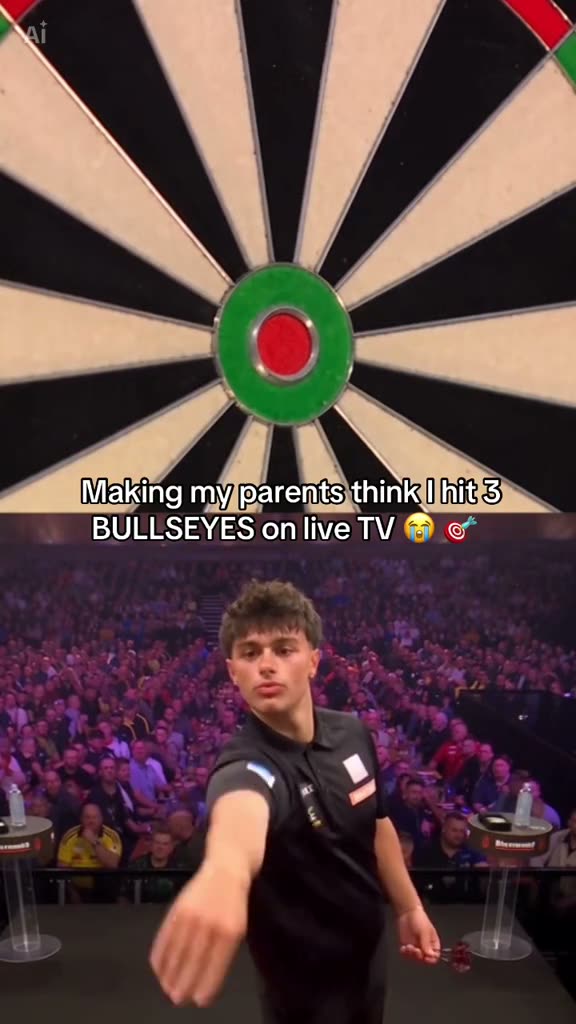
The source clip puts a close view of a dartboard above a player on a TV-style stage. Three darts land near the board's center, and the player turns to celebrate. Although the task and trend name use 170, this source shows three bullseye hits, not a 170 checkout.
The page uses the original vertical clip as its reference scene. One photo of you plays the stage role. The board, split-screen layout, crowd and order of action stay with the source. The creator account is linked with the clip.
| Time | Beat |
|---|---|
| Shot 1 | A close view of a dartboard fills the upper panel. |
| Shot 2 | The player stands on a stage in the lower panel and throws. |
| Shot 3 | Three darts land around the center of the board. |
| Shot 4 | The player turns toward the camera and celebrates. |
02How to make the Darts 170 Prank AI video from one photo
Start on the trend page and review the source clip. It shows the dartboard in one panel and the player in another. AI Trend Club uses that video as a reference and keeps the player as the single lead role, so you do not need to film the stage scene or write a prompt on the site.
Watching the original and reading the page are free. Creating the result uses credits. Before starting, check which resolution you selected and the credit number on its button. The scene is a prank format, so the page describes the visible three hits instead of claiming the clip shows a 170 finish.
- Open the trend pageWatch the board and stage panels and note how the player moves. The link beside the source clip identifies the original creator.
- Choose Create your ownThe button opens the video flow for this trend. A saved recipe describes the player's role and the split-screen scene; there is no prompt box on the site.
- Add one photoUse one photo of yourself and confirm you have permission to upload it. The photo plays the darts-stage player; the board and crowd remain in the reference.
- Choose a resolutionA 480p video uses 507 credits. A 720p video uses 1,141 credits. The button shows the exact amount before you spend.
- Make and download the videoTap Make my video and wait for the render. The download can include the original sound or be silent. The result is vertical and private to your account.
03The photo that works
This recipe uses one person as the stage player. Choose one photo of yourself and confirm you have permission to upload it. The photo changes the lead identity, while the dartboard, audience, split-screen view and throw sequence come from the original.
- Use one photo of yourself for the player role.
- Use a photo you have permission to upload.
- Keep the dartboard and crowd from the source.
- Avoid adding a second lead photo.
- Do not expect the photo to change the score or darts scene.
04The Darts 170 Prank AI prompt
The AI Trend Club page has the original clip and saved recipe, so there is no prompt box to fill in. If you want to try a similar scene in another video model that accepts a reference clip and photo, keep the board, stage and player in separate parts of the frame.
Create a vertical video from the reference clip. Use the person in the reference photo as the player in the lower panel on the darts stage. Keep the close dartboard in the upper panel, show three bullseye hits, then let the player turn and celebrate as the crowd remains in the scene. Preserve the split-screen framing and timing. Change only the stage player's identity; do not show a real score or claim a 170 checkout.05CapCut template or AI video?
A CapCut template assembles images or clips that you record or select. It does not put your photo into this source darts scene. The AI video flow on this page uses the original clip as a reference and places your photo in the stage-player role while the board, crowd and split-screen view remain part of the result.
You do not need to install an app to use AI Trend Club. After downloading your video, you can edit it in CapCut or another editor. This trend includes the original sound, and the download flow also offers a silent file.
06Is the Darts 170 Prank AI video free?
Watching the original and reviewing the trend page are free. Making a video uses credits. A new account receives 25 welcome credits, which are enough for a few images but not this trend video. The 480p version uses 507 credits, and 720p uses 1,141 credits. Failed videos return their credits automatically.
The Week pass costs $6.99 per week and gives 800 credits. That can cover one 480p version but not 720p. A separate pack of 1,000 credits costs $9.90, which is also below the 720p credit amount. Check the button before you start because it displays the exact cost for the selected resolution.
| Option | Price | Credits |
|---|---|---|
| Week pass | $6.99 per week | 800 |
| 1,000 credits | $9.90 | 1,000 |
07Post it
Your downloaded version can keep the original sound or remain silent. If you post it, credit the creator account linked above and link to the original TikTok. Describe your version as a prank edit, and do not present the source clip as your generated result.
- Three bullseyes and a stage celebration.
- My darts-stage prank edit.
- A very dramatic darts moment from my photo.
08Questions
- What is the Darts 170 Prank trend?
- It is a TV-style darts prank. The linked source clip shows three bullseye hits, not a 170 checkout.
- How do I make the Darts 170 Prank AI video?
- Open the trend page, add one photo of yourself, choose a resolution and tap Make my video. There is no prompt to write on the site.
- Which AI makes the Darts 170 Prank video?
- An AI video model guided by the original clip and the saved recipe.
- Can I make it on my phone?
- Yes. The page and video flow run in your browser, so no app install is required.
- Who made the original?
- @capcutradar.edits posted it on TikTok on October 28, 2026. The trend page links to the source post.