01What happens in the Dog Elevator Prank trend
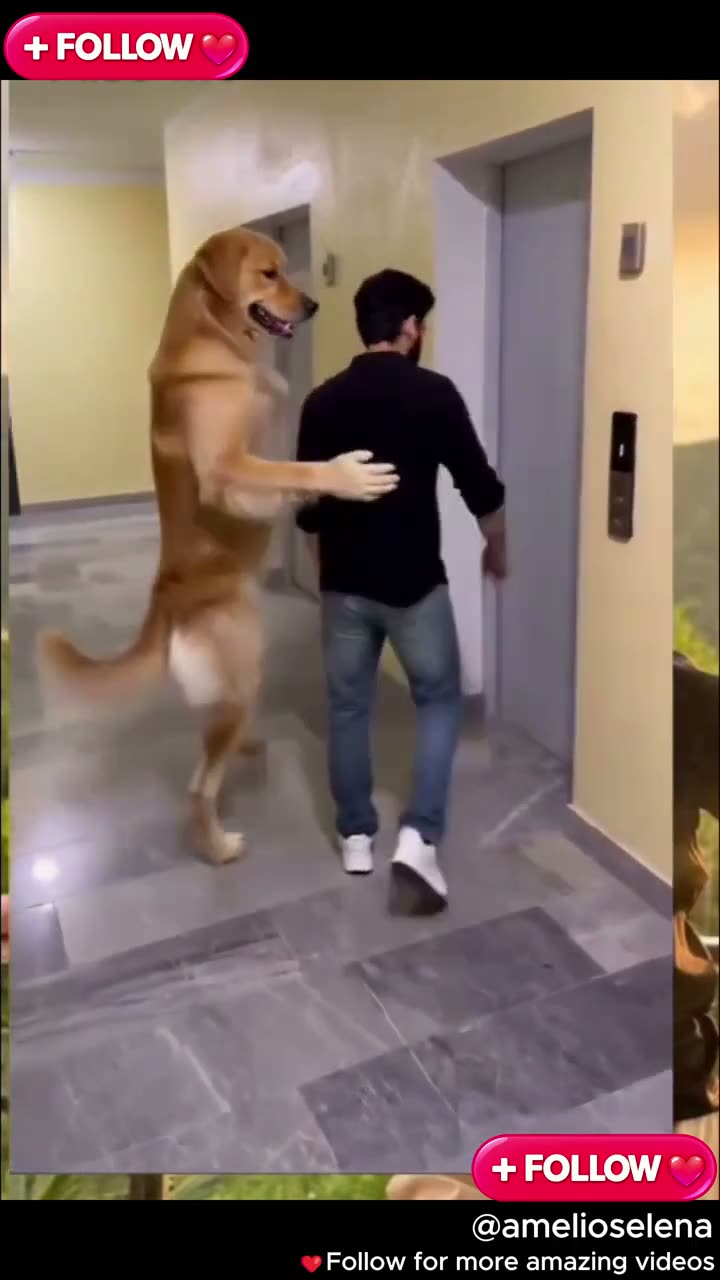
The Dog Elevator Prank clip shows a golden retriever following a man toward an elevator. The dog appears to push him as the doors open, and the scene ends with the man sitting inside while the dog remains outside. The joke comes from the dog seeming to operate the elevator.
The reference is a 15-second vertical video. AI Trend Club keeps the elevator lobby, doors, and sequence as the source scene. One photo takes the dog's lead role. The scene guide below follows the main beats of the original.
| Time | Beat |
|---|---|
| Shot 1 | A golden retriever stands beside a man in an elevator lobby. |
| Shot 2 | The dog follows behind him toward the elevator doors. |
| Shot 3 | The doors open and the man moves into the elevator. |
| Shot 4 | The clip ends with the dog outside and the man sitting inside. |
02How to make the Dog Elevator Prank AI video from one photo
You do not need to stage an elevator scene. The original clip provides the lobby, doors, and movement. Add one photo for the dog’s lead role. The upload can be a photo of yourself or your pet, as described on the trend page.
Watching the original and viewing the trend page are free. Making a video uses credits. Follow the steps and review the exact amount shown on the button before you spend.
- Open the trend pageWatch the original first. Note how the dog follows the man, how the elevator doors open, and where the clip ends. The page keeps this source sequence as the guide for your video.
- Choose Create your ownThis opens the saved Dog Elevator Prank flow. The original clip supplies the lobby and elevator, so you do not need to describe the background or write a separate prompt.
- Add one photoChoose one clear photo of yourself or your pet. The photo plays the elevator dog’s lead role. Keep the face or pet markings visible, and confirm that you have permission to use the photo.
- Choose a resolutionA 480p video uses 692 credits. A 720p video uses 1,556 credits. The exact amount appears on the button before you spend. The Week pass includes 800 credits, which covers one standard 480p video.
- Make and download the videoTap Make my video and wait for the render to finish. The page says a video is ready in a few minutes. The original sound is included. If a render fails, the credits come back automatically.
03The photo that works
The trend uses one photo in the lead role. The source clip already has the man, elevator, and lobby, so your upload represents the dog that moves through the scene.
- Use one clear photo of yourself or your pet.
- Keep the face or pet markings visible.
- Choose a sharper photo if the first one looks blurry.
- Avoid faces hidden by objects.
- Avoid very dark photos.
04The Dog Elevator Prank AI prompt
On AI Trend Club, the original clip and saved recipe guide the scene. There is no prompt to write on the site. For another video model that accepts a source clip and photo, describe the same safe comedic sequence without adding a new action.
Create a short vertical scene based on the reference clip. Use the person in the reference photo, or the pet shown in that photo, in the lead dog role. Begin in an elevator lobby with the man walking toward the open doors. Show the lead following behind and gently pushing him into the elevator. Keep the man separate from the lead and do not show an injury. Preserve the lobby, doors, wall controls, camera framing, and sequence. End with the dog outside and the man sitting inside. Add no titles, logos, or captions.05CapCut template or AI video?
A CapCut template can assemble clips you record or select. It does not put your photo into this elevator scene. The AI video uses the reference clip as a guide and puts your photo into the dog’s lead role, while the man and elevator stay in the scene.
The original sound is included with this trend. You can download your result with its sound, then add captions or trim it in CapCut. The saved recipe handles the lead role and timing, so the site does not ask you to write a prompt or film an elevator scene.
06Is the Dog Elevator Prank AI video free?
Watching the source clip and reviewing the page are free. Making the video uses credits. A new account receives 25 welcome credits, enough for a few images but not enough for this video. A 480p render uses 692 credits. A 720p render uses 1,556 credits. The button shows the exact amount before you spend, and a failed video returns its credits automatically.
The Week pass costs $6.99 per week and includes 800 credits. It covers one standard 480p video for this trend. A separate 1,000-credit pack costs $9.90. The 720p amount is higher than the Week pass balance, so check the button before choosing a resolution.
| Option | Price | Credits |
|---|---|---|
| Week pass | $6.99 per week | 800 |
| 1,000 credits | $9.90 | 1,000 |
07Post it
The original sound is included in the video. When you share your version, credit @amelioselena and link to the source post. Keep the caption focused on the dog taking charge of the elevator or the man’s reaction. The creator’s clip is linked above for context.
- The dog has the elevator handled.
- A ride with an unexpected operator.
- The doors open, and the dog stays in charge.
08Questions
- What is the Dog Elevator Prank trend?
- It is a clip where a golden retriever appears to push a man toward an elevator.
- Is there a Dog Elevator Prank AI template?
- The trend page includes the source clip and saved lead role. Add one photo to make your version.
- Which AI makes the Dog Elevator Prank video?
- It uses an AI video model guided by the original clip.
- Can I use a pet photo or a selfie?
- Yes. Add one clear photo of yourself or your pet for the lead role.
- Who made the original?
- @amelioselena posted it on TikTok on November 2, 2026. The trend page links to the source post.