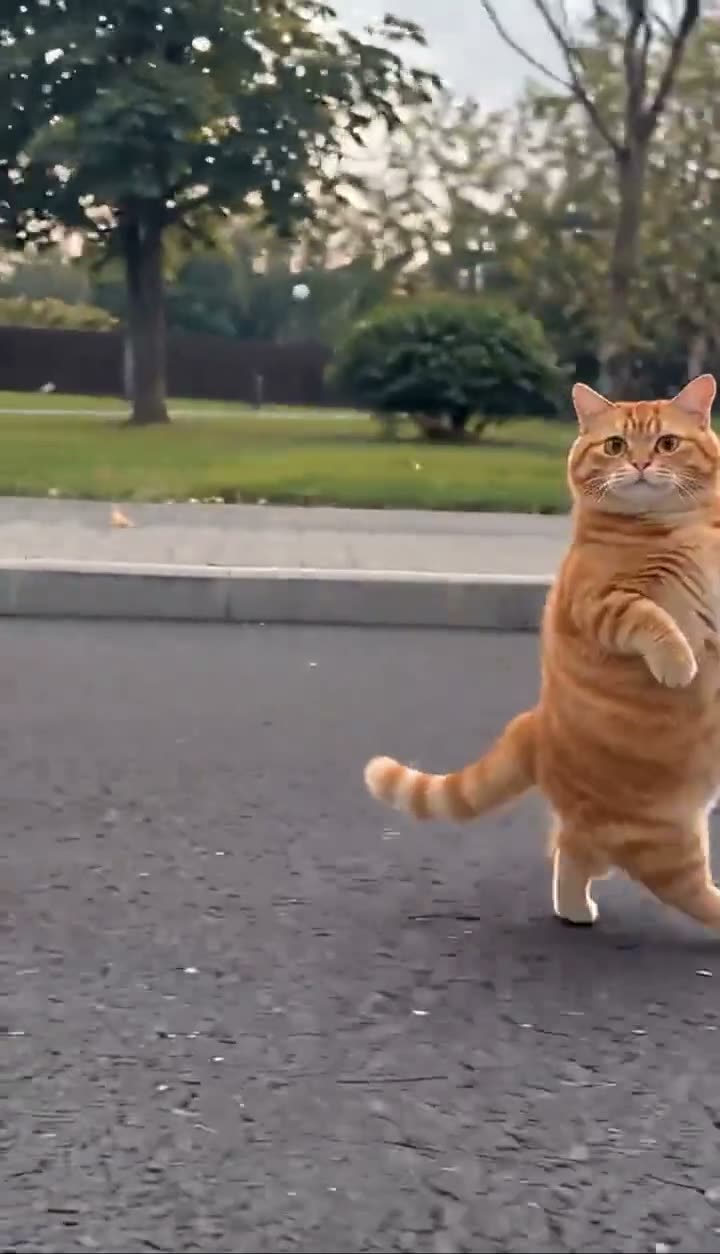
01What happens in the cat video
The Cat Middle Finger format uses a cute pet and a rude gesture for contrast. In the reference linked on the trend page, an orange cat approaches on a park path, pauses near the camera, raises its front paws in the meme pose and walks away. The walk-up is the setup; the paw gesture is the punchline.
The clip by @andrewdurant2 is one matching reference example. A separate post by @merkurianin is often discussed under the “my cat is so friendly” caption, while the task's @eddiemleskalicale post is a tutorial rather than a source clip. This page links the orange-cat walk-up so the opening, gesture and exit are visible in the same example.
This is a video workflow, unlike the photo edits for other trends. The recipe is prepared but has not been reviewed on a generated sample. Treat the reference as a guide to the idea, not a promise that every output will reproduce the same movement.
02Choose a useful pet photo
Upload one clear photo of a pet you own or have permission to use. A face that is visible, even lighting and recognizable coat markings give the video model more information to carry into the scene. A full-body photo is useful when available because the template involves the pet standing upright and raising its paws.
A front-facing or slight three-quarter view usually gives the model a clear look at the face. Avoid a photo where the animal is curled up behind a blanket, cropped tightly at the head or hidden by another pet. If you have several images, choose one with the simplest background and the clearest markings.
Use a cat photo if you want the closest visual connection to the format. The current pet-reference flow can also take a dog photo, but the result may differ because the reference is a cat. Only use images you own or have permission to use, and avoid photos with private household details that you do not want carried into the clip.
- One pet with its face and markings easy to see
- A full-body view when possible, with front legs visible
- Even light and a simple background
- A photo you own or have permission to use
03Use the built-in trend recipe
Open the trend maker from the page button. The site applies the reference recipe for the walking cat scene, so there is no separate text prompt you need to paste. The guide includes a short description of the reference action below for context, but the maker controls its own generation instructions.
The recipe describes the pet as the lead, keeps the park path and camera framing, and follows the walk-up, raised paws and walk-away sequence. It is based on the reference clip and has not yet been checked against a generated sample. The actual output may change the timing, pose or background details.
Do not expect the app to turn a still photo into the original creator's exact cat. Your own pet supplies the appearance; the source clip supplies the scene reference. The trend page shows the source creator and links to that clip so you can see what the format is meant to resemble.
Built-in trend recipe: use the uploaded pet photo as the lead subject, follow the linked cat walk-up reference, keep the park path and camera framing, and show the pet approaching, raising its front paws and turning away. The recipe is part of the trend maker and is not a prompt field to copy into another tool.04Create the video in the trend maker
Use the trend page button to open the maker, add one photo and review the consent step. The site shows the available quality and credit amount before a video is submitted. Check the selected setting and price before you continue. The page does not include a generated sample, so there is no pre-approved result to compare against.
After you submit, wait for the job to finish and inspect the result before you post it. Look at the pet's face, coat pattern and paws. Check whether the movement reads clearly and whether the clip resembles the linked reference. A generated result can vary, and the current recipe has not been verified by a sample video.
If the image of your pet is unclear, choose another photo before trying again. If the movement is not right, do not assume repeated runs will fix it. The task limit does not include paid sample generation, so the page explains the workflow while leaving sample acceptance open.
- Open the trend makerUse the button on the page so the matching pet recipe is selected.
- Add one pet photoChoose an image you own or have permission to use, then review the on-screen price.
- Inspect before sharingCheck the likeness, paw pose and walk-away before posting the result.
05Check the gesture and the pet's likeness
If the result does not look like your cat, start with a sharper input image where the eyes, face and coat are easy to see. Avoid heavy filters or a side view that hides the markings. The model can still alter details, so inspect the entire clip before you decide whether it is usable.
If the paws are hard to read, look at the clip frame by frame before sharing. The gesture is the defining part of the meme, but the model may make it subtle or change it. A clearer photo with both front legs visible may help the model understand the animal's pose. It cannot guarantee a particular hand-like shape.
If the cat turns away too soon or the approach feels rushed, compare the timing with the reference post. The recipe is not sample-accepted yet, so do not treat a missed gesture as a user error. Keep the original source attribution when you describe the trend, and identify your result as an AI edit if the platform asks.
| Issue | Check |
|---|---|
| Changed coat pattern | Use a sharper photo with visible markings. |
| Unclear paw gesture | Check the paws in the output and use a photo with both front legs visible. |
| Short or rushed walk-up | Compare with the source clip; the current recipe has not been sample-verified. |
06Credit the reference and use your own pet photo
The orange-cat clip linked on the page is by @andrewdurant2. Credit the post when you discuss the specific reference. It is one example in a broader format, not proof of who created the first version. The separate @merkurianin clip is another commonly mentioned take, and the tutorial creator @eddiemleskalicale explains a way to make the effect rather than supplying the linked source scene.
Use a photo you own or have permission to use. If you post the result, follow the platform's rules for AI content and keep the joke playful. The rude gesture is the point of the meme, so consider where the audience will see it and whether the context makes it clear that the clip is edited.
The page links to the source video and credits its creator. A link to a post does not mean its creator endorsed your remake. Keep those roles clear if you share the clip or explain how the trend works.
- Credit @andrewdurant2 when discussing this linked example
- Do not claim the reference creator endorsed your result
- Use only a pet photo you own or are allowed to use
- Follow the destination platform's AI-content rules
07Questions about the cat trend
Start with the source clip to understand the walk-up and paw gesture. Then use the trend maker if you want to try it with your own pet. The reference can guide expectations, but each generated result needs a visual check.
08Questions
- Which source clip does this page use?
- It links to the orange-cat walk-up by @andrewdurant2, one matching example of the format.
- Was the video recipe tested?
- No. It has not been checked against a generated sample, so results can vary.
- Can I use a dog photo?
- The existing pet-reference flow accepts one pet photo, but this trend page uses a cat example and dog results are untested.
- How much does it cost?
- From $6.99: the $6.99 Week pass (800 credits) covers one standard video. The 9-second template uses 415 credits at 480p or 934 credits at 720p. The maker shows the price before you submit.
- Is @eddiemleskalicale the original creator?
- The task links to that account's tutorial. This page uses the matching source clip by @andrewdurant2 and does not claim either post is the first version.
- Can I share the result as a real pet video?
- Label it as an AI edit when required and avoid implying that the real animal performed the gesture.