01What the month-letter photo is
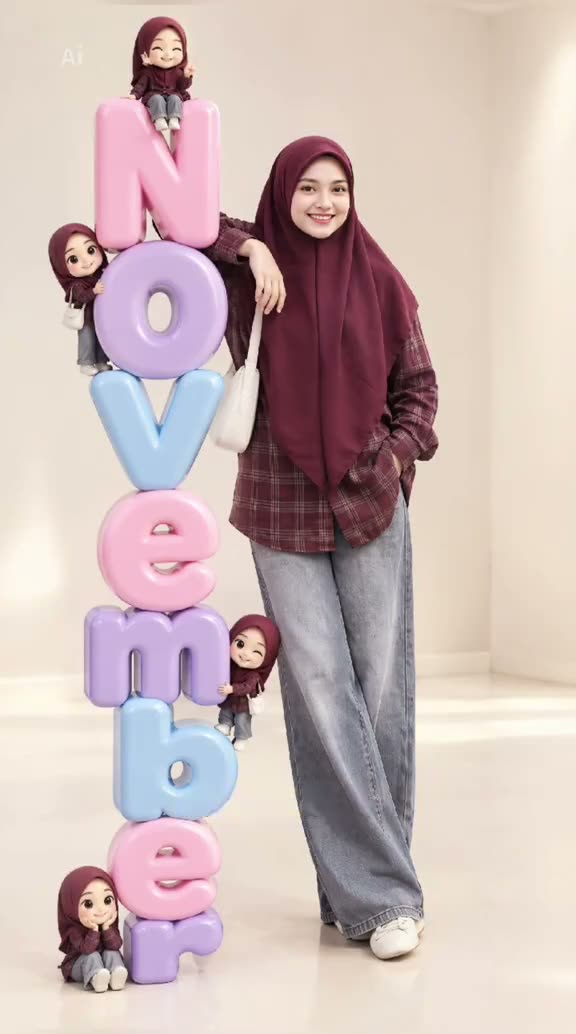
The 3D Month Letters format turns a portrait into a small studio scene. A person stands beside oversized rounded letters that spell a month, usually stacked like glossy balloons. The reference on this page shows a November version by @lovinglylov3ly0. It is a visible example of the style, not evidence that this account invented the format.
The design works because the image has one clear subject and one large prop. Your portrait gives the edit a person to place beside the letters. The month name gives the image its occasion, whether you are marking a birthday, changing a profile photo or saving a seasonal picture. The example post had 1.1M views and 13,200 likes when checked on Nov 12, 2026. Those counts describe that post at that time and can change.
This page opens an image editor. The result is a still image, not a moving clip. Generated lettering can be inconsistent, so the useful habit is to inspect the month before you share the image.
02Choose a portrait that leaves room
Use one photo of the person who will appear beside the letters. A full-body image gives the editor more information about posture and clothing, and it leaves room for a tall stack next to the subject. Choose a photo with a visible face, enough light to see the features and an uncluttered background if possible.
Think about the final composition before you upload. If the person fills the whole frame, the letters may have nowhere to sit. A little space to one side gives the image room to place the stack. A front-facing or relaxed three-quarter pose is easier to read than a face turned away from the camera.
Use a photo you own or have permission to edit. If you are making the image for someone else, ask first. Avoid group photos when only one person should be carried into the new scene. The image tool works from the photo you provide, but it can still alter small details, clothing and facial features.
- One person with a clear face and visible outfit
- A full-body crop with open space beside the subject
- Even light and a simple background
- A photo you have permission to edit
03Review the included prompt
The trend page opens the existing image editor with a prompt already filled in. It describes a full-body portrait beside glossy pastel balloon letters, a soft studio background and natural proportions. You can read the wording before you submit and change it to fit the month or look you want.
The prompt is a starting description, not a guarantee that the model will place every letter correctly. Image models may produce letterforms that look close but contain a spelling error. If accurate text matters, plan to inspect the output and make another edit with a shorter or clearer instruction. Do not assume the result has been checked for you.
The example prompt below is the same kind of instruction the editor preloads. It keeps the person's visible appearance, asks for space beside the subject and limits extra text. You can change the month word before creating, then check that the image still has room for both the person and the letters.
Edit the uploaded photo into a full-body portrait of the same person leaning beside a tall column of glossy pastel 3D balloon letters spelling NOVEMBER. Keep the person recognizable and preserve their visible outfit. Use a soft peach studio background, gentle floor reflection, natural proportions, and clean lighting. Make the letters the main set piece. Do not add other people, logos, or extra text.04Make the image in the editor
Open the editor from the trend page so the prompt is ready. Add your portrait in the photo slot and confirm that you have permission to use it. The editor shows the current price before you send the request. One image edit currently uses 5 credits. No charge happens until you submit the image job.
Read the prompt once more before starting. Check that it names the month you want, describes the person's position beside the letters and keeps the setting simple. You can adjust the words directly in the prompt field. Submit the edit only when the uploaded photo and prompt both look right to you.
When the image is ready, look closely at the face, hands, body shape and spelling. Save the result only if the details are acceptable. If something is off, change the prompt or choose a clearer input photo and start another edit. The editor cannot promise a particular result from one try.
- Open the image editorUse the button on this page to carry the trend prompt into the photo editor.
- Add and reviewUpload one permitted portrait, read the prompt and confirm the shown credit price.
- Create and inspectSubmit the edit, then check the letter spelling and the person's appearance before sharing.
05Fix common lettering and layout issues
If the month is misspelled, simplify the prompt. Keep the requested word short, name the intended month clearly and avoid asking for several lines of decorative writing at once. You can also reduce extra style details so the letters have more attention in the description. The output still needs a visual check because generated text can vary.
If the letters cover the person, ask for the person to stand beside the stack with open space between them. If the portrait looks unlike the uploaded person, use a sharper, more evenly lit source image and keep the instruction to preserve the visible appearance. The model may still change small details, so do not promise an exact match to someone else.
If the letters look flat, restate that they should be large, rounded and glossy, with soft floor shadows. If the background becomes busy, ask for one simple studio color and remove extra props from the instruction. Make one meaningful prompt change at a time so it is easier to see what helped.
| What you see | What to adjust |
|---|---|
| A misspelled month | Use the intended month as the only text and inspect the new result. |
| Letters over the portrait | Ask for the person beside the stack and leave space between them. |
| A crowded background | Remove extra props and keep a single soft studio setting. |
06Keep the edit clear when you share it
This trend depends on a portrait and a large, visibly artificial prop. Before you post, check the month, the face and the overall composition. If the image suggests a real event or endorsement that did not happen, add context in your caption. The linked reference belongs to its creator, so credit @lovinglylov3ly0 when you are discussing that example.
Use only images you own or are allowed to edit. Keep private details out of the background, including home addresses, school logos or other information you would not want copied. The original post's view and like totals are a dated snapshot rather than a promise about how another post will perform.
The trend page and this guide do not contain a generated sample. That keeps the expectation simple: the editor supplies a prompt and uses your input photo, while the exact spelling, pose and likeness still need review after generation.
- Check the month word before publishing
- Credit the linked reference when describing it
- Do not imply the image is an untouched photograph
- Keep private information out of the input photo
07Questions about 3D Month Letters
The shortest route is to start from the trend page, where the prompt is already included. You still control the photo and can revise the wording. The price appears in the image editor before submission, so you can decide whether to continue.
08Questions
- Is this a video trend?
- The reference post is a short video, but this page's remake flow creates one still image.
- Can I change the month?
- Yes. Review the included prompt and replace the month word before creating the image.
- Will the letters always be correct?
- No. Generated lettering can vary, so inspect the month spelling before sharing.
- What does one image edit cost?
- The current price is 5 credits. The editor displays the price before you submit.
- Who created the linked reference?
- The linked post is by @lovinglylov3ly0. The first creator of the monthly format has not been verified.