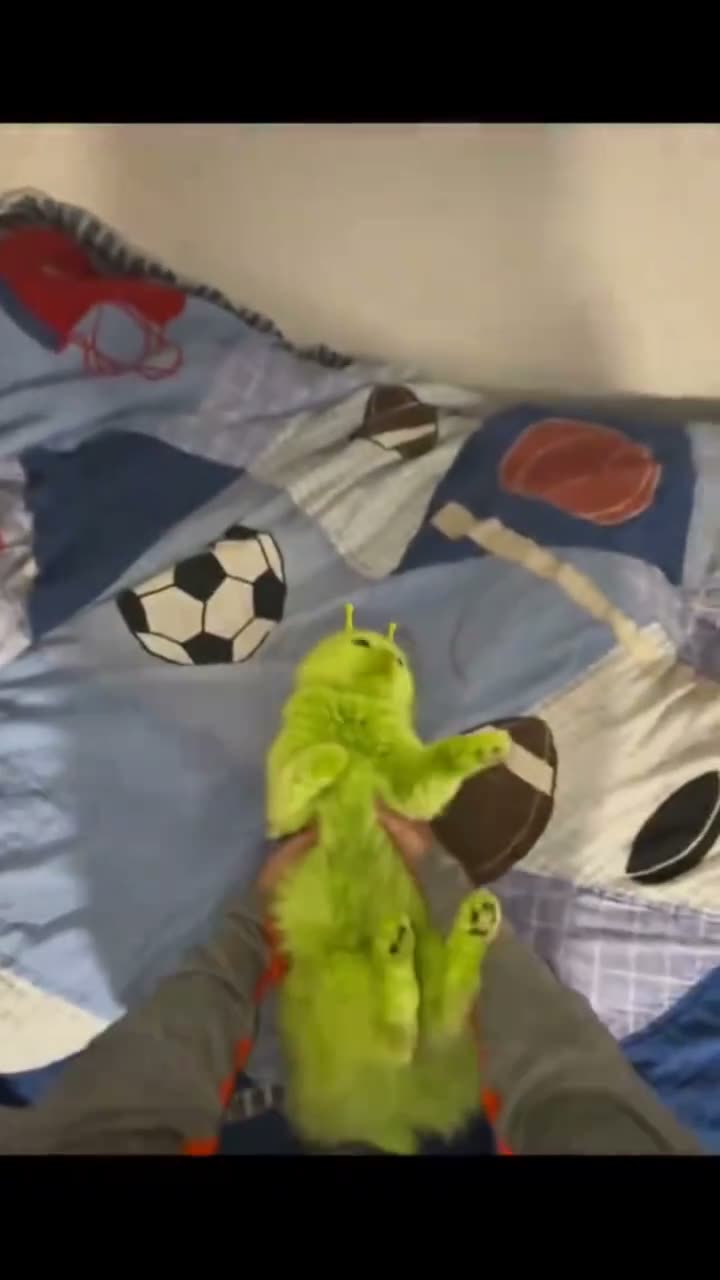
01What the Green Alien Cat photo shows
The linked TikTok clip by @areakitty51 shows a small lime-green fuzzy alien-cat plush held close to the camera. The post was published on Oct 10, 2026. When checked on Nov 12, 2026, it had 32.6M views and 6.8M likes. Those are counts for that post at that time, not a promise about another upload.
This page uses the clip as a reference and opens an image editor. Add one photo of your cat or dog to make a still portrait with a similar bright green, fuzzy alien-cat look. The editor does not animate your pet or recreate the movement in the reference clip.
- Reference: the linked TikTok post by @areakitty51
- Your input: one photo of a cat or dog
- Your result: one AI-edited still image
- Credit price: 5 credits per image
02Choose a pet photo
Use a picture of the cat or dog you want to turn into the character. Keep the pet easy to see in the frame so the editor has visible features to work from. The included prompt asks the image model to retain the pet's face and visible markings while adding the green color, antennae and plush texture.
Before you upload, check that the photo belongs to you or that you have permission to edit it. Keep personal details out of the background if you do not want them included in an image result. The prompt is a starting instruction, so inspect the finished image instead of assuming every feature will stay unchanged.
- One clear photo of your own cat or dog
- The pet visible enough to identify its face and markings
- A background without private details you want to keep out
- Permission to edit and share the input photo
03Use the included Green Alien Cat AI prompt
The trend page fills in an image-edit prompt for you. It describes a lime-green alien-cat character with short antennae, small ears, dark eyes and fuzzy texture. Review the wording before you create the image. You can edit it if you want a softer color or a more natural-looking pet portrait.
The prompt below is a starting point for the same look. It asks the editor to keep your pet recognizable while changing the style. Generated details can vary, so look at the face, markings and alien features before saving the result.
Edit the uploaded photo into a playful portrait of the same cat or dog as a bright lime-green fuzzy alien cat character. Keep the pet’s face, visible markings, and recognizable features. Add two short rounded antennae, small cat ears, large dark eyes, and a soft plush texture. Use a simple bedroom-like background with gentle light. Keep it clearly imaginary and friendly. Do not add logos, text, extra animals, or people.04Make the still image in the editor
Start from the trend page so the prompt is ready in the image editor. Add your pet photo, read the prompt and check that the edit still matches what you want. The editor displays the current credit price before you submit. One image edit uses 5 credits.
A new account receives 25 welcome credits. If you have not used them on anything else, that amount covers five image edits at 5 credits each. The result is a still image. Review the pet's appearance and the green alien details before saving or posting it.
- Open the editorUse Edit your photo on the trend page to carry the prompt into the image editor.
- Add one pet photoChoose a cat or dog photo you have permission to edit, then review the prompt.
- Submit and inspectCheck the displayed price, create the still image and review the pet's face and markings before sharing.
05Fix common pet portrait issues
If the face or markings change too much, try a clearer input photo and keep the prompt focused on preserving the pet's recognizable features. The model can still alter small details, so treat the output as an edit rather than an exact copy.
If the alien look is too subtle, keep the lime-green color, antennae and fuzzy texture in the prompt. If the pet looks more like a toy than an animal, reduce the plush wording and ask for natural fur. Change one part of the prompt at a time so you can see what changed.
| What you see | What to adjust |
|---|---|
| Face or markings changed | Use a clearer pet photo and keep the request to preserve those features. |
| Antennae are missing | Keep the short antennae in the prompt and inspect the next still image. |
| Too much plush texture | Reduce the plush wording and ask for natural fur instead. |
06What the image edit costs
One image edit uses 5 credits. The image editor shows the price before you submit, so you can review the cost before starting the job. A new account receives 25 welcome credits, equal to five image edits if none of the credits have been used elsewhere.
The reference clip and trend page let you see the look before you decide to make an image. No AI image request is sent until you submit it from the editor. The editor creates a still image and does not include the original clip's motion or audio.
| Option | Credits | What it covers |
|---|---|---|
| One image edit | 5 | One AI-edited still image |
| New account welcome credits | 25 | Five image edits if unused |
07Share the pet edit with context
The linked source post belongs to @areakitty51. Credit that account when you discuss the reference. The source clip shows a plush toy, while your result is an AI-edited image of your own pet. Keep that distinction clear if someone might mistake the still for an untouched photo.
Check the pet's face and markings, then save the image only if the result looks right to you. A caption can keep the idea light and direct, such as 'My pet, from another planet' or 'Meet the green alien-cat version of my cat.' Avoid claiming the edit is a video or an exact copy of the source plush.
- Credit @areakitty51 when referring to the linked clip
- Say that your image is AI-edited
- Review the pet's appearance before sharing
- Do not describe the still image as an animation
08Questions
- Is Green Alien Cat an AI video?
- The linked reference is a TikTok clip, but this page makes one AI-edited still image from a pet photo.
- Can I use my dog's photo?
- Yes. The prompt is written for one photo of a cat or dog you have permission to edit.
- How many credits does it use?
- One image edit uses 5 credits. The editor shows the price before you submit.
- Will my pet look exactly the same?
- The prompt asks the editor to keep visible features, but AI edits can change details. Inspect the result before sharing.
- Who posted the linked plush clip?
- @areakitty51 posted it on TikTok on Oct 10, 2026. The link is on the trend page.