01What happens in the Husband Emporium trend
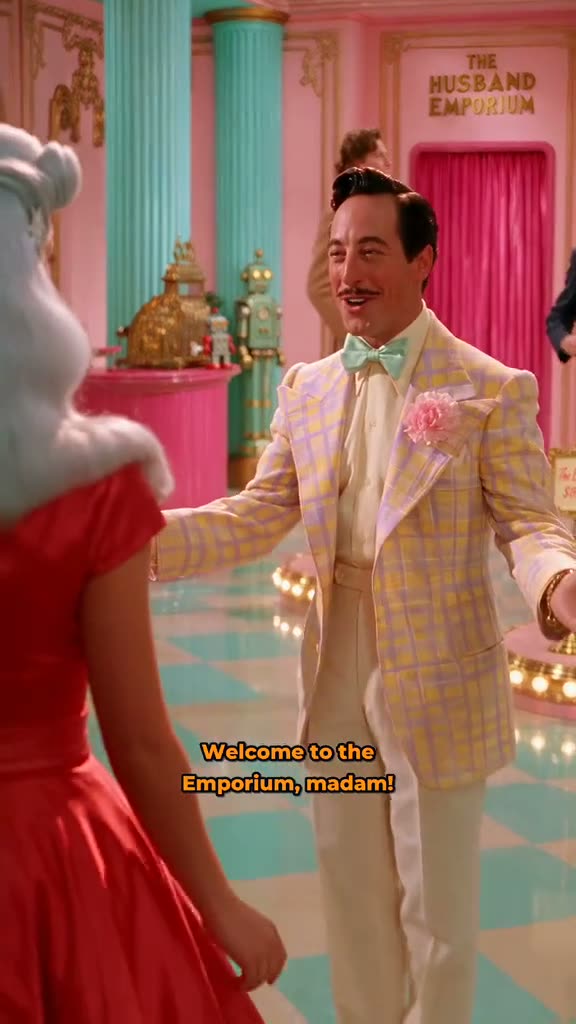
The Husband Emporium AI video plays like a short shop scene. A customer enters a pastel store, talks with staff and looks at the models on display. The hosted excerpt is a 15-second vertical clip from a 93-second original. Add one clear adult portrait to take the customer’s place while the store, staff and other people follow the reference.
TikTok creator @faux.feast posted the original on November 9, 2026. Current video metadata showed 1.2M views on November 12, 2026. The page links the original post and shows its creator credit.
| Time | Beat |
|---|---|
| Shot 1 | A shopper enters the pastel store through a bright pink doorway. |
| Shot 2 | A staff member greets the customer near the entrance. |
| Shot 3 | The customer looks over different models in the shop. |
| Shot 4 | The scene cuts to a model posing on a display platform. |
02How to make the Husband Emporium AI video from one photo
The trend page pairs the creator’s hosted clip with one photo of the adult you want to cast as the shopper. The reference supplies the store scene, the other people and the sequence. The photo supplies the lead identity. You do not need to write a prompt, and the flow runs in a browser without installing an app.
Check the live amount shown on the Make my video button before you spend credits. The standard 480p option uses fewer credits than 720p. You can compare both amounts before choosing a resolution.
- Open the trend pageVisit the Husband Emporium page on AI Trend Club and press Create your own.
- Add one photoChoose one clear adult portrait that you have permission to use. This photo fills the customer role.
- Review the setupConfirm the shopper role and check that the reference clip is the pastel store scene you want.
- Choose a resolutionThe 480p option uses 692 credits. The 720p option uses 1,556 credits. Confirm the amount shown on the button before spending.
- Make and downloadTap Make my video. The result is saved in your account and can be downloaded vertical with the original sound or silent.
03The photo that works
Use one adult portrait for the shopper. The trend has one customer role, so a single face gives the edit one identity to follow. Pick an image that is clear enough for the customer’s face to be visible in the scene.
- Choose a clear photo of one adult.
- Keep the face visible and in focus.
- Use an image you have permission to use.
- Avoid group photos because the page has one shopper role.
- Avoid blur or sunglasses that hide the face.
04The Husband Emporium AI prompt
AI Trend Club uses the original clip and your photo without asking you to write a prompt. If you want to try the same scene in another video model that accepts a reference clip and a photo, start with this description.
Recreate the 15-second vertical shop scene from the reference video. The person in the reference photo takes the place of the customer in the red dress. Keep the pastel store, bright pink doorway, teal columns, counter, staff and displayed models. Preserve the customer’s identity across the cuts. Follow the original sequence as the customer speaks with staff, looks at the models and turns toward the display platform. Keep the camera framing, gestures and timing. Change only the customer. Do not add captions, logos, extra characters or audio.05CapCut template or AI video?
A regular CapCut template arranges clips that you record yourself. It can help set timing, add cuts or place text on your footage, but it does not put your photo into this original shop scene.
An AI video edit uses the reference clip and your photo together. Your photo supplies the customer identity, while the store, staff, other models, camera framing and timing come from the source scene. The hosted clip is the creator’s original, linked on the trend page.
The download can include the original sound or be silent. If you want a different sound or extra captions, add them after downloading in the social app you use.
06Is the Husband Emporium AI video free?
You can open the original post and view the trend page without paying. Making a video uses credits. A new account gets 25 welcome credits, which can make a few images but is not enough for this trend video.
One 480p video uses 692 credits, and one 720p video uses 1,556 credits. A Week pass costs $6.99 and includes 800 credits, enough for one 480p run. The 1,000-credit pack costs $9.90. It covers a 480p run but not the 720p option. Failed videos return their credits. Check the live button before you start because it shows the current amount for the selected resolution.
| Option | Price | Credits |
|---|---|---|
| Week pass | $6.99 | 800 |
| 1,000 credits | $9.90 | 1,000 |
07Post it
The hosted reference includes its original sound, and the video can also be downloaded silent. If you share your version, credit @faux.feast and link to the original post. The shop scene is playful, so keep your caption about browsing the display or choosing from the options.
Keep the creator credit with the clip if you repost it. The page shows the source account and links directly to its post.
- Browsing my options.
- The shop has a type.
- Picking from the display.
08Questions
- What is the Husband Emporium AI video?
- It is a pastel shop scene where a customer meets staff and looks at different models. One adult photo takes the customer’s place in the hosted 15-second excerpt.
- How many credits does the video use?
- The 480p option uses 692 credits. The 720p option uses 1,556 credits. Check the live button before you start.
- Can I make it on my phone?
- The flow runs in a browser, and there is no app to install. Open the trend page, press Create your own and add one photo.
- Can I use a pet photo?
- This trend has one adult customer role. Use a photo of an adult person.
- Who posted the original?
- TikTok creator @faux.feast posted the 93-second original on November 9, 2026. The trend page links to the post.