01What happens in the Truck Driver trend
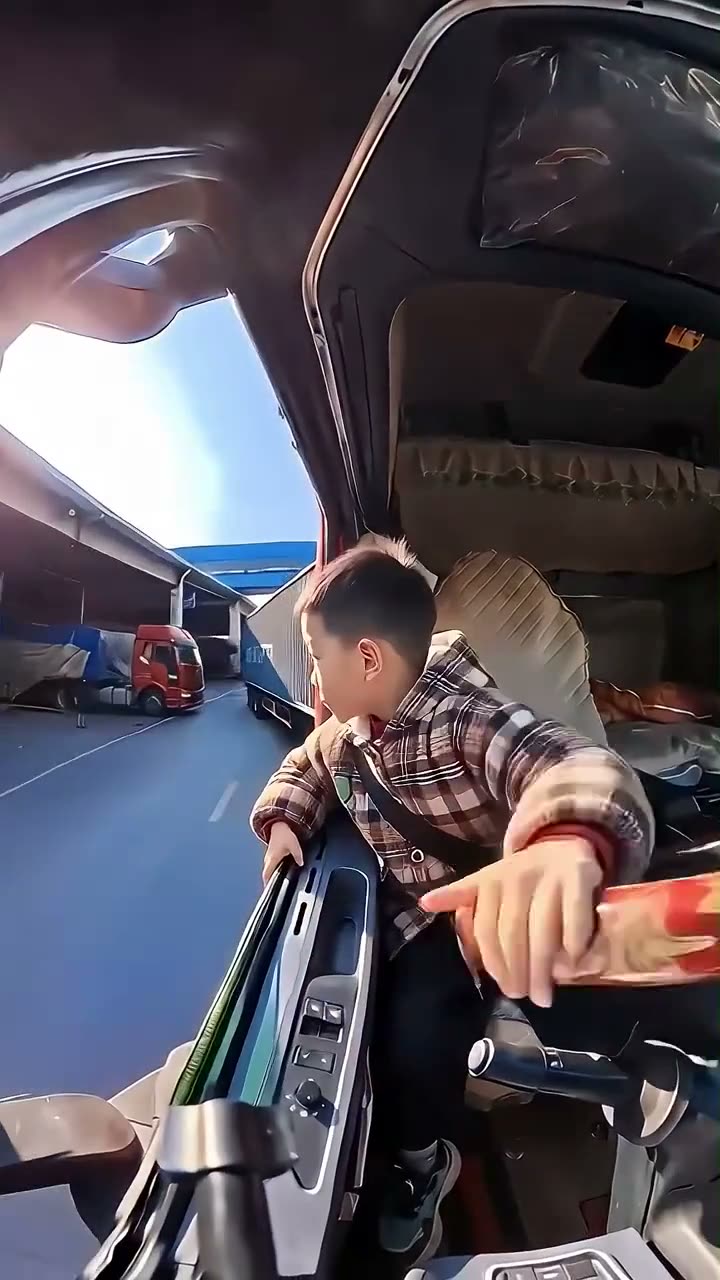
The linked clip shows people leaning out of a truck cab to look back as the truck reverses into a yard. Quick cuts bring different people into the same driver role. The preview on AI Trend Club is the source video, so you can see the timing before you start your own version.
This is the action the template follows. Each shot keeps the truck scene and changes who plays the driver.
| Time | Beat |
|---|---|
| Shot 1 | A person leans from the cab and looks back toward the yard. |
| Shot 2 | The truck moves through the loading space as the driver checks behind. |
| Shot 3 | The clip cuts to another driver looking back from the same cab. |
| Shot 4 | A final cut shows a person leaning toward the open cab doorway. |
02How to make the Truck Driver AI video from one photo
You do not have to film yourself in a truck or write a long prompt. The trend page uses the linked reference clip and one photo to put you or your pet in the driver role. The steps run in your browser, and there is no app to install.
Use a photo you have permission to use. Your video stays private to your account.
- Open the trend pageVisit the Truck Driver page on AI Trend Club. The silent source preview shows the cab, the reversing movement and the quick cuts the page is built around.
- Start your own videoPress Create your own to open the setup flow. You can do this in a browser on a phone or computer, without installing an app.
- Add the lead photoUpload one clear photo of yourself or your pet. Confirm you have permission to use it. The photo takes the driver role while the other people in the source stay separate.
- Choose a resolutionA 480p video uses 692 credits. A 720p video uses 1,556 credits. The exact amount appears on the button before you spend.
- Make and downloadPress Make my video. The site says a clip is ready in a few minutes. It is vertical and silent, so add a permitted sound separately if you want one.
03The photo that works
Choose one photo for the lead. The role is a person or a pet in the cab, so keep the intended subject easy to identify. The source has several cuts; a new result may not match every cut exactly.
- Use one clear photo of the person or pet who will play the driver.
- Keep the lead visible in the photo.
- Crop out extra people so the model has one obvious subject.
- Use only a picture you have permission to upload.
- If the first result changes the lead, try one clear image again.
- Expect the quick cuts to vary from the source clip.
04The Truck Driver AI prompt
On AI Trend Club, there is no prompt field to fill in. The page uses the source clip to guide the camera, truck cab, yard and action.
If you are testing another video model that accepts a reference clip and an image, you can use this as a starting description.
Edit the 15-second vertical reference clip. Keep the truck cab, open doorway, trailer yard, camera position and reversing movement in the same order. The person in the reference photo plays the driver role in each cut, leaning out to look back as the truck backs into the yard. Keep other visible people separate from the lead. Follow the source timing and framing with natural movement. Do not add logos, text or audio.05CapCut template or AI video?
A CapCut template arranges footage or images that you supply. It does not place your photo inside the truck scene shown in the source clip. An AI video uses your photo to put you in that scene while the cab, yard and reversing action remain part of the reference.
The workflow on this page is the AI version. The video preview is the source clip, and the page does not show a generated remake. The output can differ from the reference, especially across its quick cuts.
This preview is silent. If you edit your download, you can add a sound or text in TikTok or CapCut. Choose sound that you are allowed to use on your account.
06Is the Truck Driver AI video free?
Watching the source clip and reading this page are free. Making a new video uses credits. A new account receives 25 welcome credits, enough for a few images but not enough for this video.
The 480p option costs 692 credits. The Week pass costs $6.99 and includes 800 credits, which covers one standard 480p video. The 720p option costs 1,556 credits, so check the amount before choosing it.
A 1,000-credit pack costs $9.90 and covers one 480p video. The button shows the exact amount before a run begins. If a video fails, its credits come back automatically.
| Option | Price | Credits |
|---|---|---|
| Week pass | $6.99 | 800 |
| 1,000 credits | $9.90 | 1,000 |
07Post it
The clip on this page is silent and leaves out its source soundtrack. If you add audio after downloading, pick a track you are allowed to use on TikTok or CapCut. Credit the uploader of the source clip as @a11302540yc and link back to the post shown on the trend page.
Keep the caption short and focus on the driver moment. For example:
- Checking behind before the next move.
- Same cab, one more confident reverse.
- Taking the driver role for a spin.
08Questions
- Is there a Truck Driver AI template?
- The trend page has a reference-video flow for the truck-cab clip. Add one photo of yourself or your pet to start.
- Which AI makes the Truck Driver video?
- The page uses an AI video model guided by the original clip. The page preview is the source post, not a generated sample.
- Can I make it on my phone?
- Yes. The flow runs in a browser, so you can open the page on a phone without installing an app.
- Can my dog play the driver?
- Yes. The template accepts a person or a pet photo for the lead role.
- Who posted the source clip?
- The first upload of the format is unknown. The linked TikTok is from @a11302540yc and was posted on Nov 10, 2026. We link to it above.