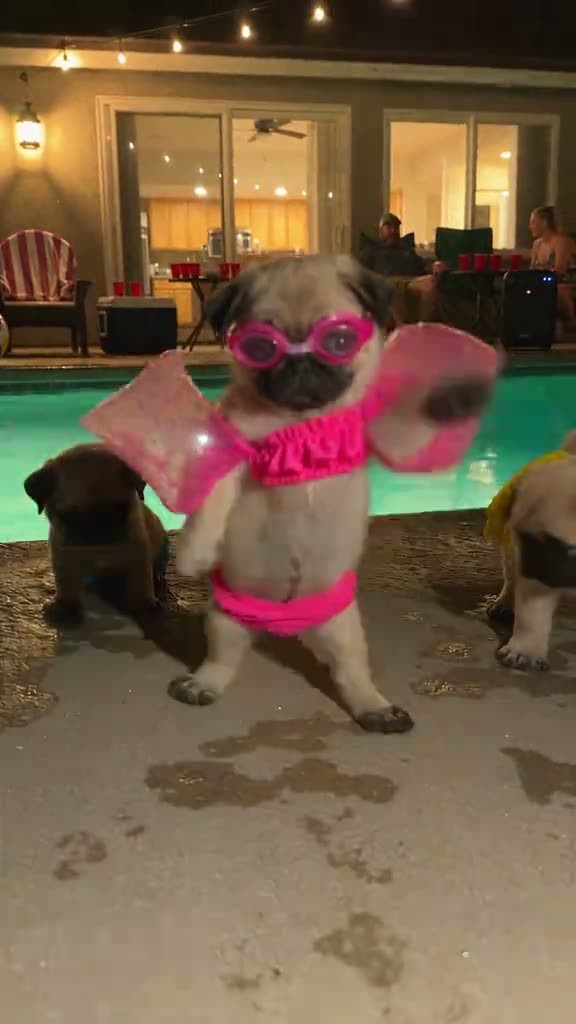
01What happens in the Dog Pool Party trend
The Dog Pool Party trend puts a dressed-up pug at the center of a backyard pool gathering. The lead wears bright pink clothes and goggles, steps and bounces on the dry deck, and turns while other dogs stay in the background. The scene is playful and deliberately simple: one main dog, a poolside setting, and a short dance.
If you came across a dog pool party clip and want to make an AI version, the page keeps the same reference scene. Your photo takes the central lead’s place. The pool, other dogs, outfit, camera framing, and order of movements remain tied to the original. The generated clip is silent, so choose audio separately if you post it.
| Time | Beat |
|---|---|
| Shot one | The central pug faces the camera on the pool deck in pink goggles and a bright outfit. |
| Shot two | The pug steps forward and bounces while the pool and other dogs stay behind. |
| Shot three | The lead turns and keeps dancing in the same poolside spot. |
| Shot four | A foreground figure crosses the view near the end and briefly blocks the dogs. |
02How to make the Dog Pool Party AI video from one photo
You do not need to film a pool party or choreograph the steps yourself. Start from the Dog Pool Party AI video page so the original clip is already selected. The site uses one photo for the lead role and keeps the source scene around it. Review the credit amount on the button before you choose to render.
- Step one: Open the trend pageOpen the Dog Pool Party page on AI Trend Club in a browser. Reading the page and watching the original reference are free. You do not need to install an app.
- Step two: Start the setupPress Create your own. This opens the setup for the poolside dog dance with the reference clip attached.
- Step three: Add one photoUpload one clear photo of a person or pet you have permission to use. Choose the subject you want to play the central dancer.
- Step four: Choose a resolutionPick 480p for 646 credits or 720p for 1,452 credits. The button shows the amount before you spend. A Week pass includes 800 credits, enough for the standard version.
- Step five: Render and downloadTap Make my video and wait for the result. You can download the silent vertical clip and add audio later if you want to post it. If a video fails, its credits come back automatically.
03The photo that works
The template has one lead role, so choose one subject for the photo. AI Trend Club can use a person or a pet, such as a dog or cat. Only upload an image you have permission to use. The original poolside scene stays in place, so the photo supplies the lead rather than a new background.
- Use one clear photo of the person or pet you want in front.
- Choose a photo you have permission to use.
- Keep the upload to one subject for the single dancer role.
- Use Create your own from this trend page so the reference remains attached.
- Expect the other dogs and the poolside setting to remain around the lead.
04The Dog Pool Party AI prompt
On AI Trend Club, there is no prompt to write. If you want to try the idea in another video model that accepts a reference image and clip, you can start with this description. It follows the visible sequence and keeps the lead in the original setting.
Recreate the poolside scene from the reference clip. The person in the reference photo takes the place of the central lead, with the same pink pool-party outfit and goggles. Keep the backyard pool, the other dogs in the background, the string lights, chairs and cups. Follow the original movement: face the camera, step forward, bounce, turn and continue the short dance. Keep the lead on the dry deck and let the brief foreground crossing happen near the end. Preserve the fixed vertical camera and original framing. Do not add text, logos, a different setting or a soundtrack.05CapCut template or AI video?
A CapCut template is an editing layout. You add clips that you recorded, and the template arranges or times them. It does not place your photo into the original pool-party footage or make you part of the pug scene.
An AI video uses the reference clip as the scene guide and uses your photo for the lead. On this page, the pool, dogs, pink outfit, camera view, and dance stay based on the source. The site creates a silent result, so the original song is not bundled with the generated file.
After downloading, you can use CapCut to add captions or choose a sound available to you on the social platform. Keep the creator credit in your post when you share a version inspired by the original.
06Is the Dog Pool Party AI video free?
Watching the original and reading the trend page cost nothing. Making the video uses credits. A new account receives 25 welcome credits, enough for a few images but not a trend video. The render button shows the exact amount before you confirm, and a failed video returns its credits.
The listed options below show the Week pass and a one-time credit pack. The Week pass starts at $6.99 and gives 800 credits. The standard Dog Pool Party version uses 646 credits, so that pass covers one standard render. The 1,000-credit pack costs $9.90 and can also cover it. The 720p version costs 1,452 credits, so either option needs more credits for that resolution.
| Option | Price | Credits |
|---|---|---|
| Week pass | $6.99 | 800 |
| 1,000 credits | $9.90 | 1,000 |
07Post it
The generated clip is silent. If you want sound, add a track in TikTok or CapCut after download. Credit @lucasthepuglife in the caption and link viewers to the original post when you share your version. Do not imply that the creator made your remake.
Keep the caption short and tied to the joke: the dressed-up dog has become the main attraction at the pool. A playful line about paws, goggles, or a tiny dance can fit the scene without claiming anything about the original creator.
- “Poolside paws, front and center.”
- “The goggles are ready for the dance floor.”
- “One small dancer, full pool-party energy.”
08Questions
- Is there a Dog Pool Party AI template?
- The AI Trend Club page opens the preselected video setup. Add one photo and start the render from there.
- Which AI makes the Dog Pool Party video?
- AI Trend Club uses an AI video model guided by the original clip.
- Can I use a photo of my pet?
- Yes. The lead can be a person or a pet, including a dog or cat. Use an image you have permission to use.
- Can I make it on my phone?
- Open the trend page in your phone browser and press Create your own. No app installation is needed for the site flow.
- Who made the original pool-party clip?
- @lucasthepuglife posted it on TikTok on Nov 8, 2026. The page links to the original.