01What happens in the Passport Makeup Prank trend
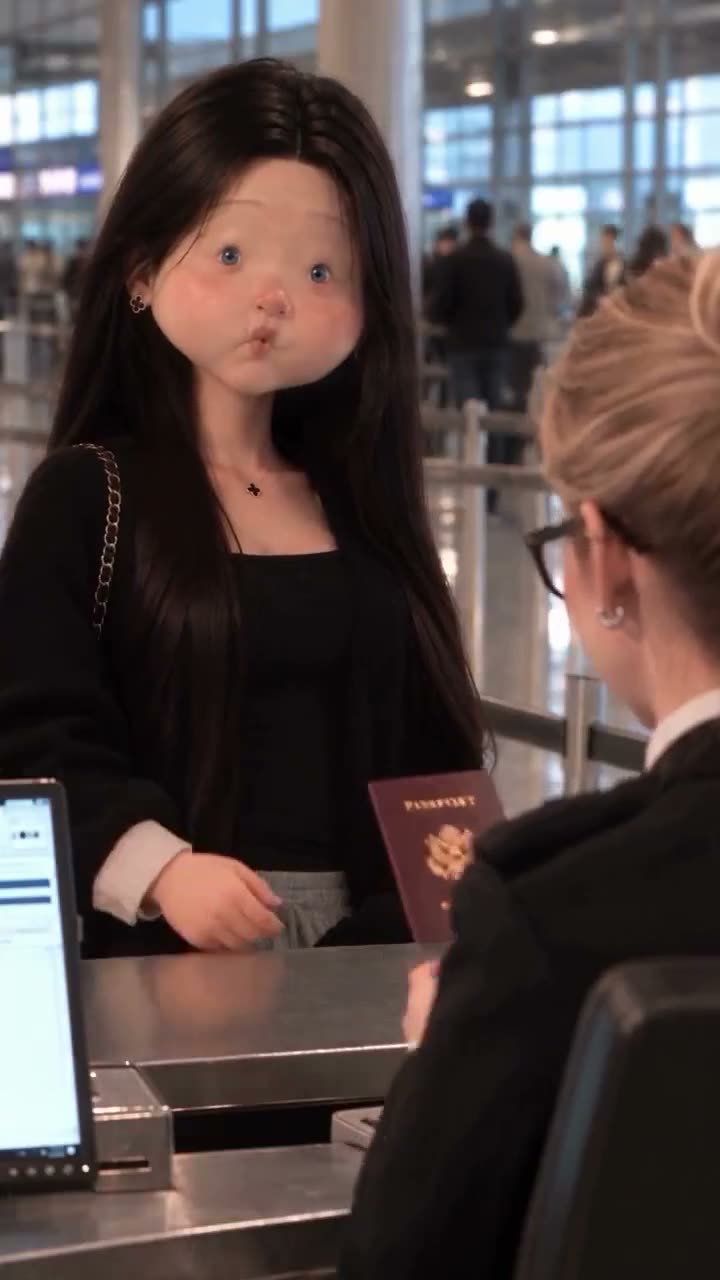
The source is a stylized airport-counter scene. A traveler presents a red passport prop, changes from a plain look to a made-up look, then reacts to the clerk. The clip is a fictional visual prank, not an example of a real travel document.
On AI Trend Club, one portrait photo plays the traveler in a silent 15-second remake. Keep the prop fictional and leave real names, passport details and airport branding out of the result.
| Time | Beat |
|---|---|
| Shot 1 | A stylized traveler stands at a counter with a clerk. |
| Shot 2 | The traveler presents a fictional red passport prop. |
| Shot 3 | The traveler's look changes from plain to made-up. |
| Shot 4 | The traveler reacts while the counter scene stays in view. |
02How to make the Passport Makeup Prank AI video from one photo
The trend page connects the photo to its reference clip. You add one portrait, confirm that you have permission to use it, then select the resolution before starting.
- Open the trendGo to the Passport Makeup Prank page on AI Trend Club and press Create your own.
- Add your portraitUpload one clear photo of yourself and confirm that you have permission to use it.
- Use the guided flowThe original scene stays attached to the trend. There is no prompt box to fill in.
- Choose a sizeSelect 480p for 692 credits or 720p for 1,556 credits. The button shows the exact amount before you spend.
- Make and downloadTap Make my video, wait for the render, and download the silent vertical clip. Add a sound separately if you want one.
03The photo that works
The traveler is the only role that takes a photo. Add one clear portrait of yourself. If the person in the result does not match, the page says to choose a clearer photo.
- Use one photo of yourself for the traveler role.
- Pick a clear portrait so the lead can match your photo.
- Upload only an image you have permission to use.
- Keep the passport prop fictional. Do not add real identity details or a real document.
- The trend flow keeps the counter scene attached to the reference clip.
04The Passport Makeup Prank AI prompt
AI Trend Club does not ask you to write a prompt. If you are testing a separate video model that accepts a reference clip, use this starting point and preserve the fictional prop.
The source shows a stylized traveler and makeup change. The wording below does not include a real country, seal, identity number or airport brand.
Create a vertical, stylized airport-counter scene. The person in the reference photo stands before the clerk, presents a clearly fictional red passport prop, then changes from a plain look to a made-up look and reacts. Keep the counter, clerk, hand gestures, camera angles and sequence from the reference clip. Use no real country name, national seal, personal data, airport brand or usable identity details. Keep the document an obvious prop throughout the scene.05CapCut template or AI video?
A CapCut template can arrange footage that you record yourself. It does not place your photo in the original counter scene. An AI video remake uses your portrait as the traveler inside the linked reference clip, while the clerk and setting remain.
The source is silent on this trend page. If you want music or a trend sound, add it after download in TikTok or CapCut. The page links the X post by @mihrace141 so you can credit the source when sharing your version.
06Is the Passport Makeup Prank AI video free?
Reading the page and watching the source clip do not cost credits. A new account receives 25 welcome credits, enough for a few images but not this video. The 480p version uses 692 credits, while 720p uses 1,556 credits.
The lowest listed purchase is the Week pass, which includes 800 credits. A failed video returns its credits automatically. The button shows the selected video size and credit amount before you submit.
| Option | Price | Credits |
|---|---|---|
| Week pass | $6.99 | 800 |
| 1,000 credits | $9.90 | 1,000 |
07Post it
The linked reference is silent. Add a sound from TikTok if you want audio, then name @mihrace141 as the source in your caption and link to the post.
Keep the result clearly fictional. Use your own portrait or another photo you have permission to use, and avoid real identity details.
- The makeup check took an AI turn.
- New look, fictional passport prop.
- The clerk had to look twice.
08Questions
- Is there a Passport Makeup Prank AI template?
- Yes. The trend page links the source clip and opens a guided flow with one portrait photo.
- Which AI makes the Passport Makeup Prank video?
- It uses an AI video model guided by the original clip. AI Trend Club does not ask you to write a prompt.
- Can I make it on my phone?
- The flow runs in a browser and does not need a separate app. Open the page, upload your photo and follow the steps.
- Can I use a real passport photo?
- Use a portrait you have permission to upload. Do not upload real passport details or create a usable identity document.
- Who posted the source clip?
- @mihrace141 posted the X clip on Nov 9, 2026. The page links to that post.