01What happens in the Cutting the Branch trend
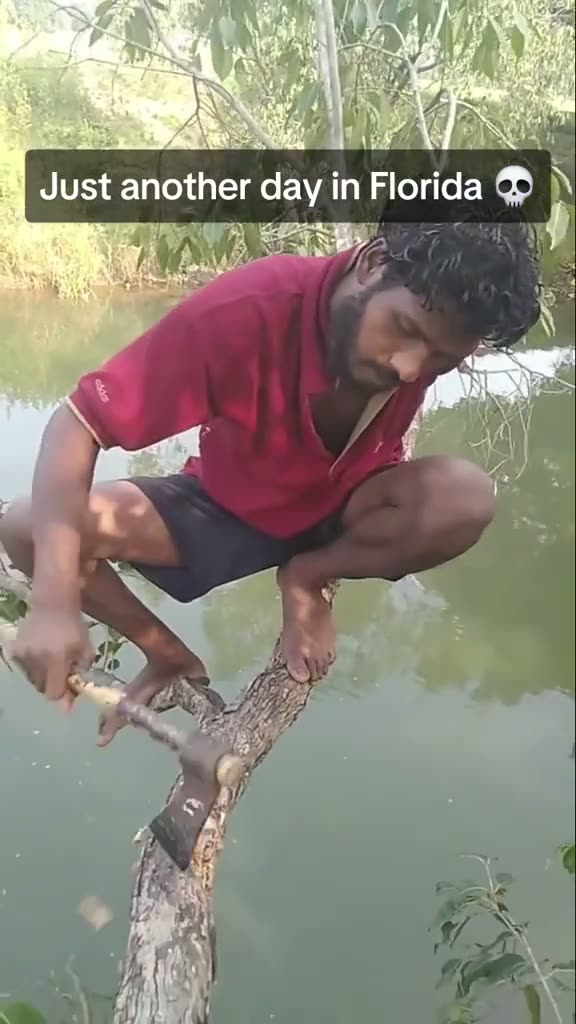
The source clip shows an adult crouched on a branch above water and using a hand saw on the branch they are sitting on. The vertical video ends before any fall appears, even though the post caption describes one.
The AI Trend Club version uses one photo for the lead in a silent remake of the visible scene. It keeps the tree, water and sawing motion from the reference clip. Do not try the stunt outside the video.
| Time | Beat |
|---|---|
| Shot 1 | An adult crouches on a branch above the water. |
| Shot 2 | The person saws the branch they are sitting on. |
| Shot 3 | The camera stays on the tree and water as the sawing continues. |
| Shot 4 | The video ends with the person still above the water, before a fall is shown. |
02How to make the Cutting the Branch AI video from one photo
AI Trend Club attaches the original reference clip to the trend. You add one photo, confirm that you have permission to use it, and choose a size before you submit.
- Open the trendVisit the Cutting the Branch page on AI Trend Club and press Create your own.
- Add one photoUpload one clear photo of yourself. Confirm that you have permission to use the image.
- Keep the referenceThe trend flow uses the linked clip, so you do not need to write a prompt or describe the scene.
- Choose a sizeSelect 480p for 692 credits or 720p for 1,556 credits. The button shows the exact credit amount before you spend.
- Make and downloadTap Make my video, wait for the render, then download the silent vertical clip. Add a sound separately if you want one.
03The photo that works
This flow has one lead role, the person with the saw. Use a clear photo of yourself and make sure the face is easy to see. If the generated lead does not match, the page recommends choosing a clearer photo.
- Add one photo of yourself for the single lead role.
- Choose a clear portrait so the person in the result can match your photo.
- Use an image you have permission to upload.
- Keep your expectations on the reference scene: the tree and camera view are meant to stay.
- Treat this as an AI video scene. Do not copy the branch-cutting stunt outdoors.
04The Cutting the Branch AI prompt
There is no prompt to write on AI Trend Club. If you are trying another video model that accepts a reference clip, use this as a starting point and keep the action fictional.
The prompt follows the visible source sequence. It does not add a fall that the source clip never shows.
Create a vertical, handheld phone scene beside water. The person in the reference photo crouches on a tree branch above the water and carefully uses a hand saw on the branch. Keep the nearby leaves, water, red shirt and fixed camera view from the reference. Hold on the sawing motion until the clip ends, with the person still above the water. Do not show a fall, injury or another dangerous action. This is a fictional AI scene, not guidance for a real stunt.05CapCut template or AI video?
A CapCut template can arrange footage that you record yourself. It does not put your photo into the original branch scene. An AI video remake uses your photo as the lead inside the linked reference clip, while the tree and water remain.
The featured source is silent on this page. After you download your result, you can add a sound in TikTok or CapCut if you want one. Keep any sound selection within the platform library and credit @titusmaximus2 when you post the remake.
06Is the Cutting the Branch AI video free?
Watching the source and reading the trend page do not cost credits. New accounts receive 25 welcome credits, which are enough for a few images but not for this video. The 480p version uses 692 credits, and the 720p version uses 1,556 credits.
The Week pass is the lowest listed purchase and includes 800 credits. A failed video returns its credits automatically. Check the button before you submit because it shows the amount for the selected size.
| Option | Price | Credits |
|---|---|---|
| Week pass | $6.99 | 800 |
| 1,000 credits | $9.90 | 1,000 |
07Post it
The trend page clip is silent, so add a sound from TikTok if you want to pair the remake with audio. Credit the source creator, @titusmaximus2, in your caption and link to the original post.
Keep the caption about the AI remake. The original post describes a fall, but the visible video ends before one happens.
- The AI version stays above water, where it belongs.
- A branch, a saw, and a clip that stops before the fall.
08Questions
- Is there a Cutting the Branch AI template?
- Yes. The trend page links the original clip and opens the guided Create your own flow with one photo.
- Which AI makes the Cutting the Branch video?
- It uses an AI video model guided by the original clip. AI Trend Club does not ask you to write a prompt.
- Can I make it on my phone?
- The flow runs in a browser, so you do not need a separate app. Open the trend page, add your photo and follow the on-screen steps.
- Does the original video show a fall?
- No. The caption mentions a fall, but the visible video ends with the person still on the branch.
- Who posted the original?
- TikTok creator @titusmaximus2 posted it on Oct 24, 2026. The trend page links to the post.