01What happens in the Golden Statue Baby Kiss clip
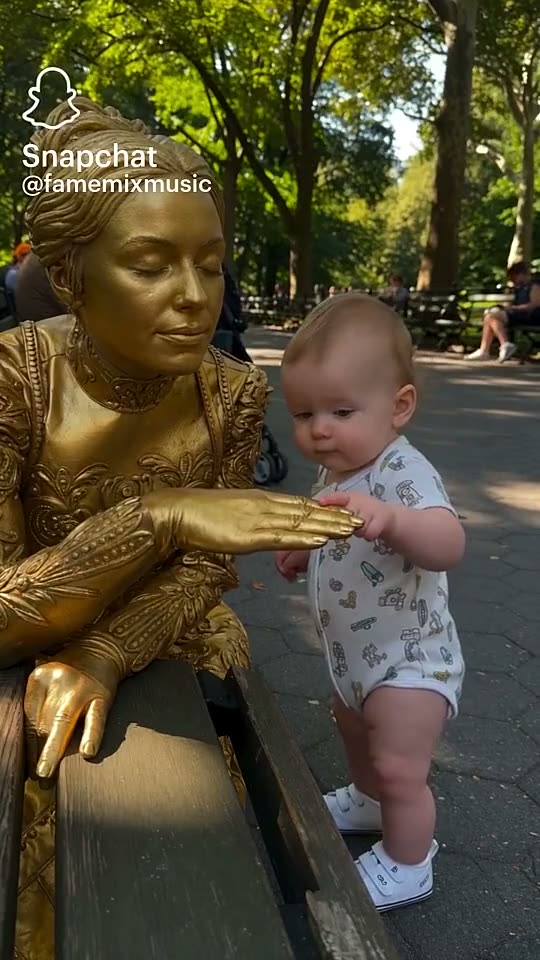
The Golden Statue Baby Kiss excerpt starts with a baby beside a gold-painted street performer in a sunny park. The baby reaches for the performer’s hand, leans in for a cheek kiss, and reacts when the performer moves. This 15-second vertical clip keeps that gentle sequence together.
The linked Snapchat Spotlight was posted by @famemixmusic on Oct 15, 2026. That account is credited as the publisher of the reference, but the earliest creator has not been verified. The post listed 1.8K likes, 27 comments and 202 shares when checked on Nov 13, 2026, with no view count displayed. Those numbers describe one dated post, not a promise about the reach of a remake.
| Time | Beat |
|---|---|
| Shot 1 | The baby stands beside the performer, who extends her gold-painted hand. |
| Shot 2 | The baby reaches for the performer’s open hand. |
| Shot 3 | The baby leans in to kiss the performer on the cheek. |
| Shot 4 | The performer moves, and the baby reacts. |
02How to make the Golden Statue Baby Kiss video from one photo
The trend page opens a guided creator flow. You do not need to write a prompt for this recipe. Use a photo you have permission to use, then review the credit amount shown on the button before you submit.
- Open the trend pageStart at the Golden Statue Baby Kiss page. It shows the reference clip, the linked post and the scene this recipe follows.
- Choose Create your ownUse the page button to open the video creator in your browser. There is no separate app to install.
- Add one permitted photoUpload one clear photo of the person who should take the visitor’s place. Confirm that you have permission to use it.
- Choose a resolutionThe 480p version costs 692 credits. The 720p version costs 1,556 credits. The button shows the exact charge before you spend.
- Make and download the videoTap Make my video and wait for the render. Download it with the original sound or choose the silent file.
03The photo to use
The role is one park visitor, so choose one photo that makes the person easy to identify. The clip has a wide view of the baby and performer together. A front-facing image that shows the full person gives the remake a clear subject to follow.
- Use one clear, front-facing photo.
- Show the full person in the frame.
- Avoid a cropped face or body that hides the visitor’s role.
- Only upload a photo you have permission to use.
04A prompt for a similar statue video
AI Trend Club supplies the guided recipe, so there is no prompt field to fill in on this page. If you want to test the idea in a different video model that accepts a reference photo and clip, you can start with a scene description like this. It cannot promise an identical result.
Set a gentle street-performance moment in a sunny park. The baby visitor is already beside a gold-painted statue performer who holds a still pose. The person in the reference photo plays the visitor. Show them touch the performer’s open hand, lean in for a brief kiss on her cheek, then look surprised when she moves. Keep the kiss on the cheek with no mouth-to-mouth contact. Preserve both people, the green park, nearby watchers, gold costume and handheld camera view. End on the visitor’s reaction.05CapCut template or guided AI video?
A CapCut template and the guided AI flow on this page are different ways to make a short video. If you are considering a particular CapCut template, check its own clip requirements and free-export conditions before editing. This page starts with one photo and uses the reference clip to guide the scene and movement.
The AI Trend Club recipe does not ask for a written prompt. It uses your photo as the visitor in the park scene. A new render can vary, so review the result before sharing it rather than expecting an exact copy of the reference. The creator can download with the included sound or as a silent file, then continue editing or add captions in CapCut if that fits the post.
06Is this video free?
You can open the trend page and watch the reference without making a video. Creating the remake uses credits. A new account receives 25 welcome credits, enough for a few images but not enough for this video. The button displays the exact credit total before you submit, and credits for a failed video come back automatically.
The Week pass is a one-time purchase for $6.99 and includes 800 credits. It expires without automatically renewing. That covers one 480p render at 692 credits, but it does not cover a 720p render at 1,556 credits. The 1,000-credit pack costs $9.90 and also covers one 480p video, but not the 720p amount by itself. Check your balance and the button total before you start.
| Option | Price | Credits |
|---|---|---|
| Week pass | $6.99 | 800 |
| 1,000 credits | $9.90 | 1,000 |
07Post it with the reference credited
The downloaded video can include the source sound or remain silent. If you share a remake, link the Snapchat post and credit @famemixmusic as the publisher of the reference. The earliest creator has not been confirmed, so do not present the account as the verified origin. Describe your own version and keep the linked reference separate from your new render.
- “One hand touch, one cheek kiss, and a baby’s surprise.”
- “The statue held still until the baby reached out.”
- “A small park visit turned into a surprise.”
08Questions
- Does this video include the original sound?
- Yes. The page offers a download with the sound or a silent file.
- Which AI makes the Golden Statue Baby Kiss video?
- The page uses an AI video model guided by the original clip. The specific model name is not listed in the trend facts.
- Can I make the video on my phone?
- The creator opens in a browser and does not require an app install. Check the button’s credit total before submitting.
- Is the Golden Statue Baby Kiss remake free?
- Viewing the reference and trend page is free. Making a video uses credits, and 25 welcome credits do not cover this trend video.
- Who posted the reference clip?
- The linked Snapchat Spotlight was posted by @famemixmusic. The earliest creator has not been verified.