01What happens in the Jingle Bell Rock Dance trend
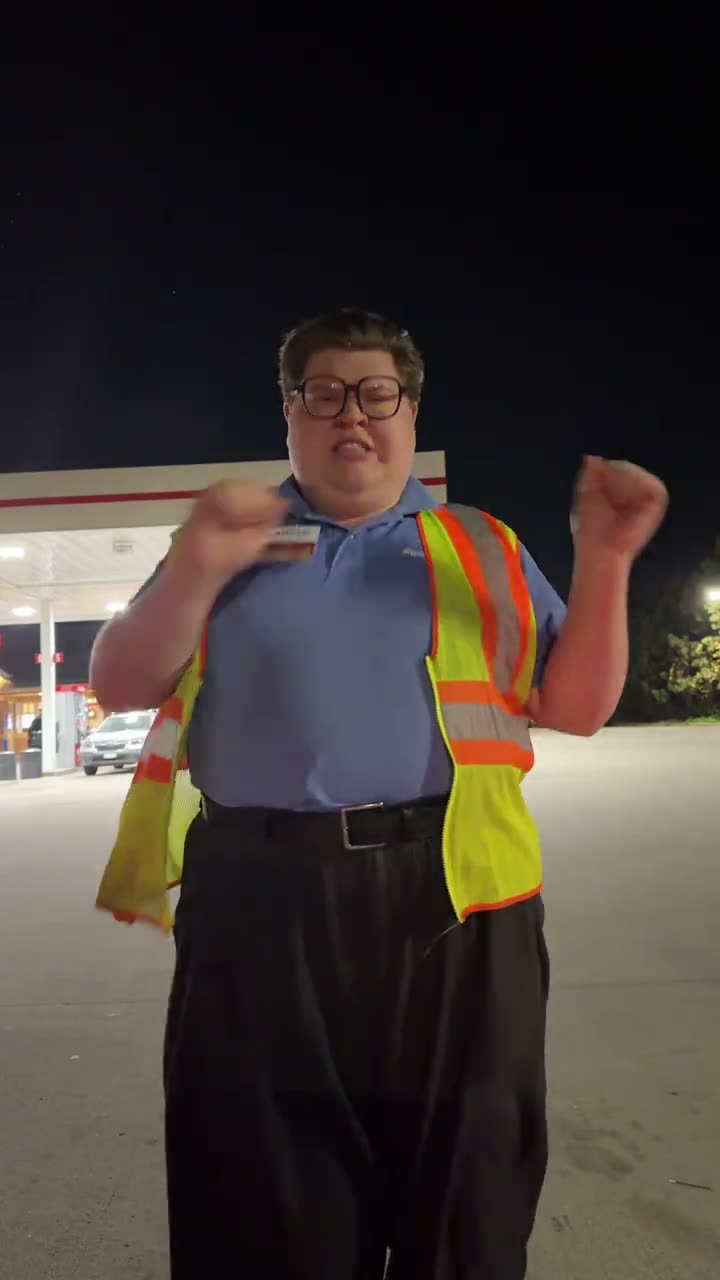
The linked TikTok by @phatboylandy shows one dancer beneath a lit forecourt canopy at night. The dancer starts with a small shoulder bounce, brings both hands toward the chest, raises their arms and sways. The page uses a silent vertical clip, so its preview shows the movements without the post’s music.
The original post was published on Nov 8, 2026. When checked on Nov 13, it had 1M views and 113K likes. Those figures describe the linked post at the time of the check. They do not predict how a new video will perform. The guided page keeps the setting and dance sequence in the reference while one photo takes the solo dancer’s role.
| Time | Beat |
|---|---|
| Shot 1 | The dancer begins beneath the lit forecourt canopy with a small shoulder bounce. |
| Shot 2 | Their hands come toward the chest as the shoulders roll. |
| Shot 3 | They raise both arms and sway from side to side. |
| Shot 4 | They finish with their arms open against the night setting. |
02How to make the Jingle Bell Rock Dance AI video from one photo
AI Trend Club has a prepared flow for this trend, so you do not write an AI prompt there. Start on the trend page, add one photo for the dancer, and review the credit amount before you submit. The site runs in your browser, and the page says videos stay private to your account.
- Open the trend pageGo to the Jingle Bell Rock Dance page to view the original post, the silent preview and the dance sequence.
- Press Create your ownThe button opens the browser-based creator. There is no app to install and no prompt field to fill in.
- Add one photoChoose one photo of yourself or a pet that you have permission to use. It takes the solo dancer’s role in the reference.
- Choose a resolutionA 480p video costs 553 credits. A 720p video costs 1,245 credits. Check the button for the current total before you spend.
- Make and download the videoTap Make my video and wait a few minutes. The download is silent, so add the Jingle Bell Rock sound in TikTok or CapCut if you want it.
03The photo that works
The page asks for one photo and names a full-body view as the role hint. That matters for a routine with shoulder, arm and side-to-side movements: the dancer needs room in the frame. The source page’s fixes also explain what to try if the face or fur changes or if the dancer looks cropped.
- Use one clear photo of yourself or a pet that you have permission to use.
- Show the full body clearly, with room around the subject.
- Choose a photo with even light on the face or fur.
- Avoid a group photo with several possible leads.
- If the face or fur changes, try a clearer photo with the subject facing the camera.
- If the dancer is cropped, use a full-body photo with room around the subject.
04The Jingle Bell Rock Dance AI prompt
There is no prompt to write in the AI Trend Club flow. If you want to try the idea in another video model that accepts a reference image and clip, start with the motion prompt below and adjust it for that tool.
Recreate the night forecourt dance from the reference clip. The person in the reference photo takes the solo dancer's place beneath the lit canopy. Begin with a small shoulder bounce, then bring both hands toward the chest as the shoulders roll. Raise the arms and sway from side to side, finishing with the arms open. Keep the nighttime forecourt, canopy lights, vertical framing, movement order and timing from the reference. Change only the lead. Keep the clip silent.05CapCut template or AI video?
A CapCut template is an editing layout for clips you record or select yourself. It can arrange your footage, but it does not put your face into the original dancer’s forecourt scene. The AI video flow starts with one photo and uses the linked clip as the guide for the setting and movement.
The page’s preview is silent and the download does not include the trend sound. After downloading your own result, you can add the sound in TikTok or CapCut, then add captions or make other edits there. Keep the source post credited when you share a remake so viewers can find the dancer who started the reference.
06Is the Jingle Bell Rock Dance AI video free?
You can watch the reference and open the trend page without buying a video. Making a new video uses credits. A new account receives 25 welcome credits, enough for a few images but not enough for this trend video. The creator shows the exact video total before you spend, and credits for a failed video come back automatically.
The Week pass costs $6.99 and includes 800 credits. That covers one 480p Jingle Bell Rock Dance video at 553 credits, but not one 720p video at 1,245 credits. The 1,000-credit pack costs $9.90 and also covers the 480p option, but it is short of the 720p total. Check your balance and the displayed total before you submit.
| Option | Price | Credits |
|---|---|---|
| Week pass | $6.99 | 800 |
| 1,000 credits | $9.90 | 1,000 |
07Post it with the source credited
The Jingle Bell Rock page provides a silent preview. Add the trend sound in TikTok or CapCut after downloading if you want the familiar music with your new video. Credit @phatboylandy and link the original TikTok shown on the trend page. Describe your own photo as the dancer, and keep the source clip distinct from the video you made.
The bright vest, dark night and simple shoulder and arm movements give the routine a playful winter feel. Keep a caption short and tied to what is visible in your result.
- A shoulder bounce beneath the lights.
- One photo takes the lead for a winter dance.
- Arms up, sway side to side, and finish the routine.
08Questions
- What is the Jingle Bell Rock Dance trend?
- It is a short solo routine beneath a lit forecourt canopy, with shoulder and arm movements. The page preview is silent.
- Can I use a pet photo?
- Yes. Add one clear photo of yourself or a pet to take the solo dancer’s role.
- Which AI makes the Jingle Bell Rock Dance video?
- It uses an AI video model guided by the original clip. The trend facts do not name a specific model.
- Can I make it on my phone?
- The creator runs in a browser, so there is no app to install. Check the credit total before you submit.
- Who posted the original?
- @phatboylandy posted the linked TikTok on Nov 8, 2026. The trend page links to that post.