01What happens in the Baby Boom trend
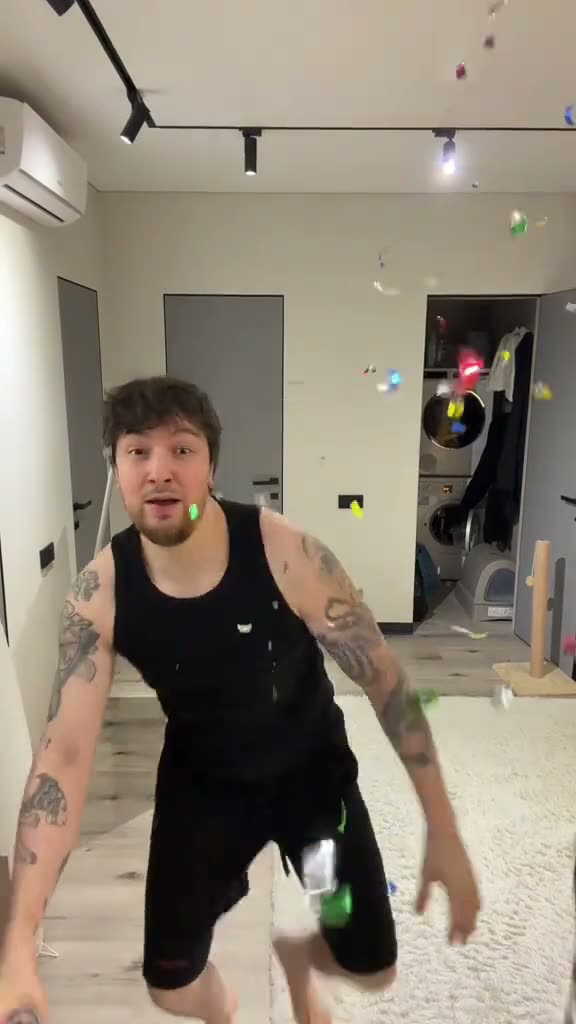
The Baby Boom clip begins in a doorway. An adult pulls a party popper, confetti falls through the room, and the performer moves closer to the camera for a lip-sync ending. The short cut makes the shift from a wide room view to a close-up easy to follow.
The TikTok by @vladragovsky was posted on Nov 11, 2026. On Nov 15, the source had 1.1M views and 244K likes. The trend is also called бейби бум or Shipuchka in the evidence collected for this page. The common thread is the confetti pop followed by a close-up, not a general video about baby boomers.
| Time | Beat |
|---|---|
| Shot 1 | The performer stands in a doorway with a party popper. |
| Shot 2 | Confetti falls across the room. |
| Shot 3 | The performer moves toward the camera. |
| Shot 4 | A close-up lip-sync finishes the sequence. |
02How to make the Baby Boom AI video from one photo
The AI Trend Club page uses the linked TikTok as its visual reference. You add one adult portrait for the lead, and the reference supplies the doorway, confetti and close-up timing. You can watch the original and review the photo role before opening the creator. No written prompt is required on the site.
You can stop after reviewing the page. The source post remains linked above the creator button, so you can compare the original scene with the role description before uploading a photo.
- Open the trend pageOpen Baby Boom and play the linked source clip. Check the creator credit and the sequence before you start. Watching the source does not start a render.
- Choose one portraitAdd one clear adult portrait for the performer. This page has one lead role, so use one person rather than a group photo.
- Confirm photo permissionContinue to the creator and confirm you have permission to use the image. The photo supplies the lead identity; the reference supplies the room, confetti and movement.
- Review resolution and creditsChoose 480p standard quality for 553 credits or 720p HD for 1,245 credits. Read the exact amount shown on the button before you spend.
- Make and download the clipTap Make my video and wait for the render. Download it with the included trend sound or choose the silent version if you want to add audio later.
03The photo that works
Use one adult portrait for the performer in the doorway. A clear image helps the system place one lead without confusing it with a second person. The trend page lists a single photo role, and its fixes recommend a sharper image with one centered subject.
- Choose one adult, not a group.
- Keep the face visible and centered.
- Use a sharp portrait rather than a blurry image.
- Avoid a hat or object that hides the face.
- If the subject is hard to place, choose a photo with one person in the frame.
04The Baby Boom AI prompt
AI Trend Club does not ask you to write a prompt. If you are using another video model that accepts a reference clip and an image, this shot description can be a starting point. Keep the same lead and sequence from the linked source.
Recreate the vertical doorway clip. The person in the reference photo enters the room, pulls a party popper and lets the confetti fall around them. Keep the small room, the original camera position and the quick move toward the lens. Bring the person into a closer frame for the lip-sync ending. Preserve the same face and hair in every shot. Do not add another lead, change the room or place words over the image. Keep the movement simple and close to the original timing.05CapCut template or AI video?
A CapCut template usually arranges clips that you record yourself. You film the doorway, the pop and the close-up, then line those moments up in an edit. That approach gives you control over your own footage, but it does not place a portrait into the linked original scene.
The AI video route on this page uses the TikTok as a visual reference. Your portrait takes the lead in the doorway while the room, confetti and cuts come from the reference. The page is for making a version of the same short sequence, not for editing a video you already filmed.
After downloading, you can still use CapCut to trim the result or add captions. The AI Trend Club page offers a version with the trend sound and a silent download. The original source stays linked on the trend page.
- Record your own party-pop scene for a template edit.
- Use the linked clip and one portrait for the AI flow.
- Add captions or make a separate cut after downloading.
06Is the Baby Boom AI video free?
Watching the original TikTok and viewing the trend page are free. Making the video uses credits. A new account receives 25 welcome credits, enough for a few still images but not enough for this video. Check the creator button for the current amount before confirming a render.
One standard 480p render uses 553 credits. The 720p option uses 1,245 credits. The Week pass costs $6.99 and includes 800 credits, so it covers the standard option. The 1,000 credits pack costs $9.9. If a video render fails, its credits come back automatically.
| Option | Price | Credits |
|---|---|---|
| Week pass | $6.99 | 800 |
| 1,000 credits | $9.90 | 1,000 |
07Post your Baby Boom video
Choose the download with the trend sound or the silent version. If you post your edit, credit @vladragovsky and link to the original TikTok. Keep the caption about the doorway pop and the close-up; do not add a singer or song name that is not needed to describe the clip.
Caption ideas:
A confetti pop, then the close-up.
The doorway had a surprise ending.
One quick party moment, all mine.
08Questions
- Is there a Baby Boom AI template?
- This page has a one-photo AI video flow based on the linked TikTok. Add one adult portrait for the lead.
- Which AI makes the Baby Boom video?
- The page uses an AI video model guided by the original clip. The model name is not listed here.
- Can I make it on my phone?
- Yes. The trend page runs in a browser, and you do not need to install an app.
- How many credits does it use?
- Standard 480p uses 553 credits and 720p uses 1,245 credits. The creator button shows the amount before you confirm.
- Who posted the original?
- @vladragovsky posted the linked TikTok on Nov 11, 2026. The trend page links back to it.