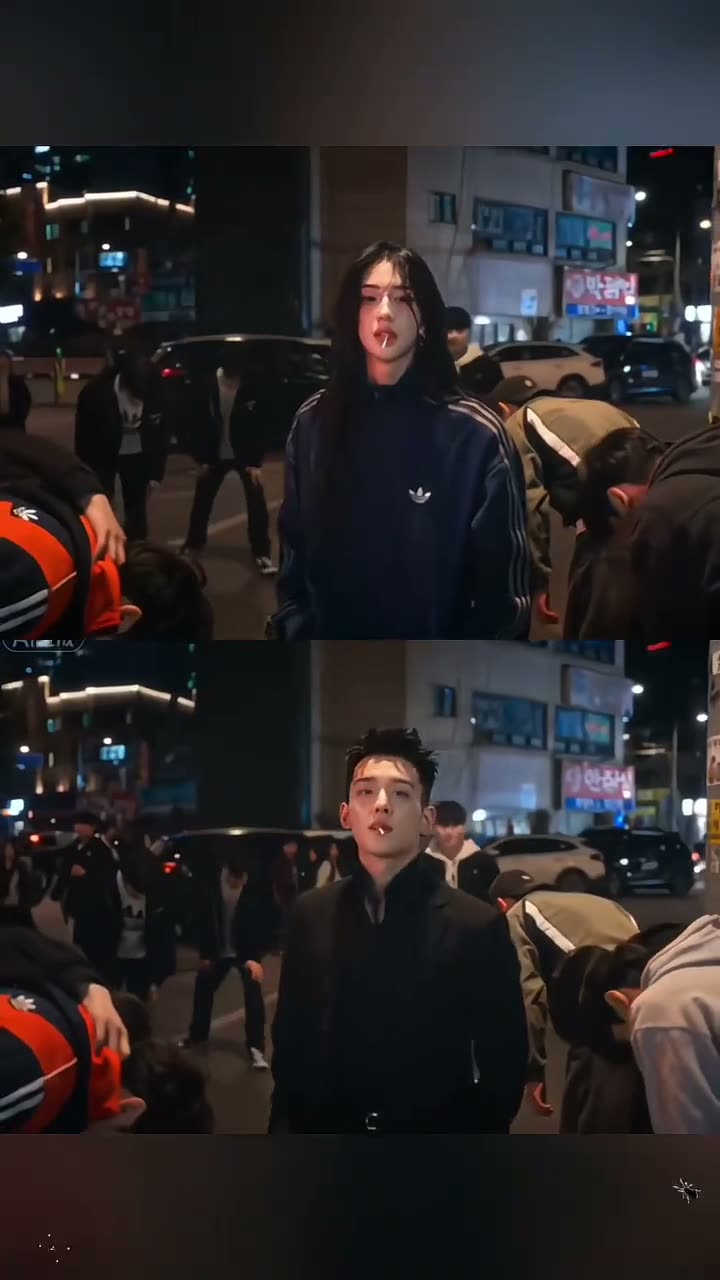
01What happens in the King Jin entrance trend
The source post shows paired example takes of an entrance edit. The upper example features a woman and the lower example features a man. Both move from a crowded night street to a close-up with a lollipop and then through a blue-lit stairwell. A later phone walkthrough includes an outdoor rooftop example with a group behind the lead.
@xdwshfzqi0k posted the TikTok on Nov 13, 2026. By Nov 15, the source had about 3M views and 171K likes. This page uses the original post in the first screen and credits the creator. One adult portrait guides the featured lower lead while the source’s other example and background people remain separate.
| Time | Beat |
|---|---|
| Shot 1 | The upper and lower examples arrive on a crowded night street. |
| Shot 2 | Both takes move into a lollipop close-up. |
| Shot 3 | The examples continue through a blue-lit stairwell. |
| Shot 4 | A rooftop group scene appears in the later phone walkthrough. |
02How to make the King Jin AI video from one photo
The creator uses the linked TikTok as the reference for the entrance sequence. The uploaded photo takes the featured lead role in the lower example. The upper example, street crowd and locations provide the surrounding scene. You can review the source and photo role before you open the creator. No written prompt is required on AI Trend Club.
The source has multiple example takes, so read the role description before uploading. This one-photo flow targets the lower lead in the paired examples. It does not ask you to identify the creator or any person shown in the original.
- Open the trend pageOpen King Jin Entrance and play the source post. Review the street, lollipop close-up and stairwell, and note that the post also shows a short phone walkthrough.
- Choose one portraitAdd one clear adult portrait for the featured lower lead. Use a single subject so the creator has one person to follow.
- Confirm photo permissionContinue to the creator and confirm you have permission to use the image. The photo supplies the lower lead; the reference supplies the scene order, movement and background.
- Review resolution and creditsChoose 480p standard quality for 692 credits or 720p HD for 1,556 credits. Check the button for the exact amount before you spend.
- Make and download the clipTap Make my video and wait for the render. The page lets you download a version with the trend sound or a silent version.
03The photo that works
Use one adult portrait for the featured entrance lead. The creator page has one role. A clear face makes it easier to keep the same identity through the night street, close-up and stairwell scenes. The upper example and surrounding crowd remain part of the source.
- Use one adult portrait.
- Keep the face centered and unobstructed.
- Avoid group photos.
- Avoid sunglasses or masks.
- Use a photo with one clear subject, not a tiny face in the frame.
04The King Jin AI entrance prompt
AI Trend Club does not require a written prompt. If you are using another video model that accepts a photo and a reference clip, you can adapt the scene description below. It focuses on the lower lead and leaves the upper example intact.
Recreate the entrance sequence using the person in the reference photo as the lower lead. Keep the upper example and the background crowd separate. Begin on a crowded night street with people bowing, cut to a lollipop close-up, then move through a blue-lit stairwell. End with an outdoor group scene behind the lead. Keep the vertical framing, scene order and restrained camera movement. Preserve the person’s identity from the photo throughout. Do not add names, logos, extra performers or a new setting.05CapCut template or AI video?
A CapCut template is an editing layout for clips that you record. You can film your own entrance, close-up and stairwell walk, then arrange those shots with transitions. That keeps your footage under your control, but it does not use the linked post as the scene reference.
The AI video flow uses the source post as a visual guide. One portrait is assigned to the featured lower lead, while the original setting and sequence remain the guide for the edit. The source post itself shows examples and a phone walkthrough; the page links to it so you can review the material before starting.
CapCut can still be useful after you download a result. You can trim the video or add captions there. This page does not require an app installation, and the original creator is credited on the trend page.
- Record your own entrance footage for an editing template.
- Use the linked source and one portrait for the AI flow.
- Add captions or trim the download afterward.
06Is the King Jin AI video free?
You can view the trend page and original TikTok without starting a render. Creating the video uses credits. New accounts receive 25 welcome credits, which can make a few still images but do not cover a trend video. The creator page shows the selected amount before you confirm.
A standard 480p render uses 692 credits. The 720p option uses 1,556 credits. The Week pass costs $6.99 for 800 credits, enough for the standard option. A 1,000 credits pack costs $9.9. Credits return automatically if a video render fails.
| Option | Price | Credits |
|---|---|---|
| Week pass | $6.99 | 800 |
| 1,000 credits | $9.90 | 1,000 |
07Post your King Jin entrance video
Choose the version with the trend sound or download the silent clip. If you post your edit, credit @xdwshfzqi0k and link to the TikTok. Keep the caption about the entrance sequence and avoid attaching a real person’s name to the trend.
Caption ideas:
The entrance was the whole point.
A close-up, then the stairwell.
A quiet walk with a big entrance.
08Questions
- Is there a King Jin AI template?
- This page has a one-photo AI video flow based on the linked TikTok. Add one adult portrait for the featured entrance lead.
- Which AI makes the King Jin video?
- The page uses an AI video model guided by the original clip. The model name is not listed here.
- Can I make it on my phone?
- Yes. Open the page in a browser; no app installation is required.
- How many credits does it use?
- Standard 480p uses 692 credits and 720p uses 1,556 credits. The creator button shows the amount before you confirm.
- Who posted the original?
- @xdwshfzqi0k posted the linked TikTok on Nov 13, 2026. The trend page links back to it.