01What happens in the Tying Shoes Money trend
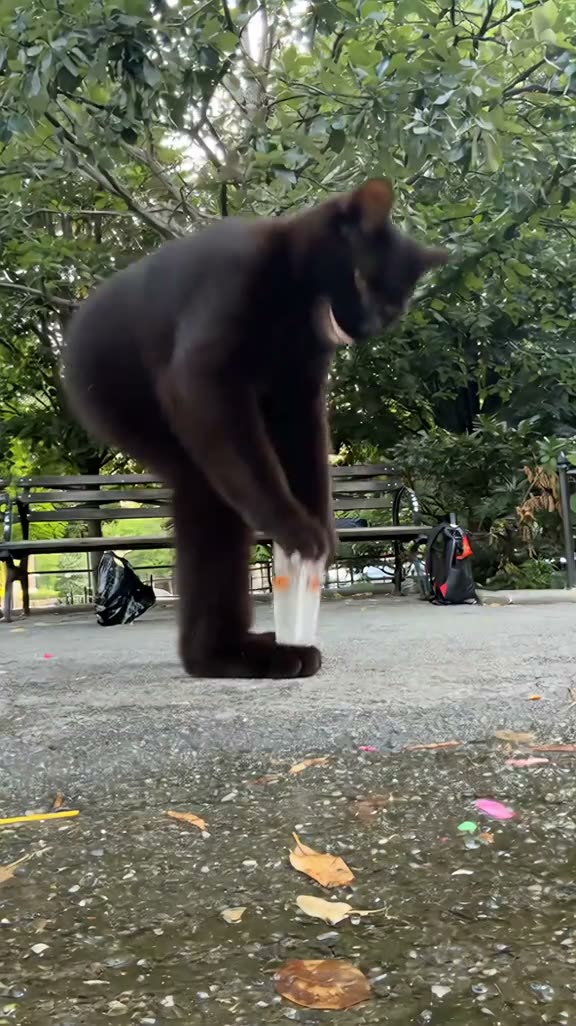
The linked TikTok shows a black cat on a leafy park path beside a clear cup. The cat sits behind it with a wide grin while passers-by drop money into the cup. The low camera keeps the cup and the approaching feet in view, turning an ordinary park moment into a tip-cup gag.
The AI cat version is by @merkurianin and was posted on Nov 11, 2026. Its caption credits @Jaywicwya for the park clip it reworks. The remix rose from 1.3M views on Nov 13 to 1.4M on Nov 14.
| Time | Beat |
|---|---|
| Shot 1 | A black cat stands on a leafy park path beside a clear cup. |
| Shot 2 | The cat grins and sits behind the cup as a hand reaches down. |
| Shot 3 | Passers-by drop money in the cup while the cat stays by it. |
| Shot 4 | A passer-by walks close to the low camera at the end. |
02How to make the Tying Shoes Money AI video from one photo
AI Trend Club uses the linked TikTok as a reference for the park setting and the lead’s movement. The workflow runs in a browser, and there is no prompt field to fill in. You can preview the original and the page before choosing to make your own version.
- Open the trend pageOpen Tying Shoes Money and watch the source clip. The page credits @merkurianin and links to the TikTok. The post caption also credits @Jaywicwya for the park scene.
- Choose one photoAdd one clear photo of yourself or a pet. The linked version uses a cat as the lead, but the page supports a person or a pet in the same single role.
- Confirm permissionPress Create your own and confirm you have permission to use the photo. The original clip guides the park scene, the cup and the timing while the uploaded subject takes the lead’s place.
- Review the quality and creditsChoose 480p standard quality for 600 credits or 720p HD for 1,348 credits. The amount appears on the button before you spend anything.
- Make and download the videoTap Make my video and wait a few minutes for the result. Download the version with the original trend sound or choose the silent file.
03The photo that works
Pick one clear image with one person or one pet. The trend page assigns a single lead role, and the linked clip shows a cat sitting by a cup. A simple photo makes it easier to see which subject should take that role in the reference.
- Use one clear photo.
- Show one person or one pet.
- Keep the lead visible in the frame.
- Avoid a group photo.
- Avoid several pets in one image.
- Avoid a crop that hides the face or body.
04The Tying Shoes Money AI prompt
There is no prompt to write on the AI Trend Club page. If you want to try the idea in another video model that accepts a reference clip and a photo, this prompt describes the scene in order.
Recreate the reference scene on the park path. The person in the reference photo takes the black cat’s place, walks up to the clear cup and sits behind it as passers-by leave money. Keep the leafy park, low phone camera, backpack, cup and same timing. Let the lead grin as in the reference. Keep each passer-by’s own appearance and retain the photo’s identity for the whole clip. Do not add another lead, a new story, captions or a brand mark.05CapCut template or AI video?
A CapCut template can arrange clips that you record. This AI video uses the linked park clip as a reference and puts one photo into the lead role. The reference supplies the path, cup, low camera and passers-by, so you do not need to film those parts yourself.
After you download the video, CapCut can help you trim it or add captions. The page offers a download with the trend sound and a silent version. Choose the sound option that fits the social app where you plan to share it.
The source credit stays visible on the trend page. If you repost the idea, keep the creator attribution and link to the original. A caption can stay focused on the cat, cup and the unexpected tips.
- Arrange your own clips in a CapCut template.
- Use the linked clip and one photo in the AI flow.
- Edit captions or timing after downloading.
06Is the Tying Shoes Money AI video free?
Watching the source and opening the trend page are free. Video generation uses credits. A new account receives 25 welcome credits, enough for a few images but not enough for this video.
The standard 480p option costs 600 credits. The 720p HD option costs 1,348 credits. Check the button before spending because it shows the current amount for the selected quality. Credits for a failed video render come back automatically.
A Week pass costs $6.99 for 800 credits. A 1,000 credits pack costs $9.90. The Week pass has enough credits for the standard option shown here. Review the live amount on the page before you start.
| Option | Price | Credits |
|---|---|---|
| Week pass | $6.99 | 800 |
| 1,000 credits | $9.90 | 1,000 |
07Post your Tying Shoes Money video
You can download the clip with its trend sound or silently. When you share it, credit @merkurianin for the linked TikTok version and retain its credit to @Jaywicwya for the park clip. Keep the post about the cup and the cat’s grin.
Caption ideas:
The cup got a very different tip.
One grin on the park path.
A small cup, a big surprise.
08Questions
- Is there a Tying Shoes Money AI template?
- The AI Trend Club page has a one-photo video flow based on the linked TikTok. Add one person or pet photo to play the lead.
- Which AI makes the Tying Shoes Money video?
- It uses an AI video model guided by the original clip. The page follows the linked park scene.
- Can I make it on my phone?
- Yes. The workflow runs in a browser, so you can open the trend page on your phone without installing an app.
- How much does it cost?
- From $6.99: the $6.99 Week pass (800 credits) covers one standard video. 480p standard costs 600 credits and 720p HD costs 1,348 credits. The button shows the selected amount before you spend.
- Who made the original?
- The linked TikTok version is by @merkurianin. Its caption credits @Jaywicwya for the park clip.