01What happens in the Opa Opa Opa trend
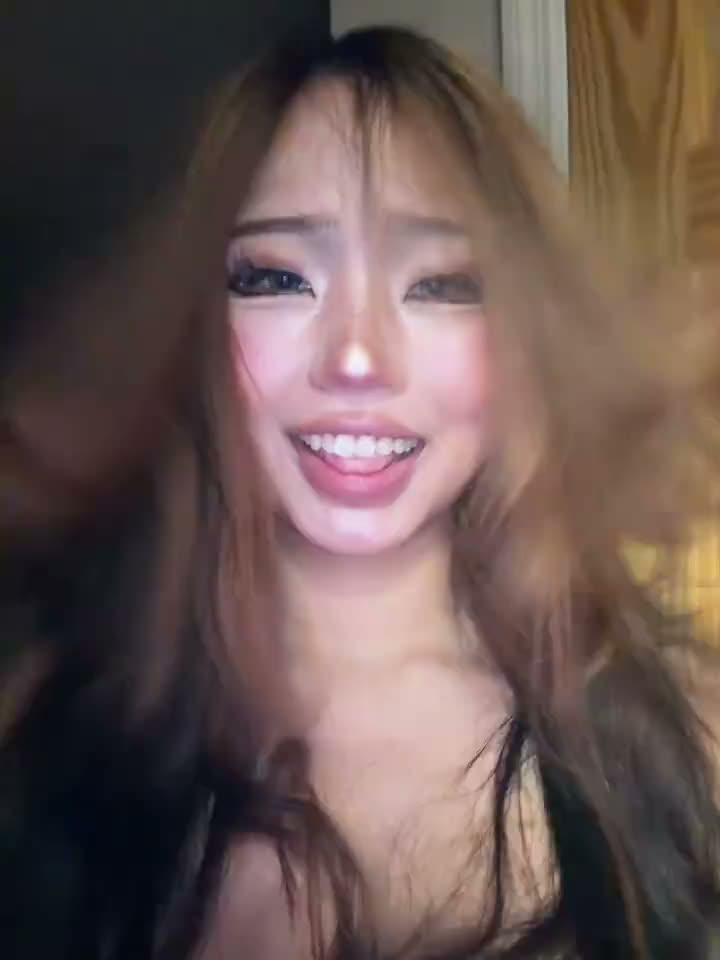
The linked TikTok is a close indoor selfie. The creator turns her head, and her long hair lifts and swings across her shoulders. The clip is short, so the motion stays at the center of the scene.
The Opa Opa Opa trend works as a simple visual effect. It does not need a group routine or a change of location. One person stays in front of the camera while the hair movement gives the clip its main beat. The source is seven seconds long and keeps a vertical 3:4 frame.
| Time | Beat |
|---|---|
| Shot 1 | A creator faces the camera in a close indoor selfie. |
| Shot 2 | She turns her head as her hair lifts and swings. |
| Shot 3 | Her hair moves across her shoulders while her expression changes. |
| Shot 4 | She finishes with one more small head movement toward the camera. |
02How to make the Opa Opa Opa AI video from one photo
The AI Trend Club page follows the linked source clip. You can watch the original and open the trend page before choosing to make a video. The page runs in a browser, and there is no prompt field to fill in.
Use the same one-photo setup shown on the page. The photo takes the creator’s place. The framing, room and sequence of small head movements stay guided by the reference clip.
The output uses the same vertical orientation as the linked clip. The page shows the source, the creator credit and the standard 480p option with its credit cost, so you can review them before you submit.
- Open the trend pageGo to the Opa Opa Opa trend page and watch the original clip. The original and the page can be viewed before you start a video.
- Choose one photoUse one clear, front-facing photo with the whole head and hair visible. The page has one role for one person.
- Start the videoPress Create your own, add the photo and confirm that you have permission to use it. The site does not ask you to write a prompt.
- Check the quality and costThe page offers one standard 480p video for 323 credits. Check the button for the exact amount before spending credits.
- Make and download itTap Make my video and wait a few minutes. Download the vertical clip with the trend sound or choose a silent version.
03The photo that works
Pick a single photo that makes the person’s face and hair easy to see. This effect is about the head turn and the hair moving around the shoulders, so keep the full head inside the frame.
The photo hint on the page is short: use one clear, front-facing photo. The original clip supplies the scene and the movement. A photo that follows that guidance gives the video model a clear lead to place in the close selfie.
- Use one photo of one person.
- Face the camera in a clear, front-facing view.
- Keep the top of the head and the hair visible.
- Avoid a group photo with several people.
- Avoid a side or back view that hides the face.
04The Opa Opa Opa AI prompt
AI Trend Club does not require a written prompt. If you are trying the effect in another video tool that accepts a source clip and a photo, you can start with the prompt below and adjust it for that tool.
Create a short vertical selfie scene based on the reference clip. The person in the reference photo faces the camera indoors in a close shot. As the sequence continues, they make small head turns and let their hair rise, sway, and fall across their shoulders. Keep their identity from the photo and preserve the vertical selfie framing, indoor room, and doorway. Let their expression change slightly, then finish with a small head movement toward the camera. Keep the source setting and timing. Do not add text, another person, or a new location.05CapCut template or AI video?
A CapCut template puts together clips that you record yourself. It can help arrange your own footage, but it does not place your photo into the linked creator’s original scene. An AI video uses a reference clip and puts the person from your photo into its shots.
For this Opa Opa Opa trend, that difference matters because the close selfie and hair movement are the main parts of the effect. The AI Trend Club page uses the linked clip as its reference. The original is shown with a creator credit, and the generated video follows its framing and motion.
You can still use CapCut after you download a video. It can add captions or help you make a separate edit. If you choose the silent download, add audio in the social app where you plan to share it. If you choose the version with the trend sound, the site includes that sound in the downloaded video.
06Is the Opa Opa Opa AI video free?
Viewing the original and the trend page is free. Making the video uses credits. A new account receives 25 welcome credits, which are enough for a few images but not enough for a trend video.
The Opa Opa Opa page currently offers one standard 480p video for 323 credits. The button displays the exact amount before you spend, and a failed video returns its credits automatically. The Week Pass has 800 credits, while the 1,000-credit pack is a separate purchase.
The Week Pass can cover one video at the listed quality. The 1,000-credit pack leaves extra credits for another image or video. Check the live amount on the button before submitting, and use the same page to review the current option and sound choices.
| Option | Price | Credits |
|---|---|---|
| Week Pass | $6.99 | 800 |
| 1,000 credits | $9.90 | 1,000 |
07Post your Opa Opa Opa video
Choose whether to download with the trend sound or silently. If you share the clip, credit the original creator, @cellow111, and link back to the TikTok. You can keep the caption focused on the visual movement rather than adding a new story.
Caption ideas based on the clip:
The hair found its own rhythm.
One little turn, then the bounce.
A close-up with a little movement.
08Questions
- Is there an Opa Opa Opa AI template?
- The AI Trend Club page has a one-photo workflow based on the linked TikTok. Add one person’s photo to play the lead in the close selfie.
- Which AI makes the Opa Opa Opa video?
- It uses an AI video model guided by the original clip. The page follows the source framing and movement.
- Can I make it on my phone?
- The workflow runs in a browser, so there is no app to install. Open the trend page, add a photo and follow the video steps.
- Do I need to write an AI prompt?
- No. AI Trend Club does not require a prompt. Add your photo and use the controls on the page.
- Who posted the original?
- @cellow111 posted the linked TikTok on Oct 19, 2026. The trend page links back to the original creator.