01What happens in the kitten merge trend
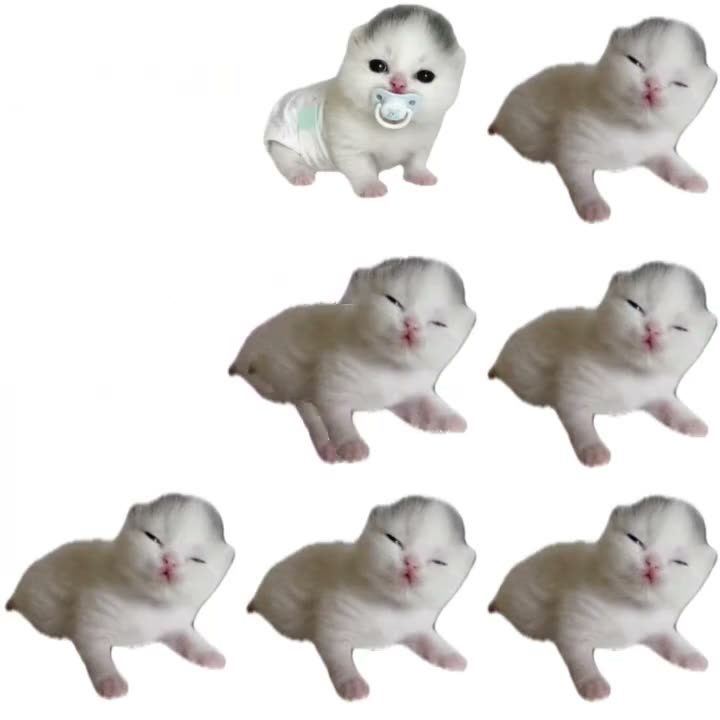
The clip presents kitten portraits against a plain white background. A small look appears first, then more rounded versions join the sequence. The contrast between the small and round pet looks creates the visual joke; it is a merge sequence rather than a dance.
This guide follows the kitten version posted by @whitejvmcfn on Nov 3, 2026. The AI Trend Club page links to that TikTok and uses a silent square excerpt. The downloadable video can include the trend sound, or you can choose a silent version.
| Time | Beat |
|---|---|
| Shot 1 | A small white kitten appears against a plain background. |
| Shot 2 | A second kitten portrait joins the frame. |
| Shot 3 | Rounder kitten versions appear beside the smaller look. |
| Shot 4 | The sequence ends on a soft, round kitten portrait. |
02How to make the pet merge AI video from one photo
The reference clip guides the sequence and the one-photo template provides the lead. You do not need to write a prompt on AI Trend Club. The page opens in a browser, and no separate app is needed. You can use a clear photo of your pet or yourself; the kitten is the featured role in the reference.
- Open the trend pageGo to the Ding Ding Ding page on AI Trend Club and press Create your own.
- Start the video flowThe page loads the reference clip and its one-photo role. You can watch the original before you add a photo.
- Add one photoChoose one clear photo of your pet or yourself. Confirm you have permission to use the photo.
- Choose a resolutionOne 480p video uses 692 credits. One 720p video uses 1,556 credits. Check the exact amount on the button before spending.
- Make and download the videoTap Make my video and wait a few minutes. When it is ready, download with the trend sound or choose a silent file. The reference and output keep a square frame.
03The photo that works
The template uses one photo for the featured pet role. A clear view of the same animal helps the sequence stay easy to follow, especially when the rounder versions appear. The current flow also accepts a person photo, but the linked example is a kitten version.
- Use one clear photo of your pet or yourself.
- Keep the face and markings visible.
- Choose a photo where the animal is easy to recognize.
- Avoid a blurry or very dark image.
04The Ding Ding Ding AI prompt
You do not need a prompt on the AI Trend Club page. The template follows the reference clip. If you are testing the idea in a different video model that accepts a reference clip, use this starting description to keep the pet sequence and square frame together.
Create a short square video based on the reference clip. The pet in the reference photo is the lead throughout, with its species, face, fur color, and markings kept consistent. Begin with a small kitten portrait against a plain white background. Let a second portrait join, then show the same pet in increasingly round merged forms. Keep the reference sequence and simple layout. Use gentle motion and do not add extra people, labels, logos, or a watermark.05CapCut template or AI video?
A CapCut template arranges footage or photos that you provide. This AI video uses the linked reference and puts one photo into its featured pet role. The reference supplies the white background and the merge sequence; your photo supplies the identity of the lead. That is the main difference between assembling your own media and following this ready-made scene.
On AI Trend Club, you do not write a prompt or install an app. Open the page in a browser, add one photo, and check the credit cost before you render. After the video is ready, download it with the trend sound or silently. You can then use a video editor to add a caption or prepare the square clip for a post.
06Is the pet merge AI video free?
You can view the trend page and linked reference without paying. New accounts receive 25 welcome credits, which are enough for a few images but not a trend video. The price depends on the video resolution: the 480p option uses 692 credits, and the 720p option uses 1,556. The button shows the exact amount before you spend, and failed renders return credits automatically.
The Week pass is the lowest-cost entry in the current price list. It gives 800 credits, enough for one standard 480p video of this trend. A 720p render costs more credits than that pass includes. The 1,000-credit pack is a one-time option, but it still does not cover the 720p amount by itself.
| Option | Price | Credits |
|---|---|---|
| Week pass | $6.99 | 800 |
| 1,000 credits | $9.90 | 1,000 |
07Post it
Download with the trend sound or silently, then credit @whitejvmcfn when sharing your own version. Link back to the original TikTok so people can see the kitten example. The source page preview is silent; the download can include the trend sound.
- “My pet joined the merge game.”
- “Starting small, ending round.”
- “One photo, a rounder pet sequence.”
08Questions
- What is the Ding Ding Ding meme?
- It is a pet merge clip that shows kitten portraits in rounder versions against a plain background. The linked example is a square kitten video.
- Which AI makes the kitten merge video?
- An AI video model guided by the original clip. AI Trend Club uses the reference and your photo in its browser-based video flow.
- Can I use my dog or cat photo?
- Yes. The current template accepts a person or a pet photo. Use one clear photo of the animal whose role you want to fill.
- Can I make it on my phone?
- Yes. The site runs in a browser and does not require an app installation.
- Who posted the kitten example?
- @whitejvmcfn posted the TikTok on Nov 3, 2026. The trend page links to the original.