01What happens in the Waist Heart trend
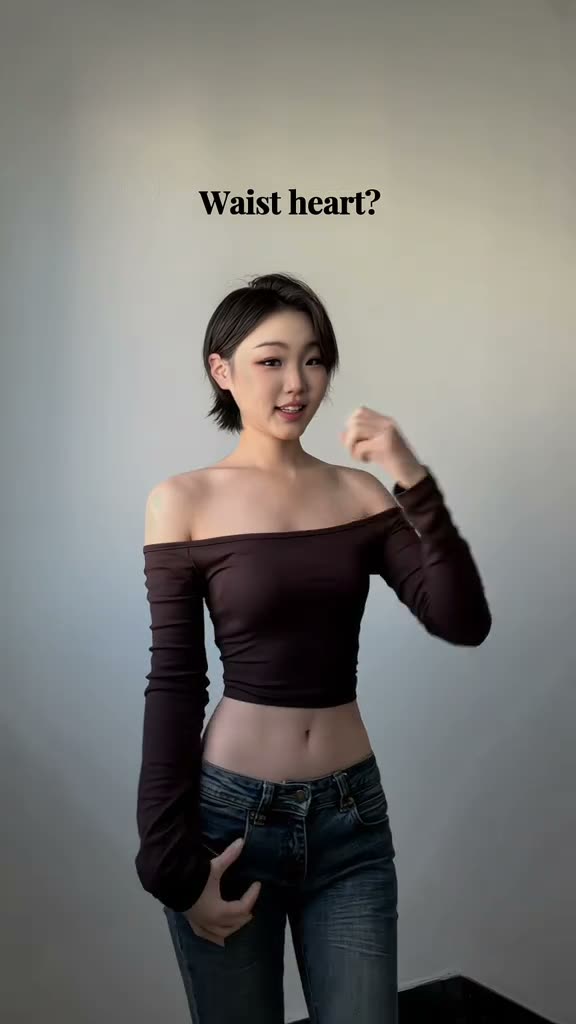
A person stands against a plain wall and faces the camera. The hands move near the waist to form the small heart pose, then change position before one hand comes near the chin. The vertical clip has one clear lead and a simple background.
This guide follows the TikTok posted by @divanaa_88 on Nov 6, 2026. The page links to that post and shows a silent excerpt. The trend sound is available when you download the finished video, or you can choose a silent file.
| Time | Beat |
|---|---|
| Shot 1 | The dancer faces the camera and begins the waist-heart pose. |
| Shot 2 | She moves her hands near her waist while keeping the pose in frame. |
| Shot 3 | She places one hand near her hip and changes the other hand position. |
| Shot 4 | She finishes with one hand near her chin. |
02How to make the Waist Heart AI video from one photo
The page uses the original clip as a reference. You add one photo of yourself, and the video flow puts you in the dancer’s role. There is no prompt box to fill in and no app to install. The page runs in a browser, so you can follow these steps from a phone or computer.
- Open the trend pageGo to the Waist Heart page on AI Trend Club and press Create your own.
- Start the video flowThe page opens the template for this reference clip. Keep the creator link visible if you want to compare the original.
- Add your photoUpload one photo of yourself. Confirm you have permission to use the photo before continuing.
- Choose a resolutionOne 480p video uses 461 credits. One 720p video uses 1,037 credits. Check the exact amount on the button before you spend.
- Make and download the videoTap Make my video and wait a few minutes. When it is ready, choose the version with the trend sound or a silent download. The clip keeps its vertical framing.
03The photo that works
This template is set up for one person, so use a clear photo of yourself. The pose happens around the waist, which means the frame should leave enough room to see the body position. The face also needs to be visible so the main person in the video can follow your photo.
- Face the camera in the photo so your features are visible.
- Leave some room around your upper body and waist.
- Avoid a crop that hides the gesture.
- Use a clear photo rather than a blurry or very dark one.
04The Waist Heart AI prompt
AI Trend Club already uses the original clip as the guide, so you do not need to write a prompt on the page. If you want to test the look in another video model that accepts a reference clip, you can start with this description and adjust it to that tool.
Create a short vertical video based on the reference clip. The person in the reference photo is the only lead and keeps the same face, hair, and appearance throughout. In a simple light room, face the camera and make the small heart-shaped gesture at the waist. Keep the short hand movements, framing, and hand-near-chin finish in the same order. Keep the wall plain and the motion natural. Do not add extra people, text, logos, or a watermark.05CapCut template or AI video?
A CapCut template builds an edit from footage or photos you provide. This AI video uses the linked reference clip and places your photo in the dancer’s role, so the setting and hand sequence come from the reference. The two workflows start from different material: one assembles your own clips, while the other follows an existing scene.
On AI Trend Club, you do not write a prompt or install an app. Add your photo in the browser flow, check the credits before making the video, and choose the resolution. The finished clip can be downloaded with its trend sound or silent. After downloading, you can add a caption or make other edits in a video editor if you want to prepare it for a post.
06Is the Waist Heart AI video free?
You can view the trend page and its original reference without paying. A new account receives 25 welcome credits, which cover a few images but not a full trend video. The render uses credits based on the resolution you select. A failed video returns its credits automatically, and the button shows the cost before you start.
The Week pass is the lowest-cost starting option listed here. The 1,000-credit pack is another one-time option. The 480p video uses fewer than 800 credits; a 720p video needs more than the Week pass includes, so check your balance and the button before you choose.
| Option | Price | Credits |
|---|---|---|
| Week pass | $6.99 | 800 |
| 1,000 credits | $9.90 | 1,000 |
07Post it
Choose the version with the trend sound or the silent download, then credit @divanaa_88 when you share your own result. Link to the original TikTok so viewers can see the source pose. The source page preview is silent, but the downloadable video can include the trend sound.
- “Tried the waist-heart pose with my photo.”
- “A small hand gesture, made personal.”
- “Here is my take on the heart pose.”
08Questions
- What is the waist heart trend?
- It is a short vertical clip of one person making a small heart-shaped pose near the waist, followed by a few hand gestures. The linked TikTok is by @divanaa_88.
- Which AI makes this video?
- An AI video model guided by the original clip. AI Trend Club uses the reference and your photo in its browser-based video flow.
- Can I make it on my phone?
- Yes. The site runs in a browser and does not require an app installation.
- Can I use a pet photo?
- No. This template is set up for a person photo. Use one clear photo of yourself.
- Who posted the original?
- @divanaa_88 posted the TikTok on Nov 6, 2026. The trend page links to the original.