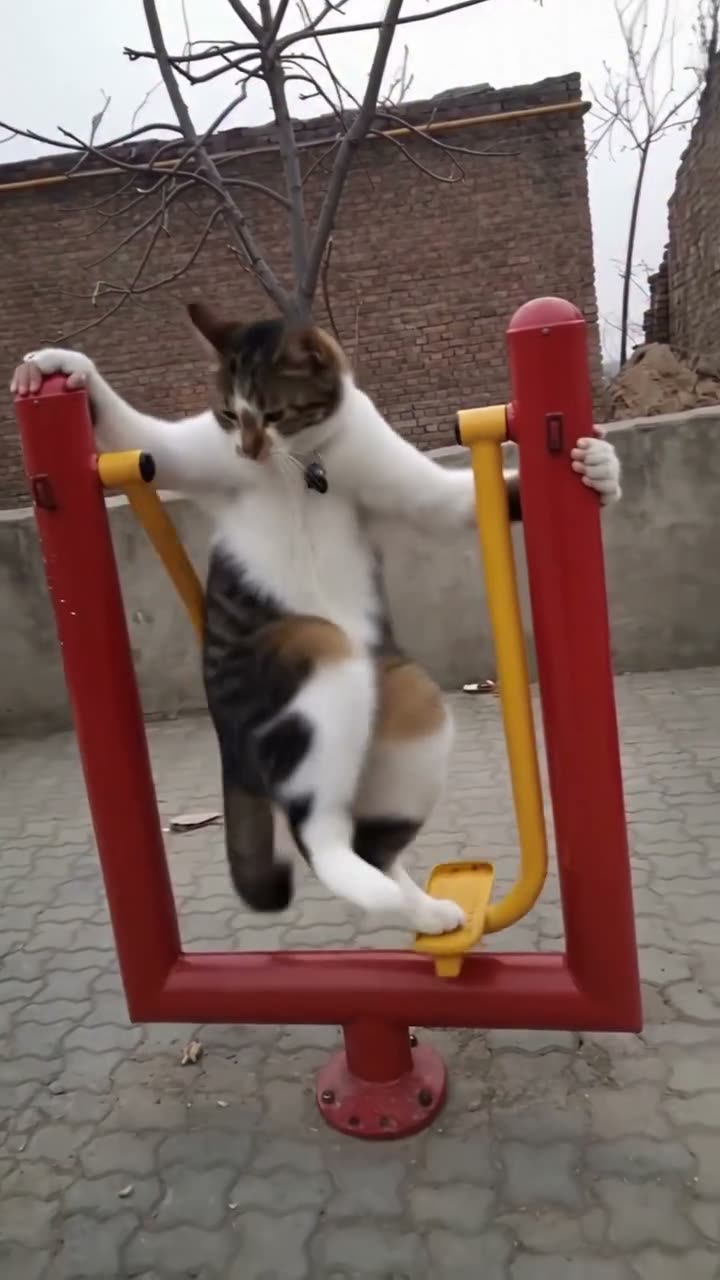
01What happens in the Cat Gym trend
The Cat Gym clip puts a cat on an outdoor air walker, a machine with moving footplates. The cat holds the red handles as the yellow arms move, then slips down from the machine. A familiar piece of exercise equipment becomes the setup for a quick physical joke.
The linked original is an Instagram reel by @pokeys__world, posted on Nov 7, 2026. On Nov 14, the post had 836K likes in the metadata we could read. Its view count was unavailable, so the page does not guess at one.
| Time | Beat |
|---|---|
| Shot 1 | A cat grips an outdoor air walker and steps onto its yellow footplates. |
| Shot 2 | It holds the red handles as its feet move with the machine. |
| Shot 3 | The yellow arms swing while the cat begins to lose its balance. |
| Shot 4 | The cat slips down from the machine as the shot ends. |
02How to make the Cat Gym AI video from one photo
The AI Trend Club page follows the linked reel as a reference. You can watch the original and review the photo role before starting. Everything runs in a browser, and the page does not ask you to write a prompt. One clear photo of a person or pet can play the lead.
- Open the trend pageOpen the Cat Gym page and watch the muted Instagram clip. The creator credit links back to the post, so you can see the exact air-walker sequence before you choose to make a video.
- Choose one photoAdd one clear photo of yourself or a pet. The page uses one lead role, so pick one subject for the scene. Check that your photo is the one you want to use before you continue.
- Confirm permissionPress Create your own and confirm you have permission to use the photo. The browser workflow uses the source clip to guide the movement and keeps the photo in the lead role.
- Review the quality and creditsChoose standard 480p for 507 credits or HD 720p for 1,141 credits. The current amount appears on the button before you spend anything.
- Make and download the videoTap Make my video and give the render a few minutes. When it is ready, download the clip with the trend sound or choose a silent version.
03The photo that works
Choose one photo where the person or pet is easy to see. The page has one lead slot, and the source scene has a single cat on the outdoor machine. Keeping the upload focused on one subject gives the video model a clear role to follow.
- Use one clear photo.
- Show one person or one pet.
- Keep the lead visible in the frame.
- Avoid a group photo.
- Avoid several pets in one image.
- Avoid a crop that hides the lead.
04The Cat Gym AI prompt
AI Trend Club does not require a written prompt. If you are trying the same idea in another video tool that accepts a reference clip and a photo, you can start with this description and adjust it there.
Create a vertical scene that follows the reference clip. The person in the reference photo takes the lead’s place on the outdoor air walker, holding both red handles while stepping on the yellow footplates. Keep the paved courtyard, brick wall, low phone camera and moving arms. Let the lead wobble and slip down in the same playful way, then end with the original framing. Preserve the photo identity and natural anatomy. Keep the background as shown. Do not add another lead, text, logos or a new location.05CapCut template or AI video?
A CapCut template arranges footage that you record yourself. This Cat Gym page uses the linked Instagram reel as a reference and places one uploaded photo in the lead role. That difference matters when you want the outdoor machine, low camera and slipping movement from this clip to guide the result.
You can still use CapCut after you download a video. Add captions, trim the start or end, or prepare a separate edit for a social app. If you choose the version with the trend sound, the download includes that sound. The silent option lets you add audio in the app where you plan to share it.
The trend page links to @pokeys__world and shows the source muted for viewing. The generation flow uses one photo and does not ask you to supply a text prompt.
- Use your own recorded footage with a CapCut template.
- Use the linked reference and one photo for the AI video.
- Add captions or make a separate edit after downloading.
06Is the Cat Gym AI video free?
Watching the original clip and viewing the trend page are free. Making a video uses credits. New accounts receive 25 welcome credits, enough for a few still images but not enough for this trend video.
A 480p Cat Gym video costs 507 credits. The 720p option costs 1,141 credits. The page shows the exact amount on the button before you spend. If a video render fails, the credits come back automatically.
The Week pass costs $6.99 and includes 800 credits. The 1,000 credits pack costs $9.90. Check the live button before you start so you can confirm the current quality and credit amount.
| Option | Price | Credits |
|---|---|---|
| Week pass | $6.99 | 800 |
| 1,000 credits | $9.90 | 1,000 |
07Post your Cat Gym video
Choose whether to download the clip with its trend sound or silently. If you share it, credit the original creator, @pokeys__world, and link back to the Instagram reel. Keep a caption close to the visual gag of a cat trying the outdoor machine.
Caption ideas:
The air walker had a plan.
One step, then the wobble.
A gym day with a twist.
08Questions
- Is there a Cat Gym AI template?
- AI Trend Club has a one-photo video flow based on the linked Instagram reel. Add one photo of yourself or a pet to play the lead.
- Which AI makes the Cat Gym video?
- It uses an AI video model guided by the original clip. The page shows the reference before you start.
- Can I make it on my phone?
- Yes. The workflow runs in a browser, so there is no app to install. Open the trend page and follow its photo steps.
- How much does it cost?
- From $6.99: the $6.99 Week pass (800 credits) covers one standard video. Standard 480p costs 507 credits, and 720p costs 1,141 credits. The button shows the current amount before you spend.
- Who posted the original?
- @pokeys__world posted the linked Instagram reel on Nov 7, 2026. The trend page links back to the source.