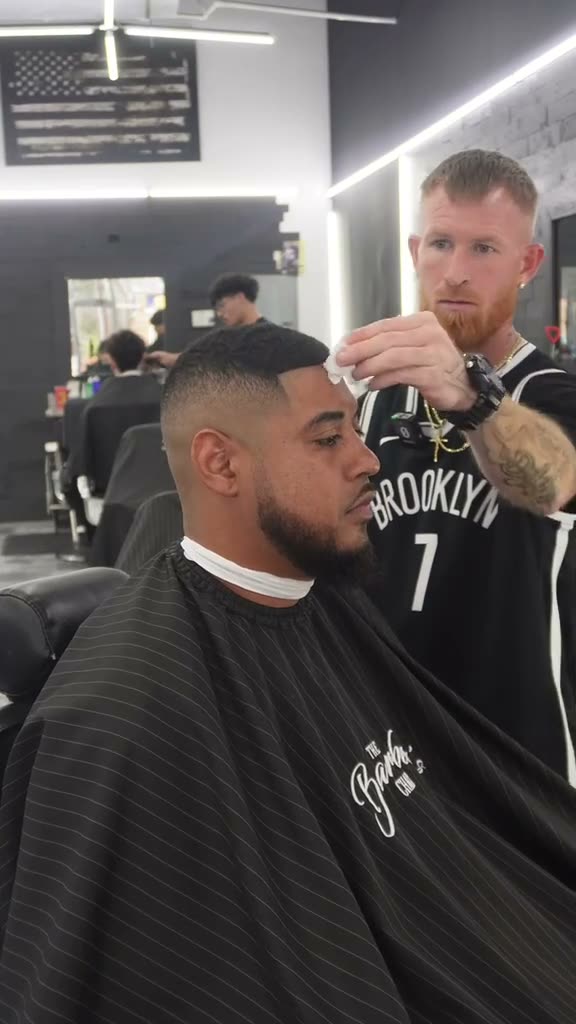
01What happens in the Boy It's Just Alcohol trend
Boy It's Just Alcohol is a short barbershop joke. A customer sits in the chair under a cape. The barber applies rubbing alcohol, the customer recoils and throws off the cape, and the barber stays calm. The two-photo template gives one role to each person. It is a scene about rubbing alcohol at a barbershop, not a drink, bar or alcohol-brand ad.
The linked TikTok reference is by @choppedbystev0. It was posted on March 12, 2024. When checked on November 14, 2026, the original had 88.6M views, 7.6M likes, 36.9K comments and 633.5K shares. Those counts describe that post at that time. They do not predict how a new edit will perform.
| Time | Beat |
|---|---|
| 0:00 | The customer sits in the barber chair with a cape. |
| 0:02 | The barber applies rubbing alcohol to the customer's forehead. |
| 0:04 | The customer recoils and starts throwing off the cape. |
| 0:06 | The barber stays composed as the short exchange lands. |
02How to make the AI video from two photos
The trend page follows the original clip and assigns a separate photo to each role. It does not ask you to write a prompt. The recipe is configured from the reference, but no generated sample has been checked, so the exact motion and likeness can vary.
- Open the trend pageGo to the Boy It's Just Alcohol page and choose Create your own.
- Add the customer photoChoose one portrait of a consenting adult for the person seated in the barber chair.
- Add the barber photoUse a second, separate portrait of a consenting adult for the barber. Check the role labels before continuing.
- Review the 480p priceThis trend is currently offered at 480p. The button shows the credit total before you spend; the current quote is 415 credits.
- Submit and downloadThe site follows the reference timing. When the render is ready, download it with the trend sound or choose a silent file.
03Choose two photos for the two roles
Use two separate adult portraits, one for the customer and another for the barber. Each photo should belong to the role shown in its upload slot. Use photos only when the people pictured have agreed to be in the edit.
- Put the customer in the customer slot and the barber in the barber slot.
- Use a different photo for each role rather than one image containing both people.
- Choose portraits of consenting adults. The two roles are both people.
- Keep the framing focused on the customer and barber in the source scene.
- Review the finished video. This recipe has not been checked against a generated sample, and results may vary.
04A Boy It's Just Alcohol AI video prompt
On AI Trend Club, you do not need to write a prompt. The scene is already set up from the reference clip. If you are trying another video model that accepts reference photos and a reference clip, this prompt can help describe the roles.
Edit the vertical reference clip with two distinct consenting adults. The person in the first reference photo plays the customer seated in the barber chair; the person in the second reference photo plays the barber. Keep each face, hair, skin tone and facial hair with its own person. The barber applies rubbing alcohol to the customer's forehead. The customer recoils and flings the cape away while the barber stays calm. Keep the barbershop setting and original timing. Make the joke about rubbing alcohol, not a drink or brand. Keep the clip silent. Add no readable text, logos, captions or watermark.05CapCut template or AI video
A CapCut template can arrange clips you record or choose yourself. It does not place your two faces into the original barbershop scene. This AI video uses the linked clip as its reference and gives the customer and barber roles to your two portraits. The scene, timing and gag come from the reference; the uploaded photos choose who appears in the two roles.
After the video downloads, you can use CapCut to add a caption or the trend sound. The original sound is available with the video, and the page also offers a silent download. Keep the original creator credit when you describe the reference. An AI remake is a new edit, not the creator's original post.
06Is the Boy It's Just Alcohol AI video free
Watching the original and reading the trend page are free. Making a video uses credits. The current 480p quote is 415 credits, and the button shows the exact amount before you submit. New accounts receive 25 welcome credits. That covers a few image edits, not this video. A failed video returns its credits automatically.
The two purchase options below each cover the current quote. A Week pass renews weekly, while the 1,000-credit pack is a one-time credit pack. Check the checkout screen for its current terms before you buy.
| Option | Price | Credits |
|---|---|---|
| Week pass | $6.99 | 800 credits |
| 1,000 credits | $9.90 | 1,000 credits |
07Post it with the original creator credited
The original sound carries the short exchange. If you choose a silent download, add the trend sound in TikTok or CapCut. Credit @choppedbystev0 when you refer to the source clip, and make clear that your version is an AI edit. The original was posted on March 12, 2024; the linked post's view and like counts were checked on November 14, 2026.
Keep the caption on the small barbershop moment: the customer reacts, the cape goes flying, and the barber tries to stay calm. These short lines describe the gag without turning it into a product ad.
- One touch, one very big reaction.
- The cape had to leave first.
- Trying to stay calm in the barber chair.
08Questions
- Which AI makes the Boy It's Just Alcohol video?
- An AI video model guided by the original clip. The recipe has not been checked against a generated sample, so results may vary.
- Is there a Boy It's Just Alcohol AI template?
- Yes. The trend page has two roles, one for the customer and one for the barber. Add a separate portrait for each role.
- Can I make this video on my phone?
- The trend page and upload flow run in a web browser. Use the page's Create your own button to open the editor.
- Does the video include the original sound?
- Yes. You can download it with the trend sound or choose a silent file.
- Who made the original?
- The linked reference is a TikTok by @choppedbystev0, posted on March 12, 2024. We have not confirmed who first made the meme.